19
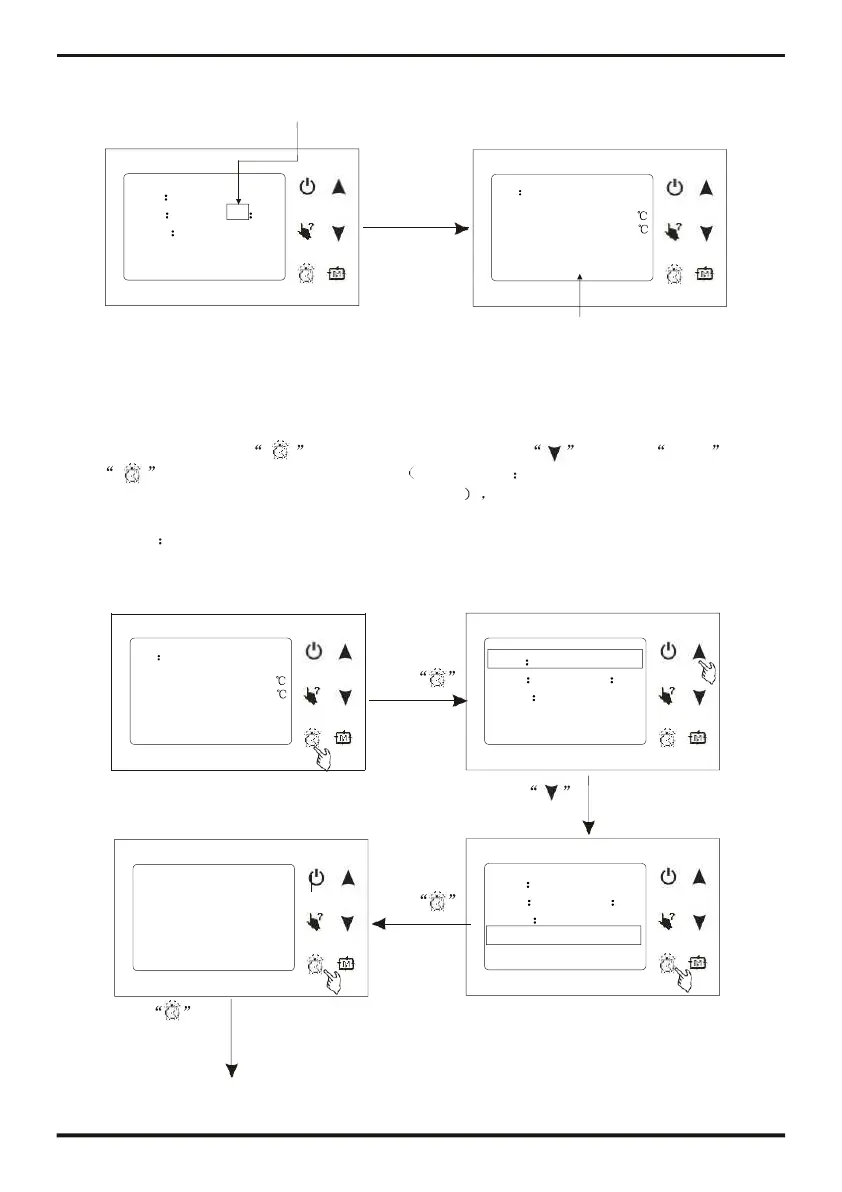
Press
to enter Timer
setting interface
Hour bit flashing
31/01/2011 06:55 THU.
It has been changed
4.7
The operation of timer setting
You can set four timer on and timer off according to you needing.
At main interface, press to enter timer setting, press to select Timer , then
press
to enter timer setting interface, timer setting you can set four timer on and timer
off, and the time you set can from Monday to Sunday. the operation is the same with clock
setting.
For example
ON Cooling
Date 31/01/2011
Inlet temp.: 25.0
Press Time 05 55
Outlet temp.: 25.0
Week Thursday
31/01/2011 06:55 THU.
to enter clock
interface
Timer
Date format
s
ress
to
"Timer"
Timer zone
Date 31/01/2011
Daily timer
Press
Time
Week
05 55
Thursday
Timer
interface
Date format





 To Next Page