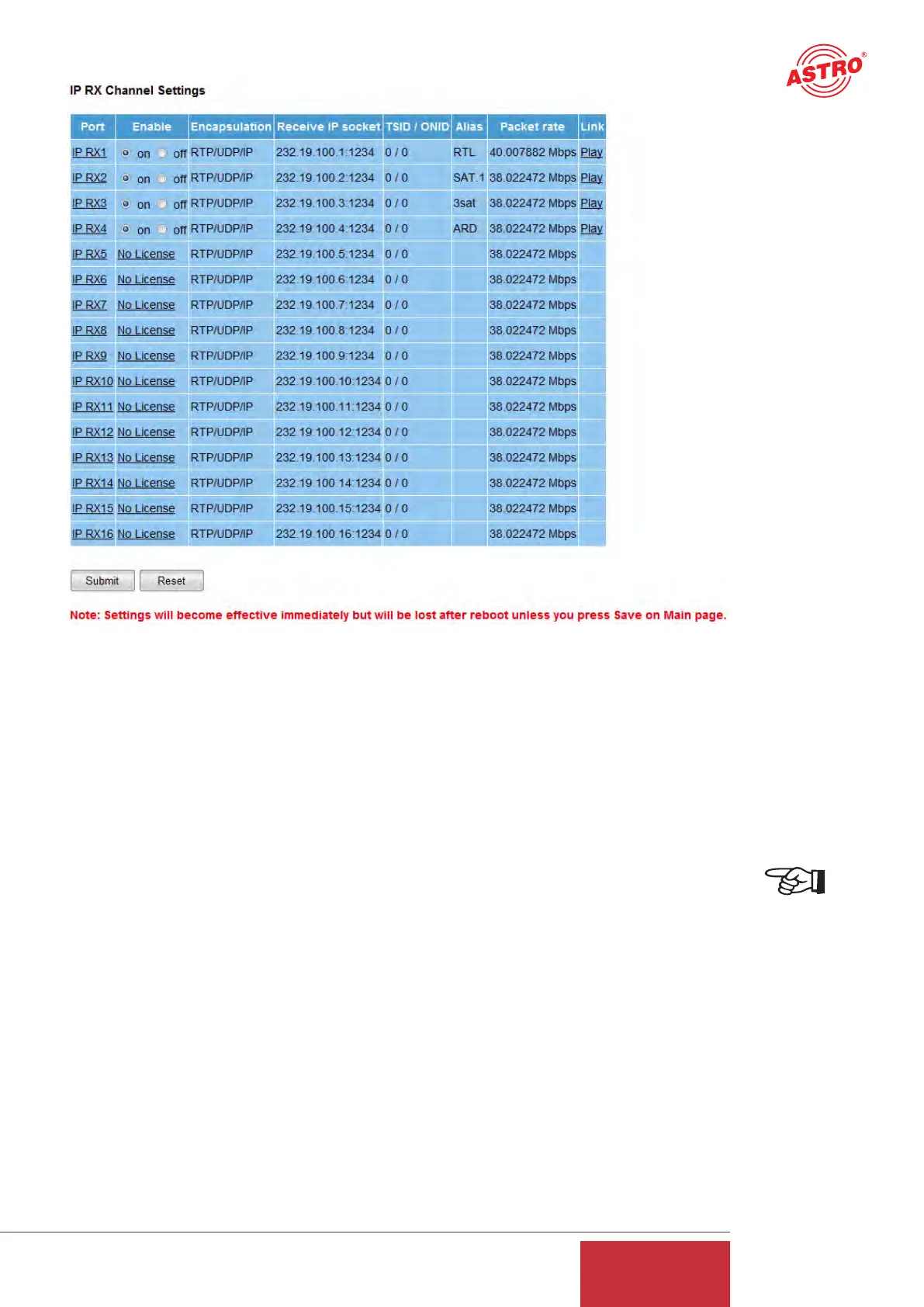
Figure 11: Overview of the configured reception ports
The overview shows the configurations of the individual reception ports. The U 261 Gateway in
the above example is equipped with four reception licenses, i.e. four IP Multicast groups can recei-
ve and be distributed over the ASI ports. The links "RX1" to "RX16" take you to the detailed con-
figuration of the respective port.
9 IP setting for transmission port
NOTE:
The transmission port should be configured in agreement with the network administrator in order
to ensure that the network works!
Clicking on the "IP TX1" submenu takes you to the IP settings for the transmission port.
9.1 Transmit port
The "Transmit Port" line can be used to select the port which is used to send the multicast group.
A value ≥ 1024 should be set for this in order to avoid conflict with services (Port 21: FTP, Port 80:
http, Port 110: POP3 etc.).
9.2 Destination IP
The "Destination IP:Port" line is used to assign an IP address and a UDP port to the ASI trans-
port stream converted according to IP. Usually, a multicast address is input here, since this allows
the data stream to be received by several U 261 Gateways. By contrast, a unicast address can be
received only by one U 261 Gateway.
13
User Guide
U 261


 To Next Page