Using the optical drive (on selected models only)
SD/MMC/MS
Smart Card
CF/MD
Inserting an optical disc
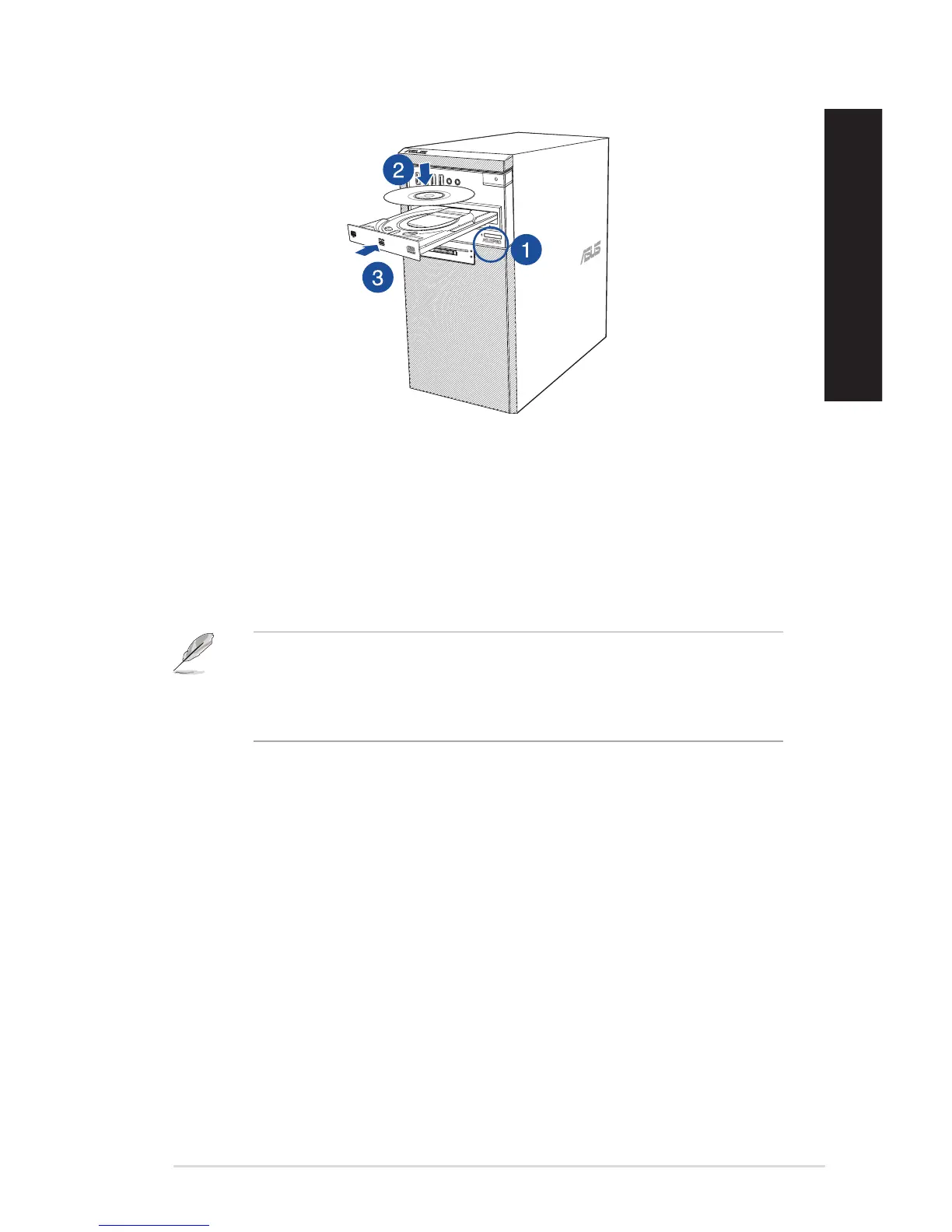
To insert an optical disc:
1. While your system is on, press the eject button below the drive bay cover to open the tray.
2. Place the disc to the optical drive with the label side facing up.
3. Push the tray to close it.
4. Select a program from the AutoPlay window to access your files.
If AutoPlay is NOT enabled in your computer, to access the data on an optical disc:
• OnWindows
®
7, click the Start > Computer, and double-click the CD/DVD drive icon.
• OnWindows
®
10, click File Explorer from the Start menu, then double-click the CD/DVD
drive icon.
Removing an optical disc
To remove an optical disc:
1. While the system is on, do either of the following to eject the tray:
• Presstheejectbuttonbelowthedrivebaycover.
• FromtheStartmenu,clickFile Explorer, right-click the CD/DVD drive icon, and click
Eject.
2. Remove the disc from the disc tray.
ASUS Desktop PC 43
ENGLISH
ENGLISH
ENGLISH
ENGLISH



 To Next Page