Configuring a dynamic IP/PPPoE network connection
To configure a dynamic IP/PPPoE network connection:
1. Launch Network and Sharing Center in Windows® 7 / 10 system.
Windows® 7
• GotoStart > Control Panel > Network and Sharing Center.
Windows® 10
• Doeitherofthesetwoways:
•Fromthetaskbar,right-click , then click Open Network and Sharing Center.
•FromtheStartmenu,clickSettings > Network & Internet > Ethernet > Network and
Sharing Center.
2. From the Open Network and Sharing Center
screen, click Change Adapter settings.
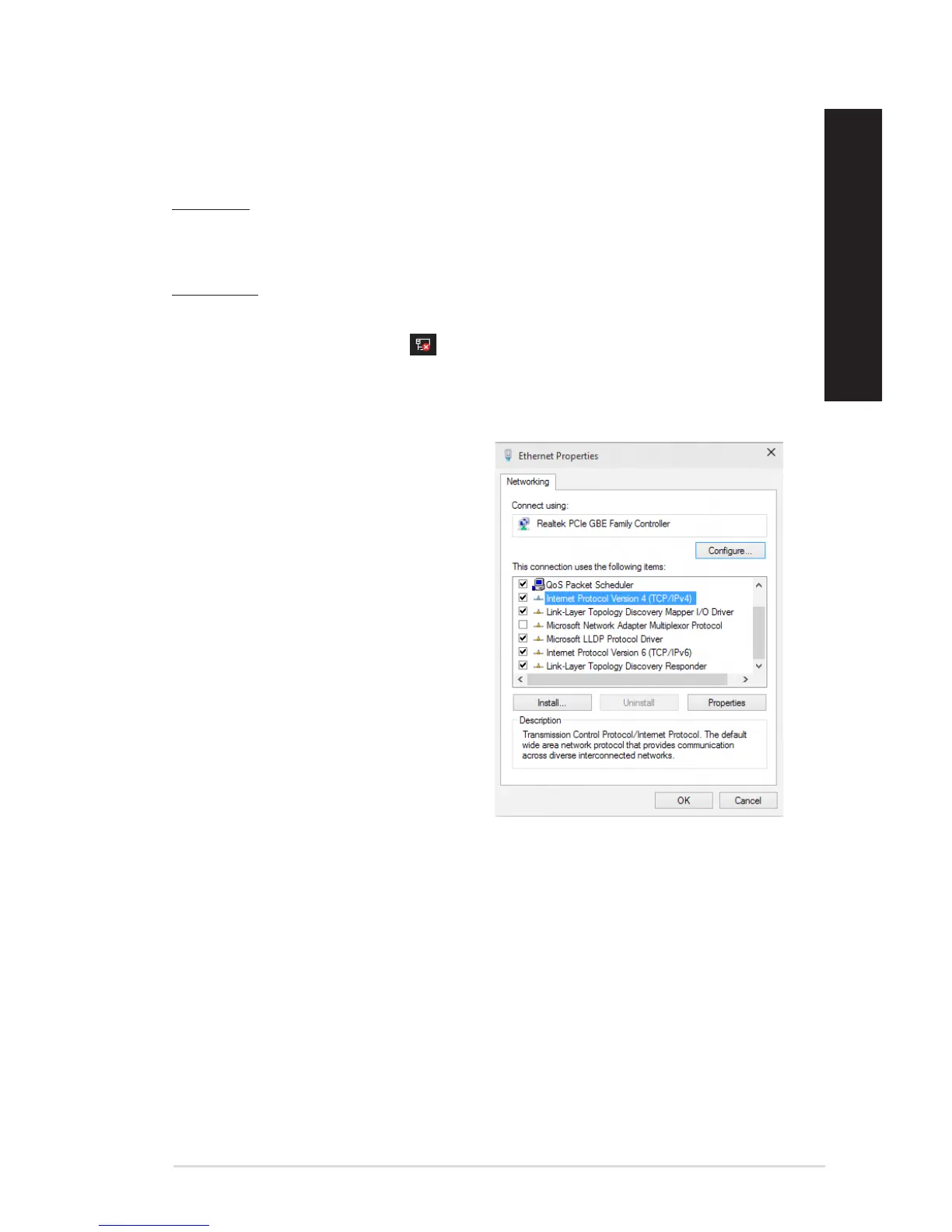
3. Right-click on your LAN and select
Properties.
4. Click Internet Protocol Version 4(TCP/
IPv4) and click Properties.
ASUS Desktop PC 51
ENGLISH
ENGLISH



 To Next Page