ASUS H87-PLUS
4-3
Chapter 4
4.3 Software information
Most of the applications in the support DVD have wizards that will conveniently guide you
through the installation. View the online help or readme le that came with the software
application for more information.
4.3.1 AI Suite 3
AI Suite 3 is an all-in-one interface that integrates several ASUS utilities and allows users to
launch and operate these utilities simultaneously.
Installing Ai Suite 3
To install AI Suite 3 on your computer:
1. Place the support DVD to the optical drive. The
Special tab appears if your computer
has enabled the Autorun feature.
2. Click
Utilities tab > AI Suite 3.
3. Follow the onscreen instructions to complete the installation.
4. After the AI Suite 3 is installed, restart your computer.
Using AI Suite 3
You can launch the AI Suite 3 for the following Windows
®
operating systems:
• For Windows
®
7, click on the notication area.
• For Windows
®
8, click the AI Suite 3 app from the Start Screen.
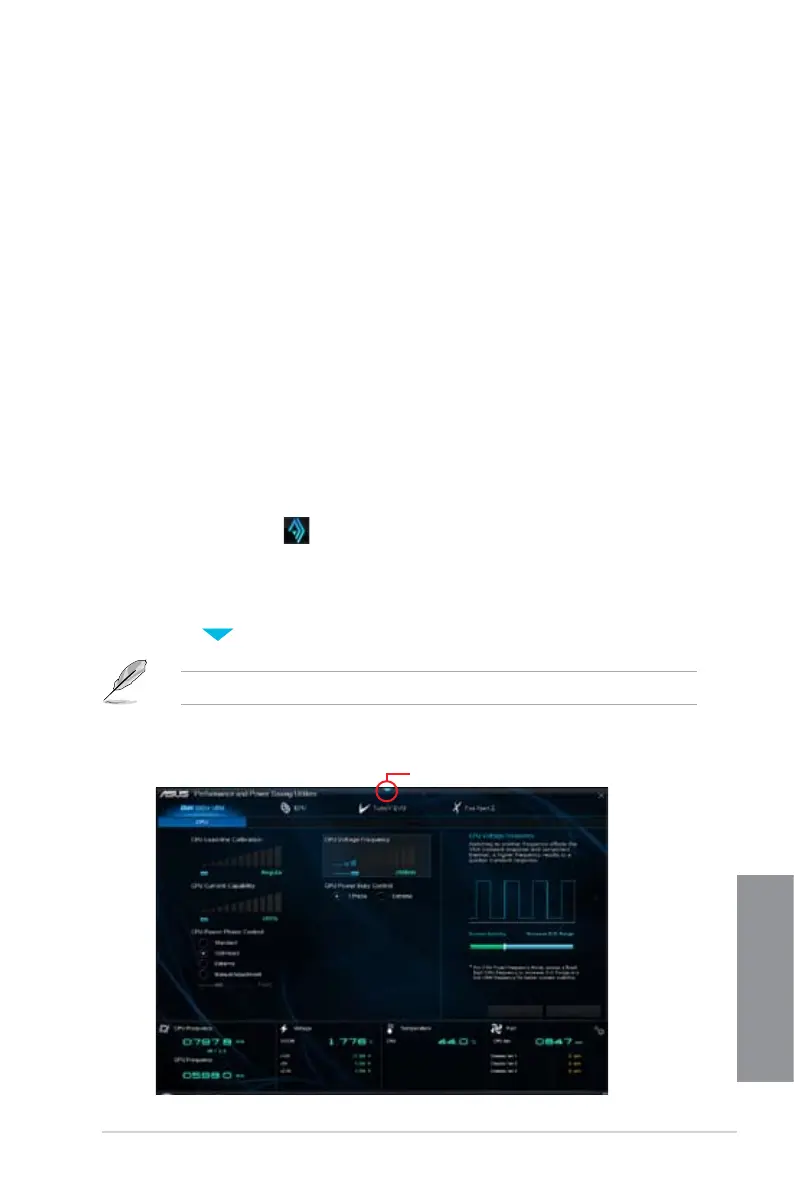
When launched, the main screen of the AI Suite 3 appears. To go to the AI Suite 3 main
menu bar, click on the top edge of the screen.
The main screen of the AI Suite 3 is for reference only and vary with models.
Click to launch AI Suite 3 menu bar
Main screen


 To Next Page