ASUS H87-PLUS
3-39
Chapter 3
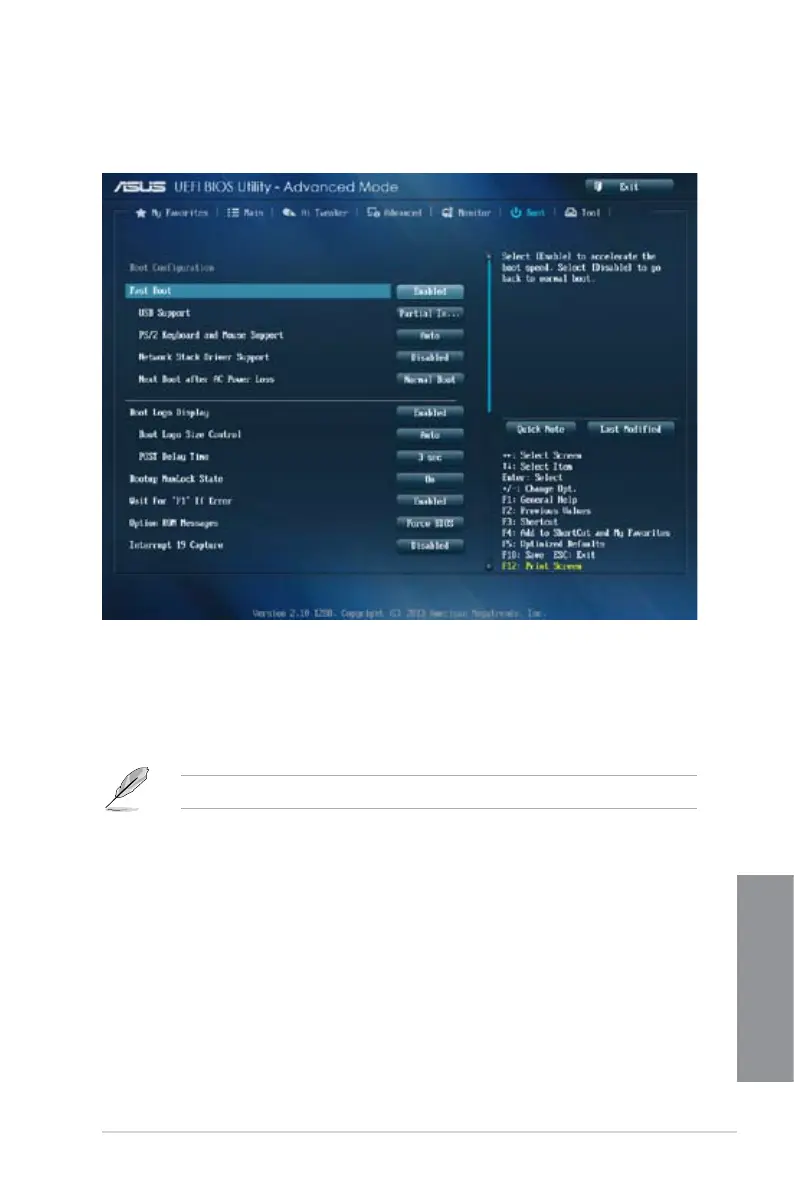
3.8 Boot menu
The Boot menu items allow you to change the system boot options.
Scroll down to display the other BIOS items.
Boot Conguration
Fast Boot [Enabled]
[Disabled] Allows your system to go back to its normal boot speed.
[Enabled] Allows your system to accelerate the boot speed.
The following four items appear only when you set Fast Boot to [Enabled].
USB Support [Partial In...]
[Disabled] All USB devices will not be available until OS boot up for a fastest
POST time.
[Full Initialization] All USB devices will be available during POST. This process will
extend the POST time.
[Partial Initialization] For a faster POST time, only USB ports with keyboard and mouse
connections will be detected.


 To Next Page