ASUS H87-PLUS
4-17
Chapter 4
4.3.11 ASUS Boot Setting
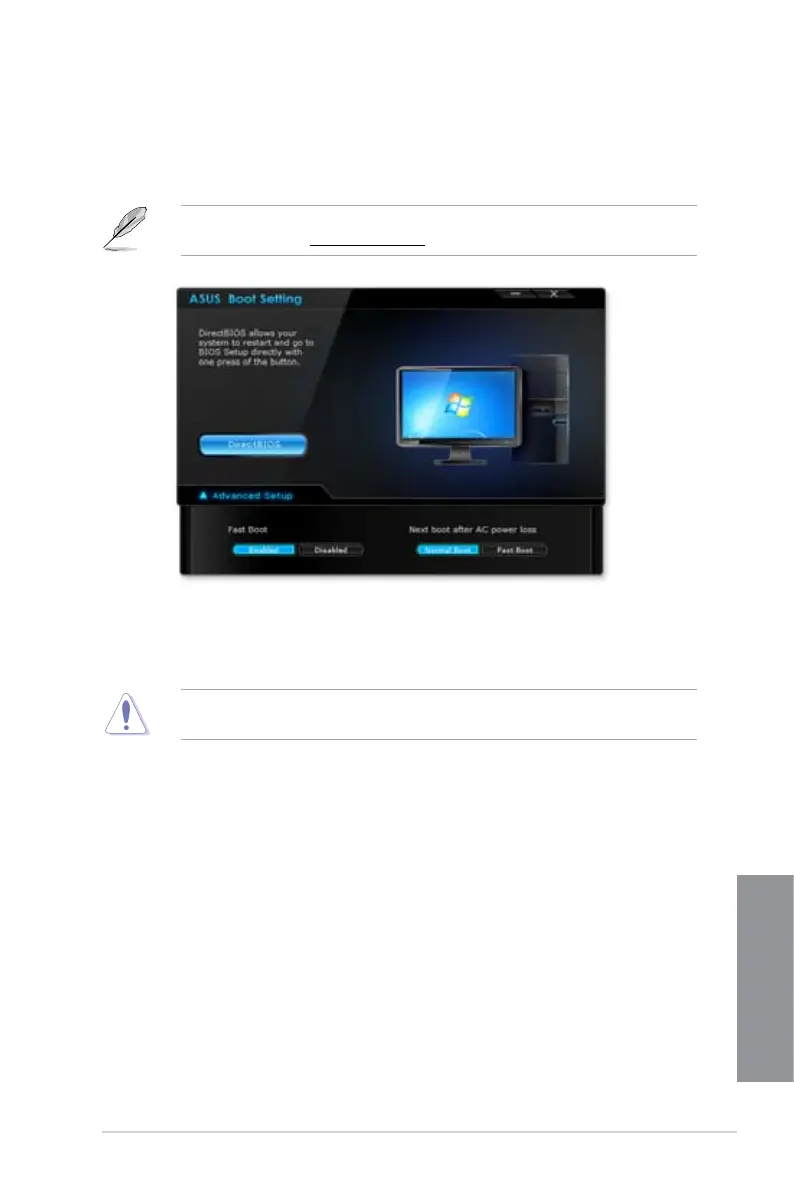
ASUS Boot Setting utility allows you to quickly enter the BIOS setup with a click of the
DirectBIOS button. It also allows you to select the system bootup process using Normal Boot
or Fast Boot.
To fully support ASUS Boot Setting on your motherboard, download the latest BIOS from
ASUS Support site at http://www.asus.com and update the BIOS to your system.
Using DirectBIOS button
This button allows you to restart your system and enters directly to BIOS Setup without
having to press the <DEL> key during POST.
Using the DirectBIOS function may result to data loss. We recommend to save your data
before clicking this button.
To use DirectBIOS:
1. From the ASUS Boot Setting screen, click
DirectBIOS.
2. On the conrmation message, click
OK to restart your system and go to the BIOS
setup directly.


 To Next Page