4-4
Chapter 4: Software support
Chapter 4
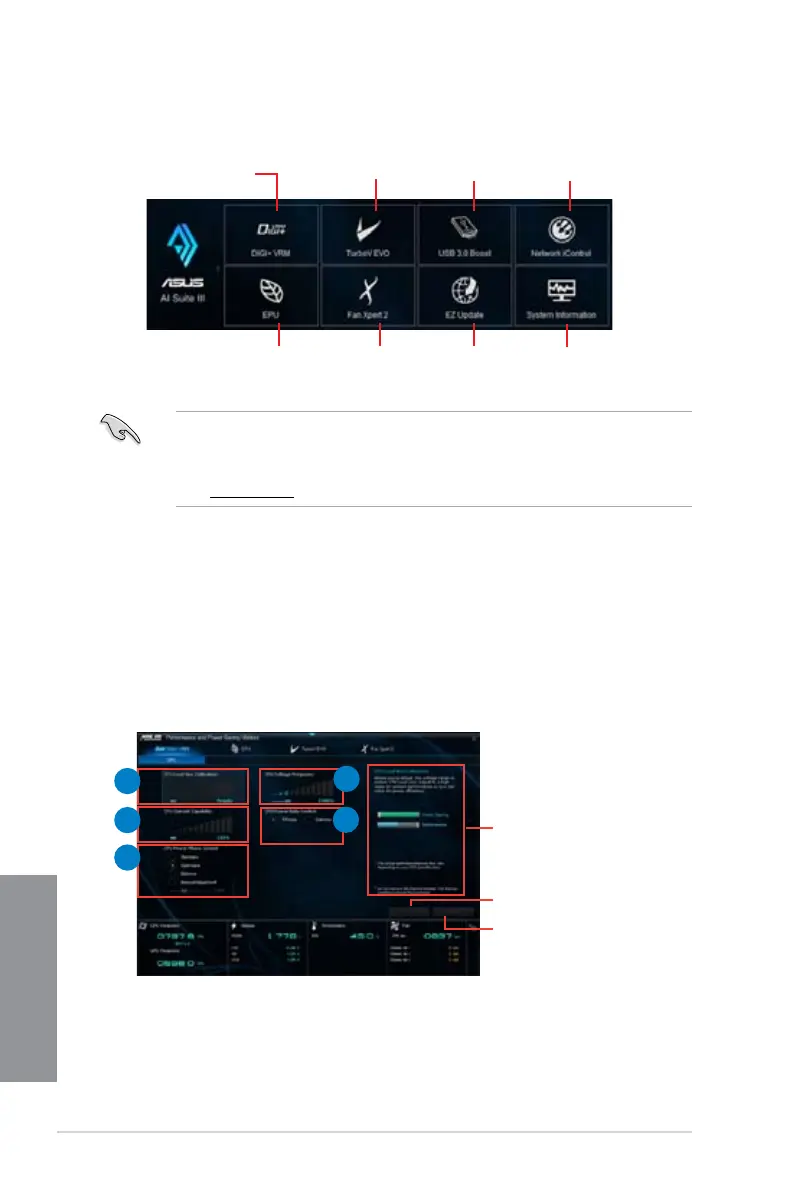
AI Suite 3 main menu bar
• The screenshots of AI Suite 3 in this user manual are for reference only. The actual
screenshots vary with models.
• Refer to the software manual in the support DVD or visit the ASUS website at
www.asus.com for detailed software conguration.
4.3.2 DIGI+ VRM
ASUS DIGI+ VRM allows you to adjust VRM voltage and frequency modulation to enhance
reliability and stability. It also provides the highest power efciency, generating less heat to
longer component lifespan and minimize power loss.
To launch DIGI+VRM, click DIGI+ VRM on the AI Suite 3 main menu bar.
4
2
1
3
5
Help
Click to apply all the changes
Click to undo all the changes
TurboV EVO
DIGI+VRM
USB 3.0 Boost
Network iControl
EPU Fan Xpert 2 EZ Update
System
Information


 To Next Page