1-18
Chapter 1: Product introduction
Chapter 1
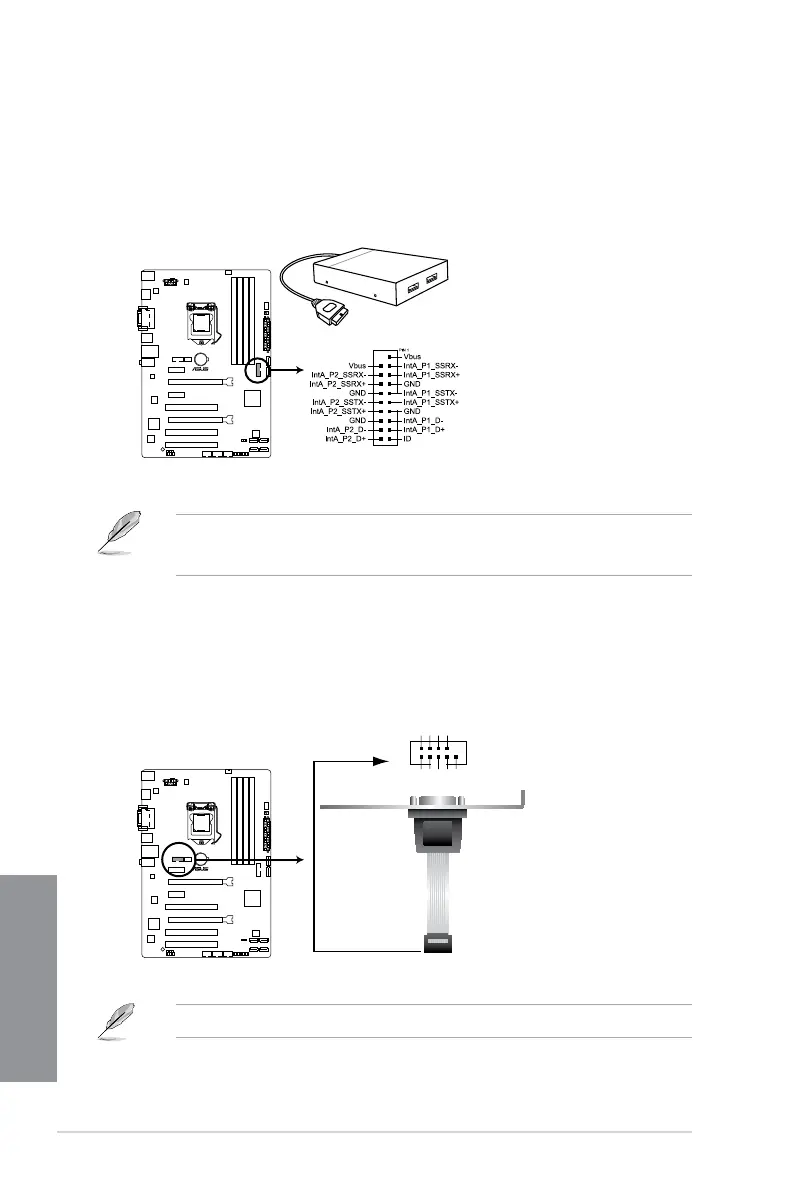
2. USB 3.0 connector (20-1 pin USB3_12)
This connector allows you to connect a USB 3.0 module for additional USB 3.0 front
or rear panel ports. With an installed USB 3.0 module, you can enjoy all the benets of
USB 3.0 including faster data transfer speeds of up to 4.8Gbps, faster charging time for
USB-chargeable devices, optimized power efciency, and backward compatibility with
USB 2.0.
• The USB 3.0 module is purchased separately.
• You can connect the ASUS front panel USB 3.0 bracket to this connector.
3. Serial port connector (10-1 pin COM)
This connector is for a serial (COM) port. Connect the serial port module cable to this
connector, then install the module to a slot opening at the back of the system chassis.
The COM module is purchased separately.
H87-PLUS
H87-PLUS USB3.0 front panel connector
USB3_12
H87-PLUS
H87-PLUS Serial port (COM) connector
PIN 1
COM
D
C
D
DX
T
D
N
G
S
T
R
I
R
D
X
R
R
T
D
RS
D
S
T
C


 To Next Page