IPIBL-LA(Berkeley-GL8E)12
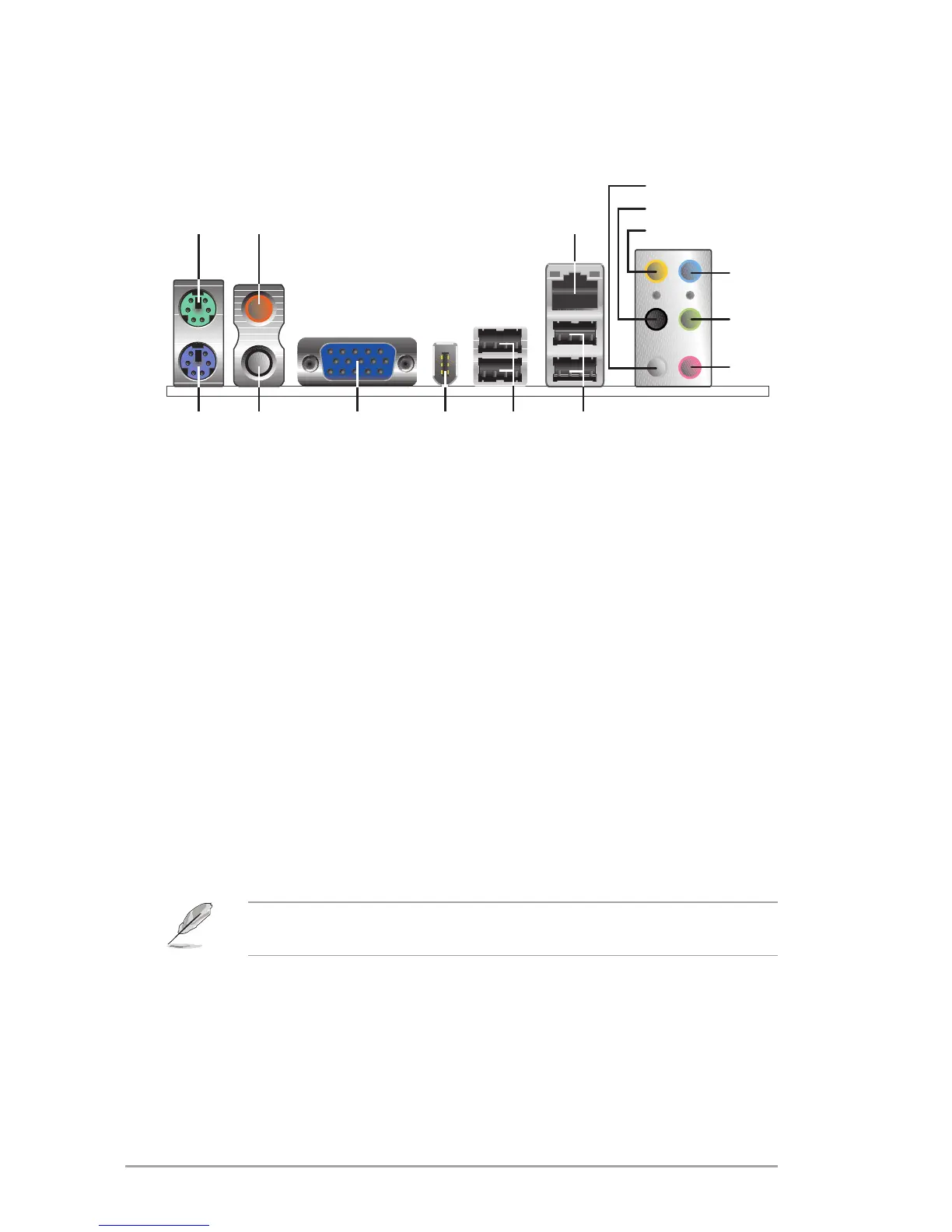
1. PS/2 mouse port (green).ThisportisforaPS/2mouse.
2. Coaxial S/PDIF Out port.Thisportconnectsanexternalaudiooutputdevice
via a coaxial S/PDIF cable.
3. LAN (RJ-45) port.ThisportallowsconnectiontoaLocalAreaNetwork
(LAN)throughanetworkhub.
4. Side Speaker Out port (gray).Thisportconnectstothesidespeakersinan
8-channelaudioconguration.
5. Rear Speaker Out port (black).Thisportconnectstotherearspeakersona
4-channel,6-channel,or8-channelaudioconguration.
6. Center/Subwoofer port (yellow orange).Thisportconnectsthecenter/
subwooferspeakers.
7. Line In port (light blue).Thisportconnectsatape,CD,DVDplayerorother
audiosources.
8. Line Out port (lime).Thisportconnectsaheadphoneoraspeaker.In4-
channel,6-channel,and8-channelmode,thefunctionofthisportbecomes
FrontSpeakerOut.
9. Microphone port (pink).Thisportconnectsamicrophone.
6. Connectors
6.1 Rear panel connectors
Refertotheaudiocongurationtableonthenextpageforthefuntionofthe
audioportsin2,4,6,or8-channelconguration.


 To Next Page