8
ASUS Xonar Phoebus
3.3 Connecting TV tuner card
If you have a traditional PCI or PCI Express TV tuner card on your PC, you may
needtoconnectittotheaudiocardtosendthetunercard’ssoundtoyourPC
speakers.
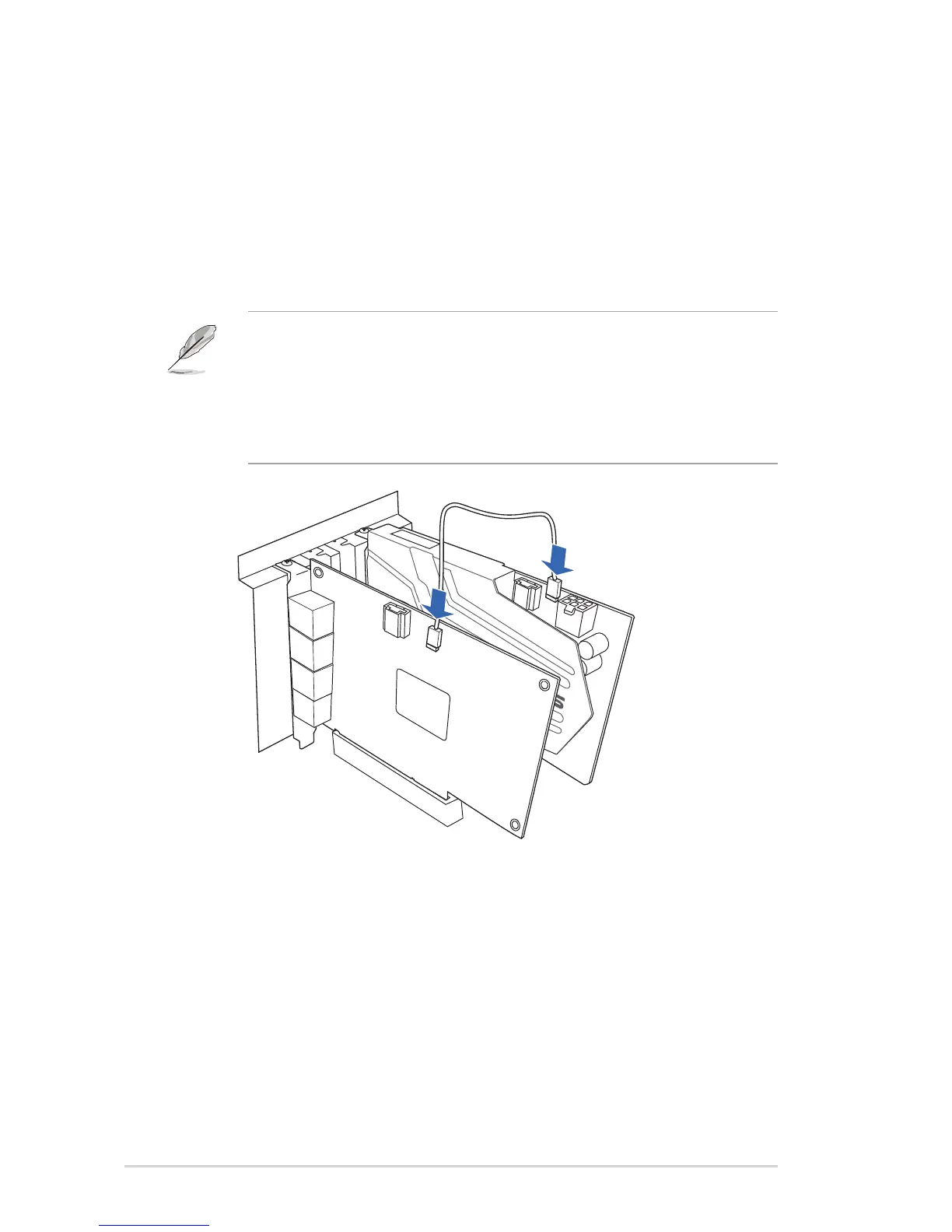
1. Secure the PCI/PCI Express TV tuner card and screw it into the back-panel.
2. Connect the audio output header from the TV tuner card to the Aux-In header
oftheaudiocard,asshowninthegurebelow.
For optimum TV audio quality, Xonar uses ADC recording to digitize the signal
and loops it back to DAC playback. Please select Aux-In as the recording
sourceintheXonarAudioCenter’srecordingmixerandenablethemonitoring
button to pass this signal to the audio output. Using this setup, you can even
turn on sound effects such as Pro-Logic IIx to expand the stereo TV audio to 5.1
or 7.1 channel surround sound. TV audio on your PC will become even better
thanonyourTVset!


 To Next Page