Chapter 4: Motherboard information
4-4
4.2 Jumpers
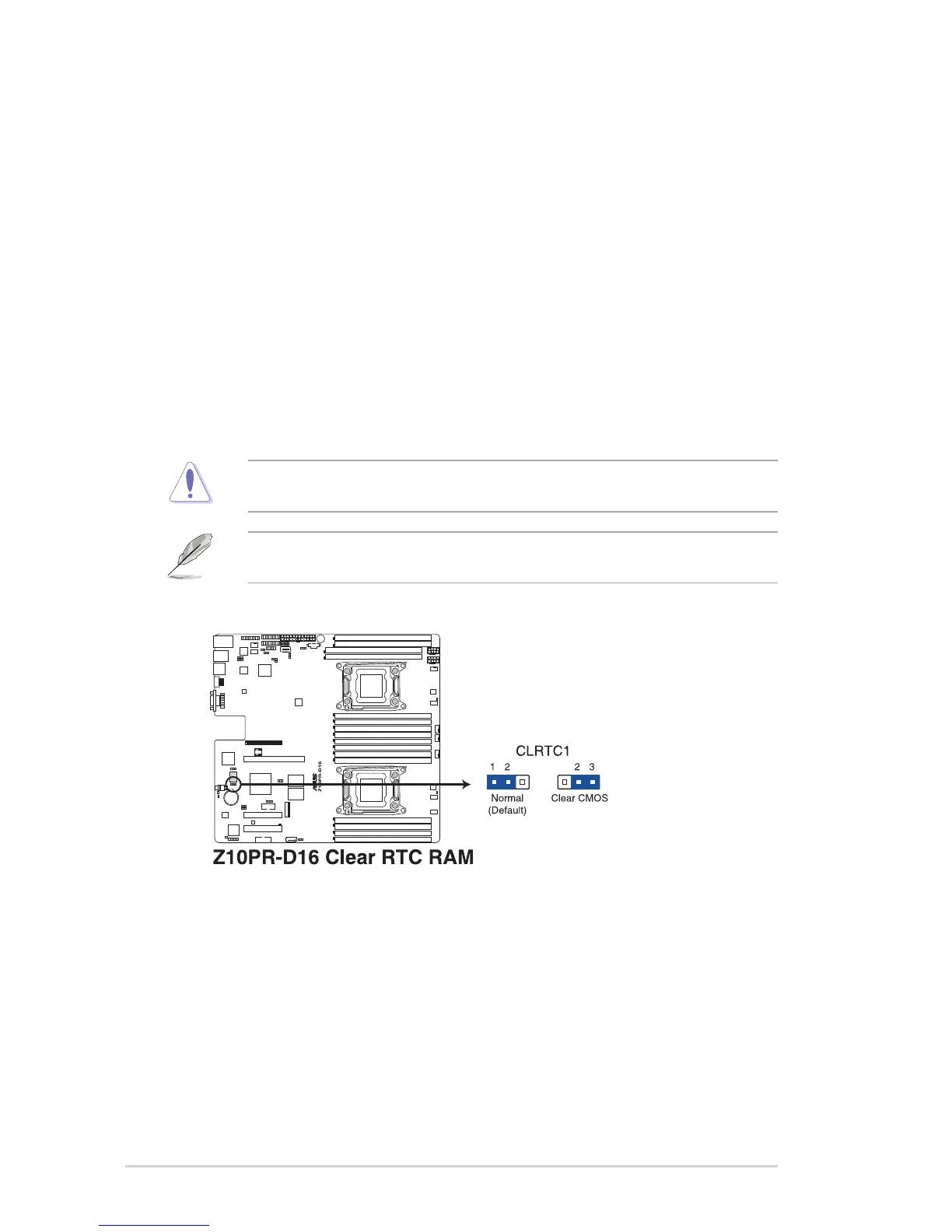
1. Clear RTC RAM (3-pin CLRTC1)
ThisjumperallowsyoutocleartheRealTimeClock(RTC)RAMinCMOS.Youcan
clear the CMOS memory of date, time, and system setup parameters by erasing the
CMOSRTCRAMdata.TheonboardbuttoncellbatterypowerstheRAMdatainCMOS
whichincludesystemsetupinformationsuchassystempasswords.
To erase the RTC RAM:
1. TurnOFFthecomputerandunplugthepowercord.
2. Movethejumpercapfromthedefaultpins1–2topins2–3.Keepthecaponpins
2–3forabout5to10seconds,thenmovethecapbacktopins1–2.
3. PlugthepowercordandturnONthecomputer.
4. Holddownthe<Del>keyduringthebootprocessandenterBIOSsetuptore-
enter data.
DONOTremovethecaponCLRTCjumperdefaultpositionexceptwhenclearingtheRTC
RAM.Removingthecapwillcausesystembootfailure!
Ifthestepsabovedonothelp,removetheonboardbatteryandmovethejumperagainto
clear the CMOS RTC RAM data. After the CMOS clearance, reinstall the battery.














 To Next Page