Chapter 4: Motherboard information
4-10
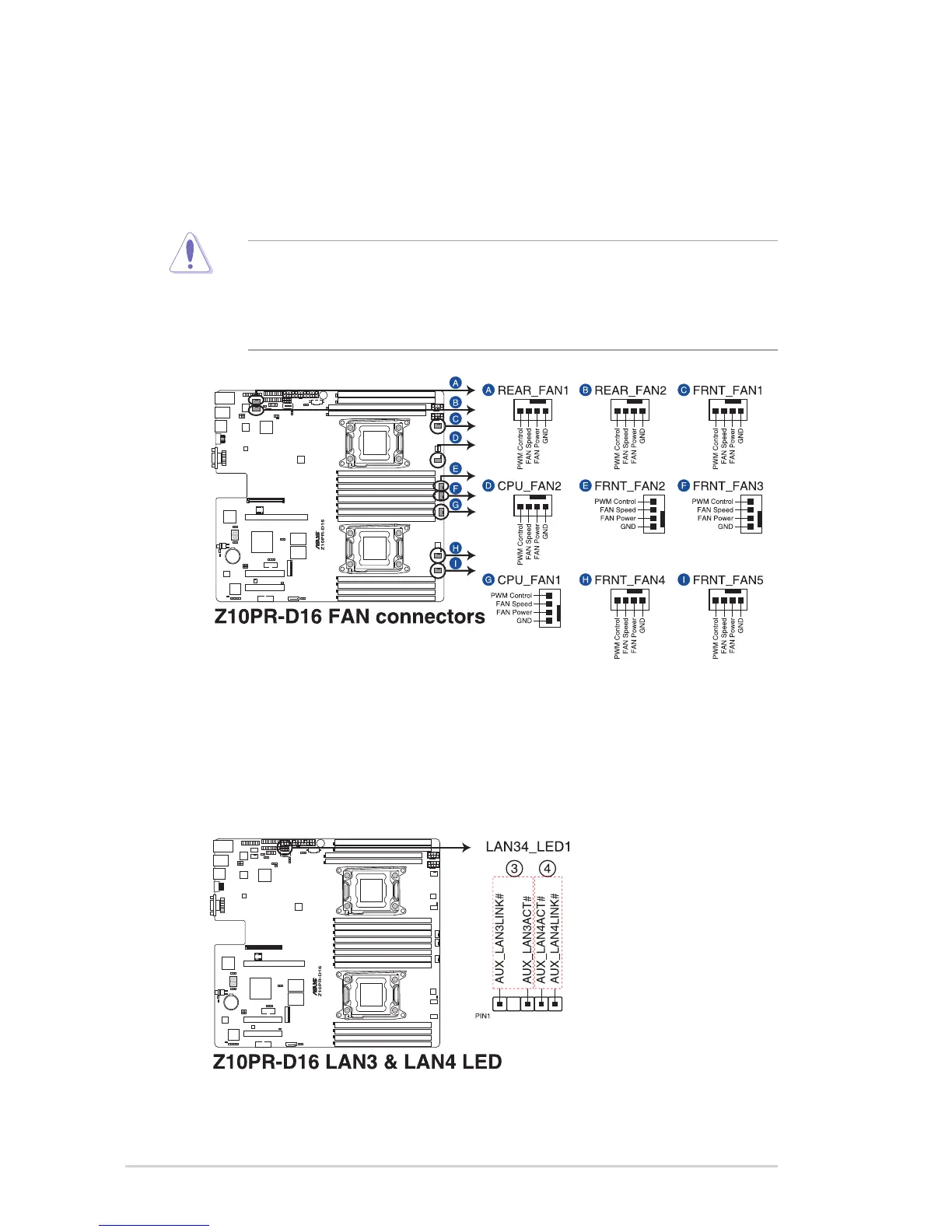
6. LAN Activity LED connector (5-1 pin LAN34_LED1)
Theseleadsarefor10GLANactivityLEDsonthefrontpanel.ConnecttheLANLED
cabletothebackplaneforLANactivityindication.
5. CPU, front, and rear fan connectors (4-pin CPU_FAN1, CPU_FAN2, FRNT_FAN1,
FRNT_FAN2, FRNT_FAN3, FRNT_FAN4, FRNT_FAN5, REAR_FAN1, REAR_FAN2)
The fan connectors support cooling fans. Connect the fan cables to the fan connectors
onthemotherboard,ensuringthattheblackwireofeachcablematchesthegroundpin
of the connector.
• DONOTforgettoconnectthefancablestothefanconnectors.Insufcientairow
inside the system may damage the motherboard components.
• Thesearenotjumpers!DONOTplacejumpercapsonthefanconnectors!
• AllfansfeaturetheASUSSmartFantechnology.














 To Next Page