2-9
ASUS TS110-E8-PI4
2.3 System memory
2.3.1 Overview
ThemotherboardcomeswithfourDoubleDataRate3(DDR3)DualInlineMemoryModules
(DIMM)sockets.
ADDR3modulehasthesamephysicaldimensionsasaDDR2DIMMbutisnotched
differentlytopreventinstallationonaDDR2DIMMsocket.DDR3modulesaredevelopedfor
better performance with less power consumption.
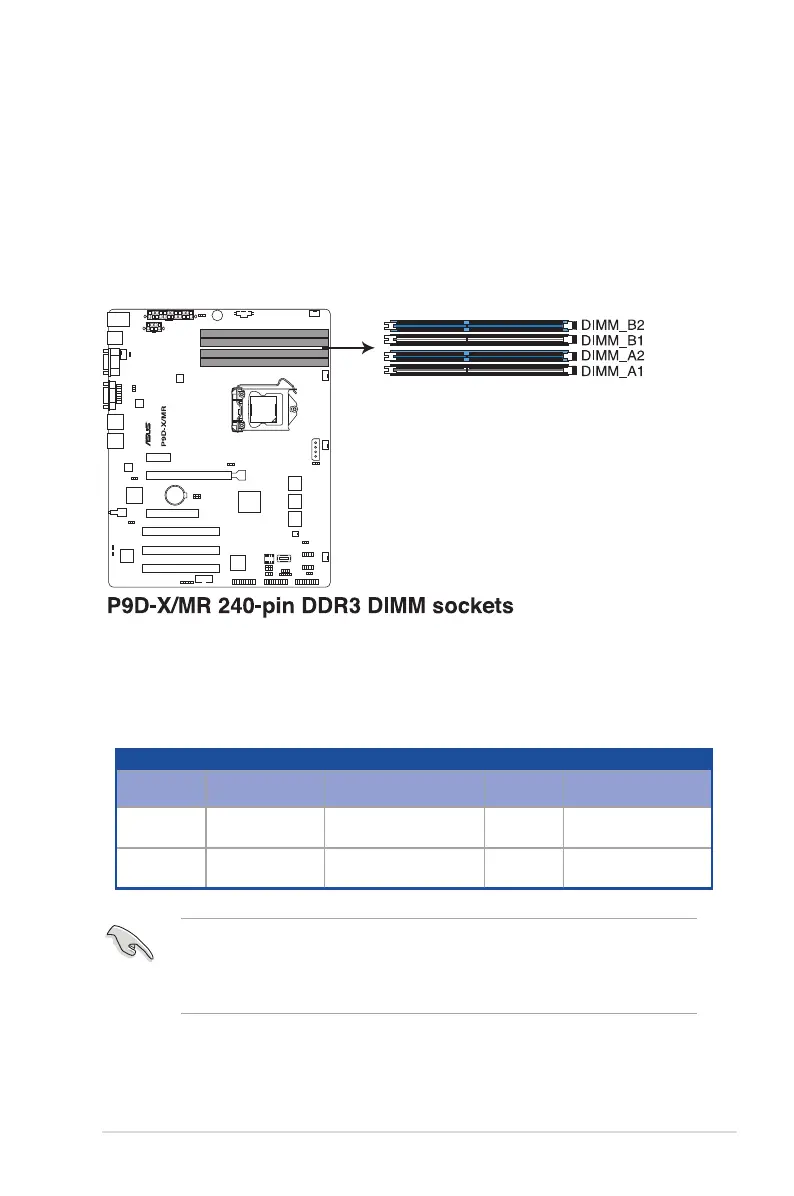
ThegureillustratesthelocationoftheDDR3DIMMsockets:
2.3.2 Memory Configurations
Youmayinstall2GB,4GB,8GBUnbufferedwithECCDDR3DIMMsintotheDIMMsockets
usingthememorycongurationsinthissection.
Memory Configuration
DIMM Slot Per
Channel
DIMM Populated
per Channel
DIMM Type Speed Rank per DIMM
2 1 UnbufferedDDR3ECC 1333/1600
SingleRank,
DualRank
2 2 UnbufferedDDR3ECC 1333/1600
SingleRank,
DualRank
• AlwaysinstallDIMMswiththesameCASlatency.Foroptimumcompatibility,itis
recommended that you obtain memory modules from the same vendor.
• InstalltheDDRtotheA2orB2(blueslot)wheninstallingonlyonememorymoduleto
the motherboard.













 To Next Page