Chapter 2: Hardware setup
2-10
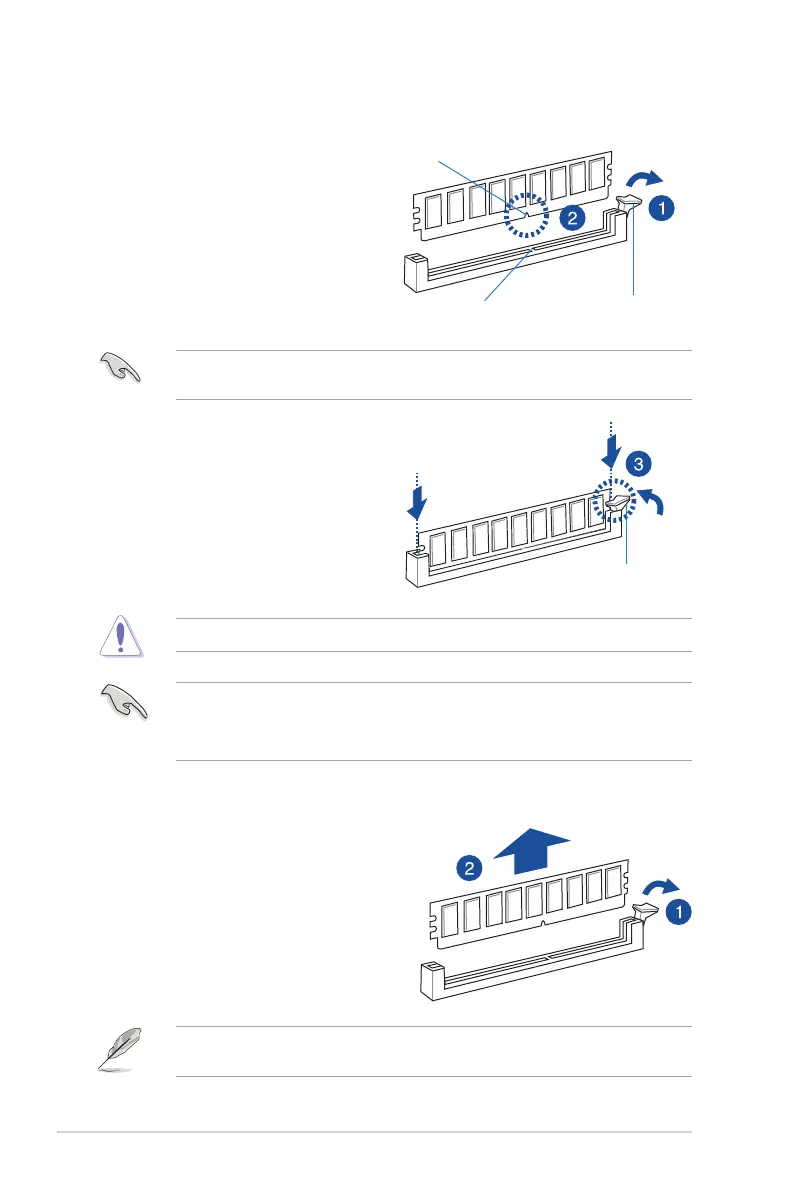
2.3.3 Installing a DIMM on a single clip DIMM socket
3. HoldtheDIMMbybothofitsends
theninserttheDIMMverticallyintothe
socket.Applyforcetobothendsofthe
DIMMsimultaneouslyuntiltheretaining
clipsnapsbackintoplaceandthe
DIMMcannotbepushedinanyfurther
toensurepropersittingoftheDIMM.
Locked Retaining Clip
1. UnlockaDIMMsocketbypressingthe
retaining clip outward.
2. AlignaDIMMonthesocketsuchthat
thenotchontheDIMMmatchesthe
DIMMslotkeyonthesocket.
Unlocked retaining clip
DIMM notch
DIMM slot key
1. Press the retaining clip outward to
unlocktheDIMM.
2. RemovetheDIMMfromthesocket.
Removing a DIMM from a single clip DIMM socket
• ToinstalltwoormoreDIMMs,refertotheuserguidebundledinthemotherboard
package.
• Refertotheuserguideforqualiedvendorlistsofthememorymodules.
SupporttheDIMMlightlywithyourngerswhenpressingtheretainingclips.TheDIMM
mightgetdamagedwhenitipsoutwithextraforce.
AlwaysinserttheDIMMintothesocketverticallytopreventDIMMnotchdamage.
ADIMMiskeyedwithanotchsothatittsinonlyonedirection.DONOTforceaDIMMinto
asocketinthewrongdirectiontoavoiddamagingtheDIMM.













 To Next Page