Viale del Lavoro, 19 37030 Colognola ai Colli (Verona) Italy
Tel. ++39 045 6159411- Fax ++39 045 6159422 - e-mail: info@at-os.com – www.at-os.com
39
Door opening at the end of the wash cycle can also be automatic (optional). This speeds up drying of the products being washed and
also informs the operator that the wash cycle is terminated: he can see that the appliance has terminated its work cycle and is ready
to start a new cycle.
10.2.3 Anti-scale product
The machine can be equipped with a dosing pump to introduce a special chemical product (called: anti-scale). This product, mixed
with the water in the last rinse cycle, prevents scale deposits from forming and speeds up drying of the items being processed
(consult chapter 9 for instructions regarding anti-scale handling and storage).
10.2.4 Detergent
The machine can be equipped with a dosing pump to introduce a chemical detergent product during the hot wash cycle in order to
improve wash results (consult chapter 9 for instructions regarding detergent handling and storage).
OS S.r.l. if you want to change the concentration of detergent and anti
products, used for the wash cycle
10.2.5 Machine block in case of clogged drain trap
Machine may be equipped with a safety device that blocks all machine functions if the drain trap is clogged. This prevents the
machine from being used until the breakdown situation has been eliminated.
10.2.6 End-of-work-cycle audio signal (optional)
The machine may be equipped with an audio signal (buzzer) sounds for a few seconds at the end of the wash cycle to indicate that
the machine has terminated its program.
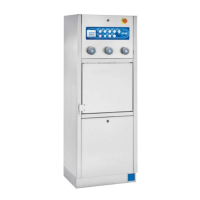
10.2.7 Elbow-operated push-buttons (optional available for models AF2.60Ex only)
Wash programs can be started using three elbow-operated push-buttons (see page I appendix I, position 11) as well as using the
standard control panel. The symbol on the push-button is the same as the symbol on the control panel and indicates, for both
functions, the related type of wash.
A fourth elbow-operated push-button performs the same function as the pedal control: it can be used to open and close the wash
chamber door.
Use of elbow-operated push-buttons on AT-OS machines is part of the cleanliness and hygiene philosophy that the company has
been pursuing for years, making it easy and clean for operators to use the machine. Generally the items to be washed are carried to
and inserted in the machine using disposable gloves. Often these gloves may be dirtied during these tasks. The elbow-operated
push-button permits the door to be closed and the wash cycle to start without the operator's having to remove his gloves. The
sequence we recommend for properly using the appliance is as follows:
1. Once you are in front of the items with the items to be washed use the pedal control to open the door
(see page I appendix I, position 7);
2. Set the items on the supports as indicated in the support's instructions;
3. Start the chosen wash cycle by pressing your elbow on the mushroom shaped push-button (see photo
on the right);
When the wash cycle is terminated the machine will wait until the items are removed from their support. It
will remain in this stand-by state until the operator comes to remove the items that are now ready to be
used;
4. Press the pedal (see page I appendix I, position 7) or the mushroom shaped push-button (see page I
appendix I, position 10) to automatically open the door;
5. Remove the items that have been washed;
6. Close the door by pressing the mushroom "close" push-button with your elbow (see page I appendix I, position 10).
10.2.8 Printer (optional)
The machine can be equipped with a printer placed on the control panel. This device is used to print information concerning the
wash program: the time the machine requires to perform the wash program, the time disinfection temperature is maintained, the
disinfection temperature, any alarms that took place and other data.
Instructions for replacing t
he roll of paper in the printer:
Turn the machine off, open the cover where the empty roll is contained, replace it with a new roll,
close the cover and turn the machine back on.


 To Next Page