EasyManua.ls Logo

ATEQ H6000 - Date and Time (Fixed Device Only)

ATEQ H6000
72 pages
Print Icon
To Next Page IconTo Next Page
To Previous Page IconTo Previous Page
Loading...
Chapter 4 - Functions of the instrument
UM-30200D-U User manual H6000 Page 37 / 58
7.7. DATE AND TIME (FIXED DEVICE ONLY)
The device has a built in clock (hour, minutes) and an internal calendar (day, month and
year) which allows dating the events and the archives.
7.7.1. Date
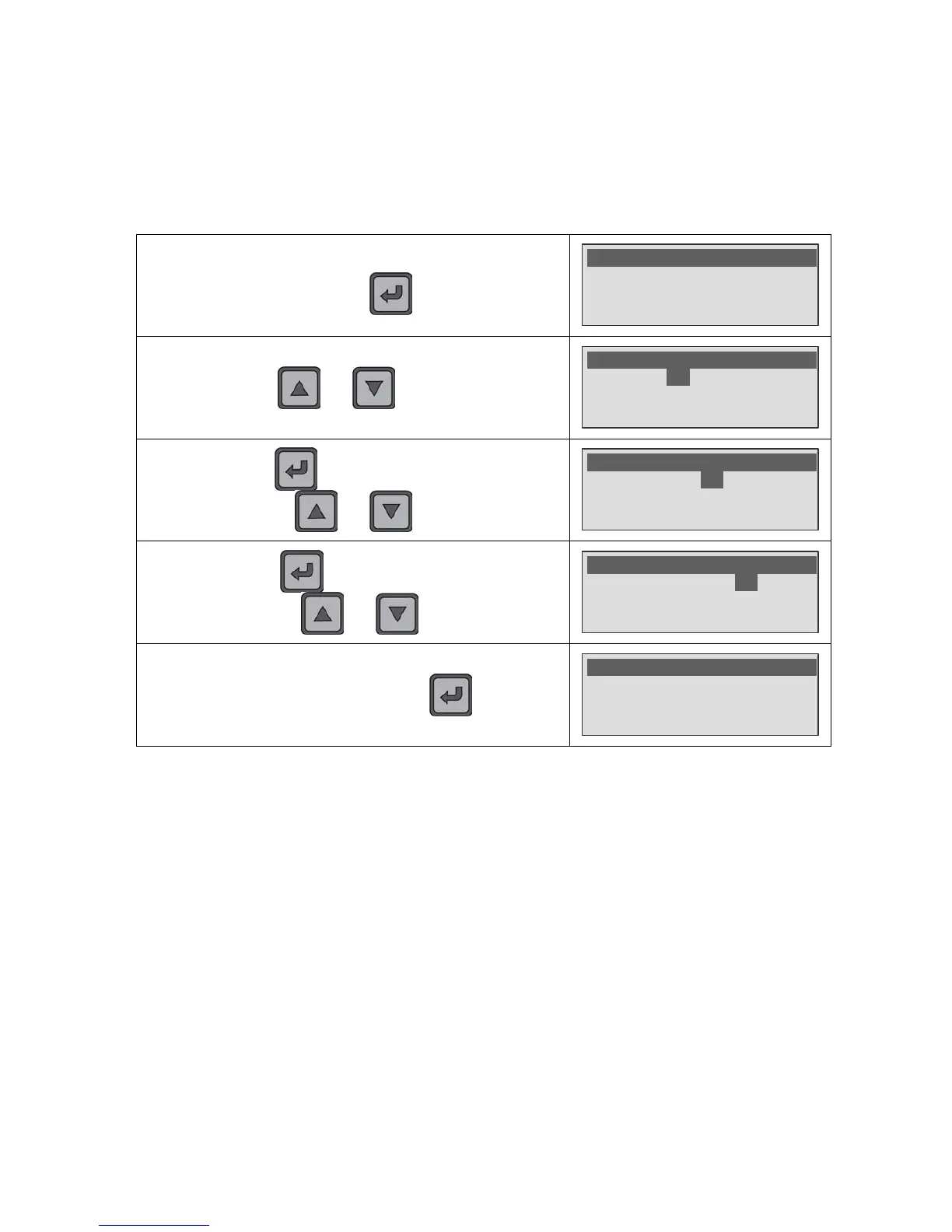
In the SYSTEM SETTINGS menu, select the Date function then
confirm with the
key.

SYSTEM
S
E
TTINGS
ME
NU
>Date : 10/08/10
Hour : 15:35
Backlight : 60%
By using the and keys, set the day.
SYSTEM
S
E
TTINGS
ME
NU
Date : 01/08/10
Hour : 15:35
Backlight : 60%
Validate with the key. The cursor goes to the month
setting. By using the
and keys, set the month.
SYSTEM
S
E
TTINGS
ME
NU
Date : 01/09/10
Hour : 15:35
Backlight : 60%
Validate with the key. The cursor goes to the year
setting. By using the
and keys, set the year.
SYSTEM
S
E
TTINGS
ME
NU
Date : 01/09/10
Hour : 15:35
Backlight : 60%
To save the date, validate with the key.
SYSTEM
S
E
TTINGS
ME
NU
>Date : 10/08/09
Hour : 15:35
Backlight : 60%

Table of Contents