Chapter 4 - Functions of the instrument
UM-30200D-U User manual H6000 Page 32 / 58
6. SEQUENCE MODE RUNNING
The sequence mode allows chaining several programs the ones after the others
following a defined order. Each program is a step. The sequences can contain until 999
steps. A test program can be several times in the same sequence, or in several
sequences.
The tests cycles are chained according the user who will run the steps whatever the
result of each test (pass part or fail part). He can skip a step, either by reset or marking
it "to do" to carry out later or he can cancel it.
The sequences programming can only be done
from the Winateq300 software, for their
management: creation, modification or deletion, see
the user manual of this software.
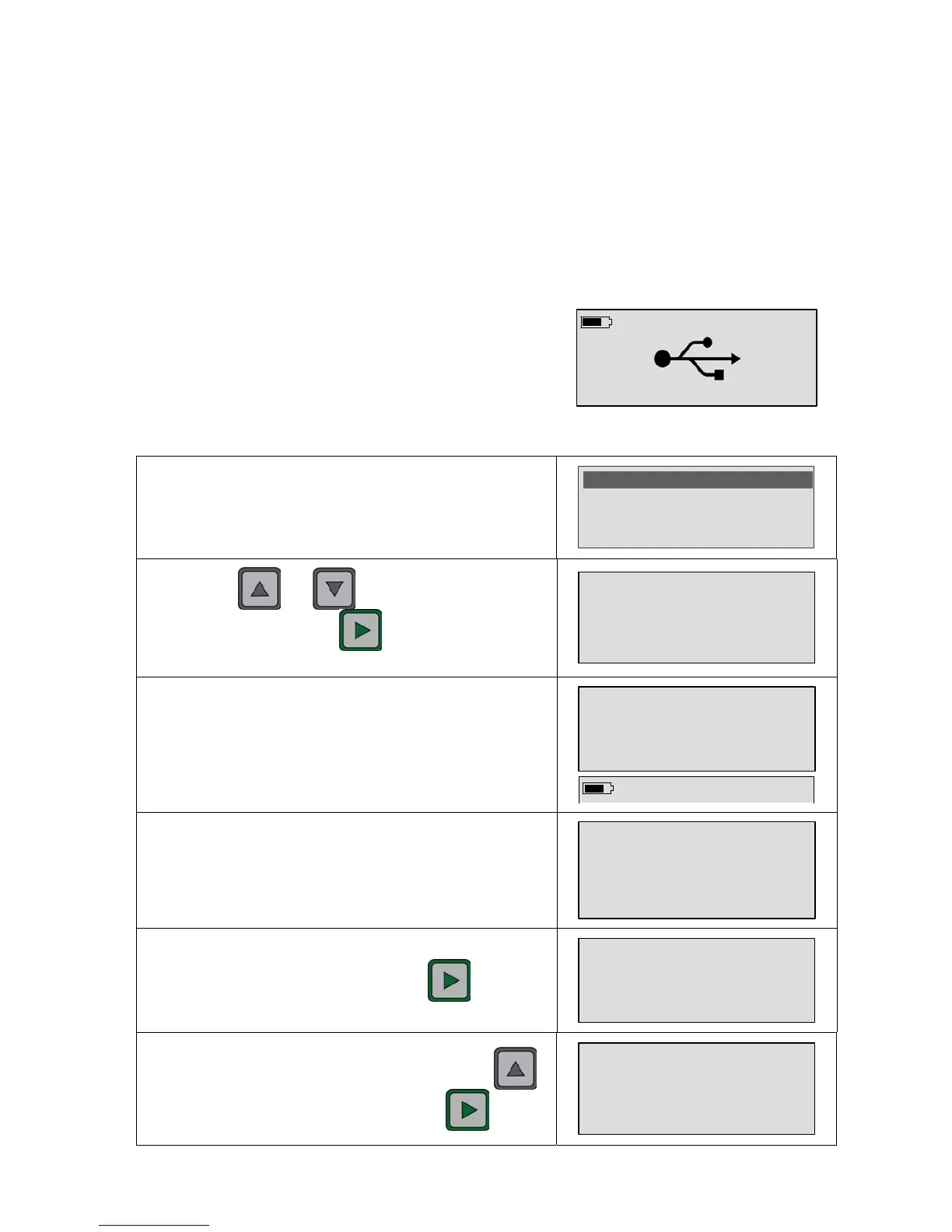
The opposite screen appears when the device is
connected to the software from the USB link.
Sequence running:
The instrument must be in the "Sequence" mode. Function to
validate in the main menu.
Parameters : Unlock
>Mode : Sequence
Program : Pr01
By using the and keys select the sequence to
run (here S01). Press on the
key to run the sequence
(or make a contact with the probes).
Press X to measure
S
T
: Sequence +/-
The instrument is waiting the measurement of the first step of
the sequence. The sequence step (here 1/3) and the program
name are displayed alternatively.
S01 -1/3- Pr01
-----
Save the step result by pressing the key.
6.9 E-5 ml/s
Result saved
To skip to the next step, the user must press on the
key. Run the second step by pressing the
key.


 To Next Page