Chapter 4 - Functions of the instrument
UM-30200D-U User manual H6000 Page 34 / 58
7. SYSTEM SETTINGS
The SYSTEM SETTINGS menu allows configuring the instrument following the user
preferences.
At any time, to return to the main menu or the measurement mode, press the key
one or several times.
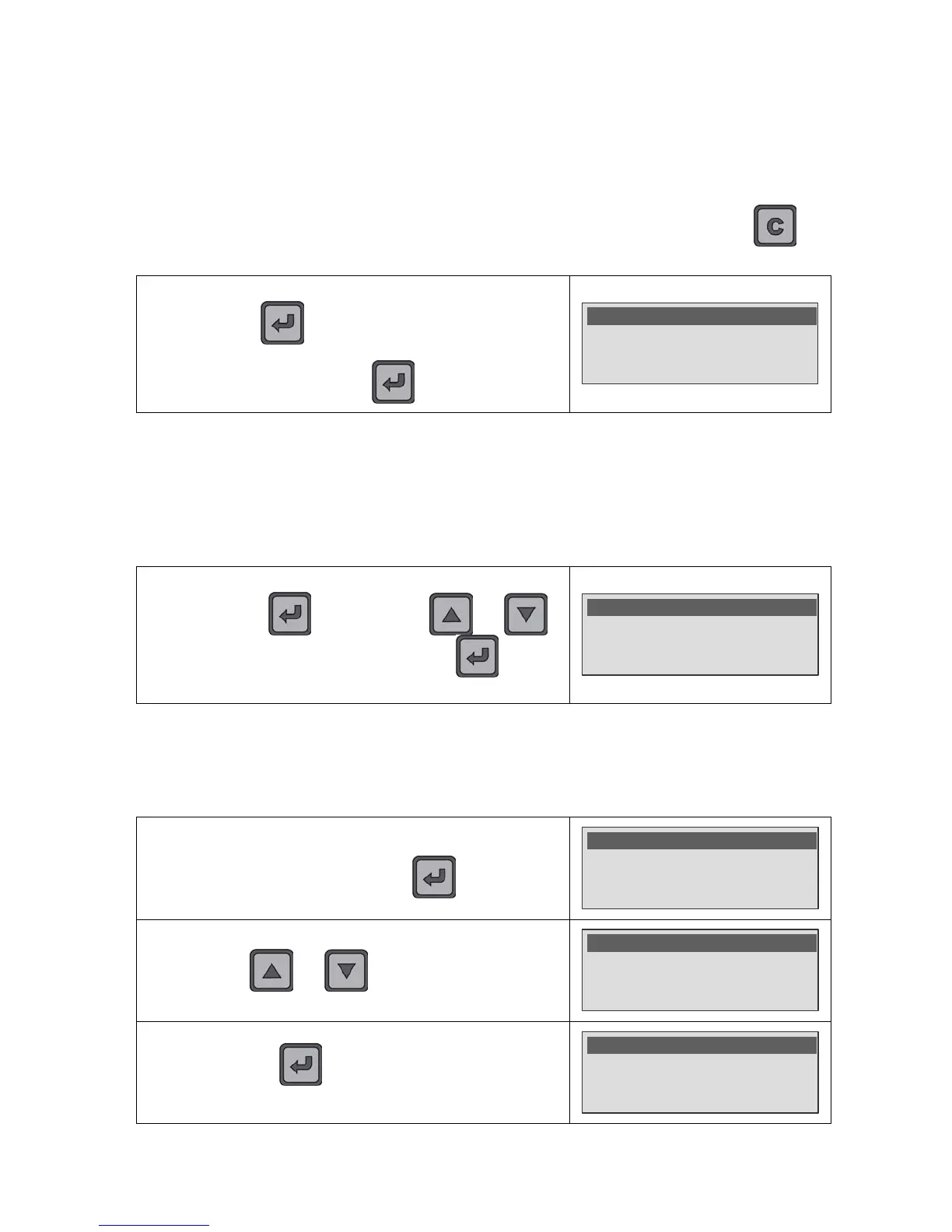
In all cases, to access to the SYSTEM SETTINGS menu, Press
and hold the
key (three seconds) to enter to the
MAIN MENU and select the SYSTEM SETTINGS menu.
Validate with the
key.
MAIN MENU
Rej. Unit : ml/mn
Reject : 5.50 E-3
>SYSTEM SETTINGS
7.1. CONCENTRATION H
2
(CONC. H2)
The H
2
concentration in the gas H
2
N
2
can be different according to the provider
(concentration in the supply bottle). This parameter must be adjusted according to the
identification displayed on the high pressure bottle (adjustable from 0% to 100% by
steps of 0.1%).
In the SYSTEM SETTINGS menu, select the Conc. H2 function,
validate with the
key. By using the and
keys, adjust the new value. Validate with the
key to
confirm.
>Conc. H2 : 5.0%
Language : English
Date : 10/08/09
7.2. LANGUAGE
This function allows choosing the language displayed. The resident languages in the
device are: English and French.
In the SYSTEM SETTINGS menu, select the Language
function and validate with the
key.


 To Next Page