30
Before programming the device, you must set the device to the correct time or make sure that the system day and time
is correct.
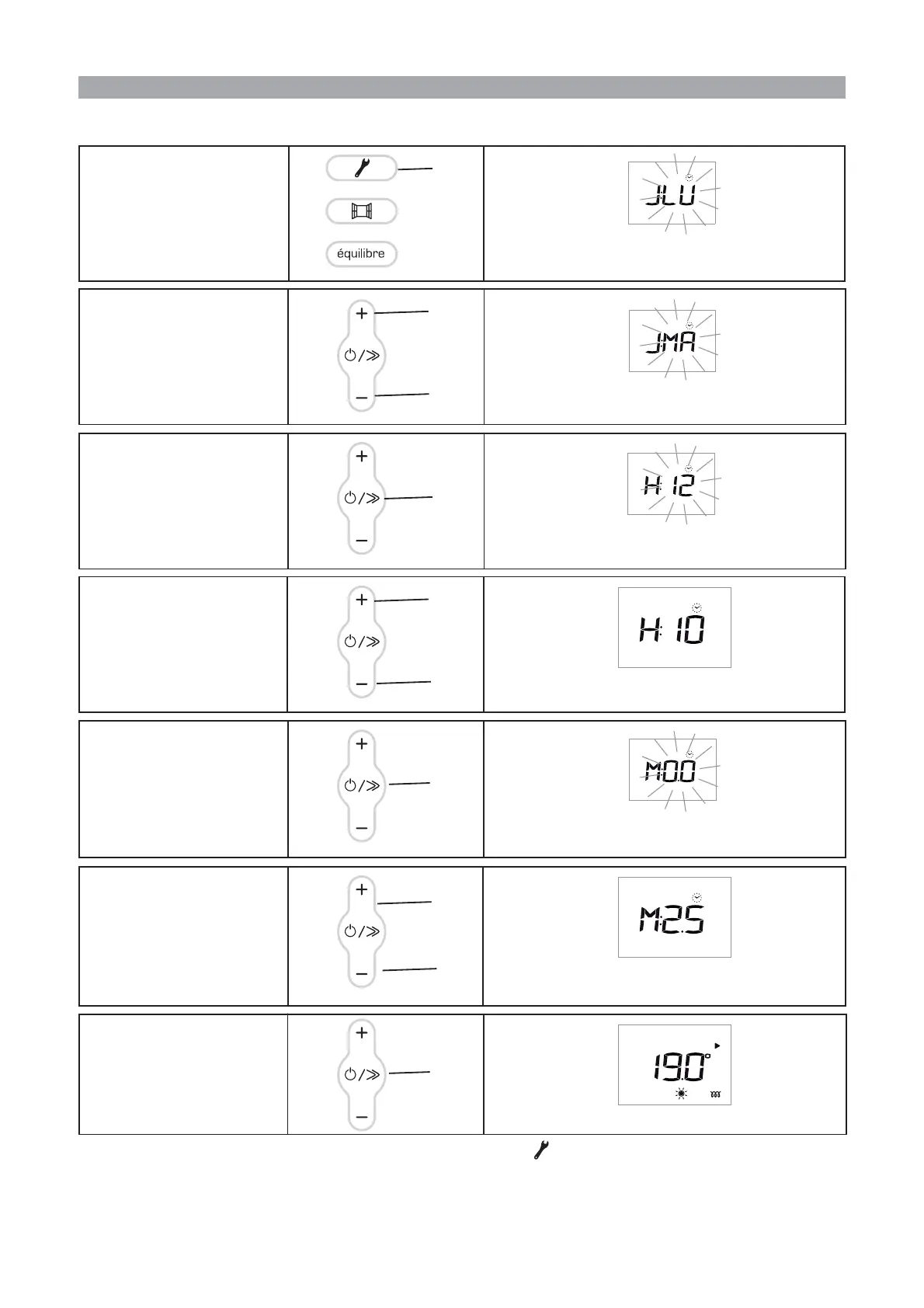
HOW TO SET THE DAY OF THE WEEK AND TIME ?
To set the day of the week and
the time, hold the Programming
key (C) down for several se-
conds.
The letters on the screen start flashing: you can now set
the day of the week. (J= day - LU = Monday)
C
To change the day, press the +
(D)or-(F) key.
You have changed the day. You can now set the time.
D
F
To set the time, press the Scroll
(E) key.
The letters on the screen flash so that you can change the
hour.
E
To change the hour, press the +
(D)or-(F) key.
You have changed the hour. You can now set the mi-
nutes.
D
F
To set the minutes, press the
Scroll (E) key.
The letters on the screen flash so that you can change
the minutes.
To change the minutes, press the
+(D)or-(F) key.
You can now confirm your setting.
D
F
N.B.: You can exit the settings at any time by pressing the Programming key (C).
The settings made are saved.
E
To confirm the minutes, press
the Scroll (E) key.
The screen returns to the main menu.
E



 To Next Page