31
a-You want to keep the selected program - Monday in the example
b-You want to change the selected program - Monday in the example
Two solutions are possible :
a- you want to keep the selected program,
b- you want to change the selected program.
HOW TO ASSIGN A DAILY PROGRAM ?
YOU WANT TO ASSIGN A DAILY PROGRAM TO ALL THE DAYS OF THE WEEK
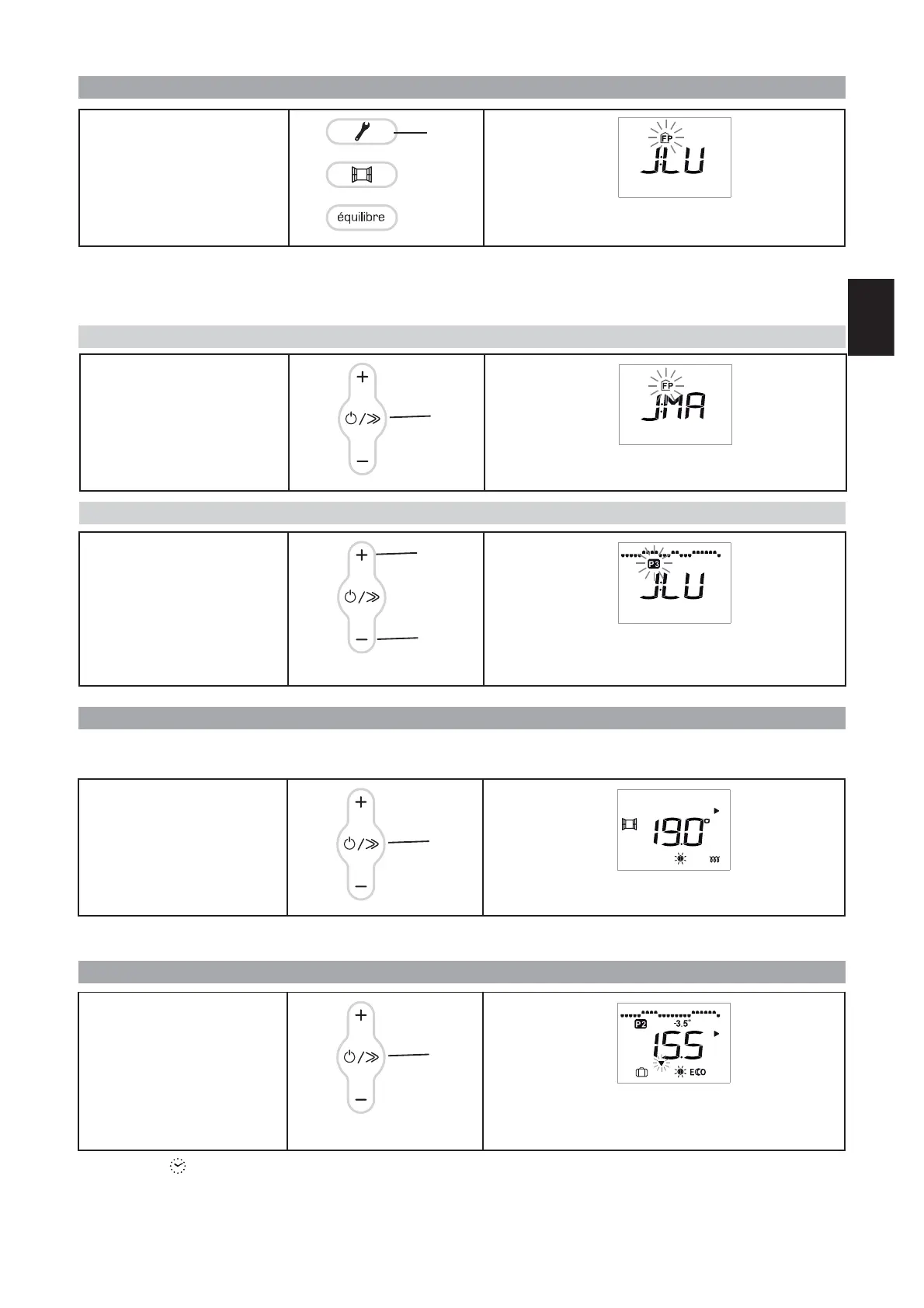
To access the daily program,
press the Programming key (C).
For Monday, the ‘FP’ program is selected.
(J= day - LU = Monday - FP = programming control)
C
You want to keep the ‘FP’ pro-
gram for Monday: press the
Scroll key (E).
The program for Monday is confirmed. You can now se-
lect the program for Tuesday.
E
Confirm the programs chosen
for each day of the week by
pressing the Scroll key (E).
You have confirmed the daily programs. You must now
activate the Programming mode.
E
You want to change the ‘FP’ pro-
gram for Monday: press the +
(D)or-(F) key until the pro-
gram you want flashes on the
screen.
You have chosen the P3 program for Monday, you can
now confirm.
D
F
Carry out the same procedure for all the days of the week, up until Sunday, either keeping the selected program or chan-
ging it.
N.B.: Even if there is a power cut, the settings are saved.
HOW TO ACTIVATE THE PROGRAMMING MODE ?
N.B.: If the icon blinks, you need to check the day and time settings (see page 30).
PROG
To activate the Programming
mode, press the Scroll key (E)
until the arrow is on this mode
.
The mode selection arrow flashes several seconds, then re-
mains on the display with the icon of the mode being pro-
grammed.
PROG
E
PROG
PROG
GB



 To Next Page