2-2
2.01. HOMESCREEN
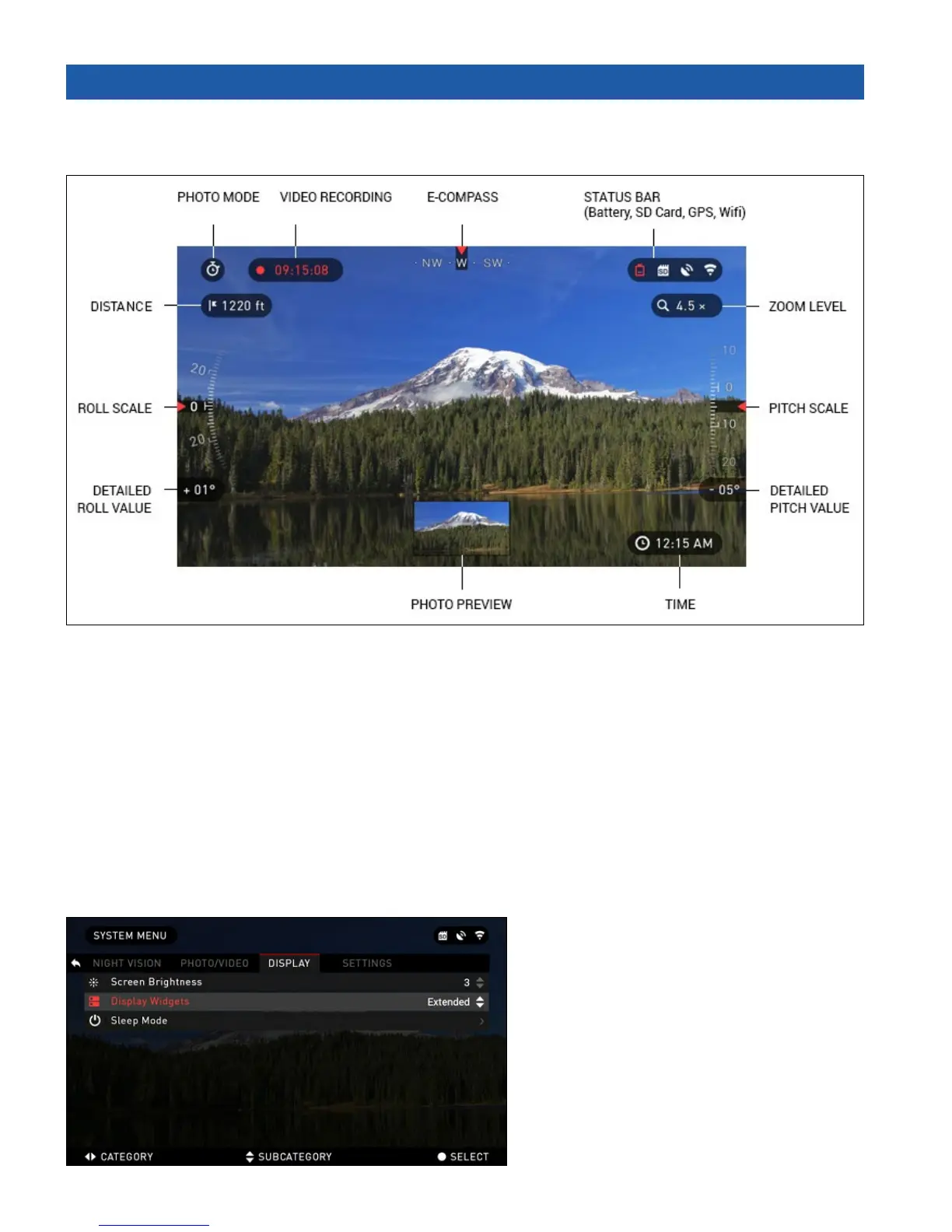
First screen you’ll see after switching on the device is Homescreen. It consists of Scales, Status Bar
icons and different Informational Widgets.
SCALES
E-Compass Scale shows yaw angle based on e-Magnetometer data.
Roll Scale shows binocular cant based on internal 3D Gyroscope.
Pitch Scale shows binocular inclination based on internal 3D Gyroscope.
STATUS BAR
Its job is to display information about the current state of the system.
Currently inactive icons become invisible, so you will only see the important information on the
Homescreen Interface:
• Battery — appears when energy level is low
• SD Card — shows the presence or
absence (red icon) of memory card
• GPS and WiFi — show when the func-
tion is enabled.
WIDGETS
They are interface elements which pro-
vide quick access to useful information.
There are several types of widgets:
• icons without value — are used for
mode displaying (Photo and Video Modes)



 To Next Page