20
担当
生産図
葉数: 1 / 1
図面番号:
名称:
色調:
設計:承認:
1
2
3
4
5
6
発行:ATV株式会社
eD3 TOP PANEL
HR08-****
改定履歴
Mori
2017.3.27
承認日付
公差:±0.3
Gray (C0M0Y0K50)
担当
生産図
葉数: 1 / 1
図面番号:
名称:
色調:
設計:承認:
1
2
3
4
5
6
発行:ATV株式会社
eD3 TOP PANEL
HR08-****
改定履歴
Mori
2017.3.27
承認日付
公差:±0.3
Gray (C0M0Y0K50)
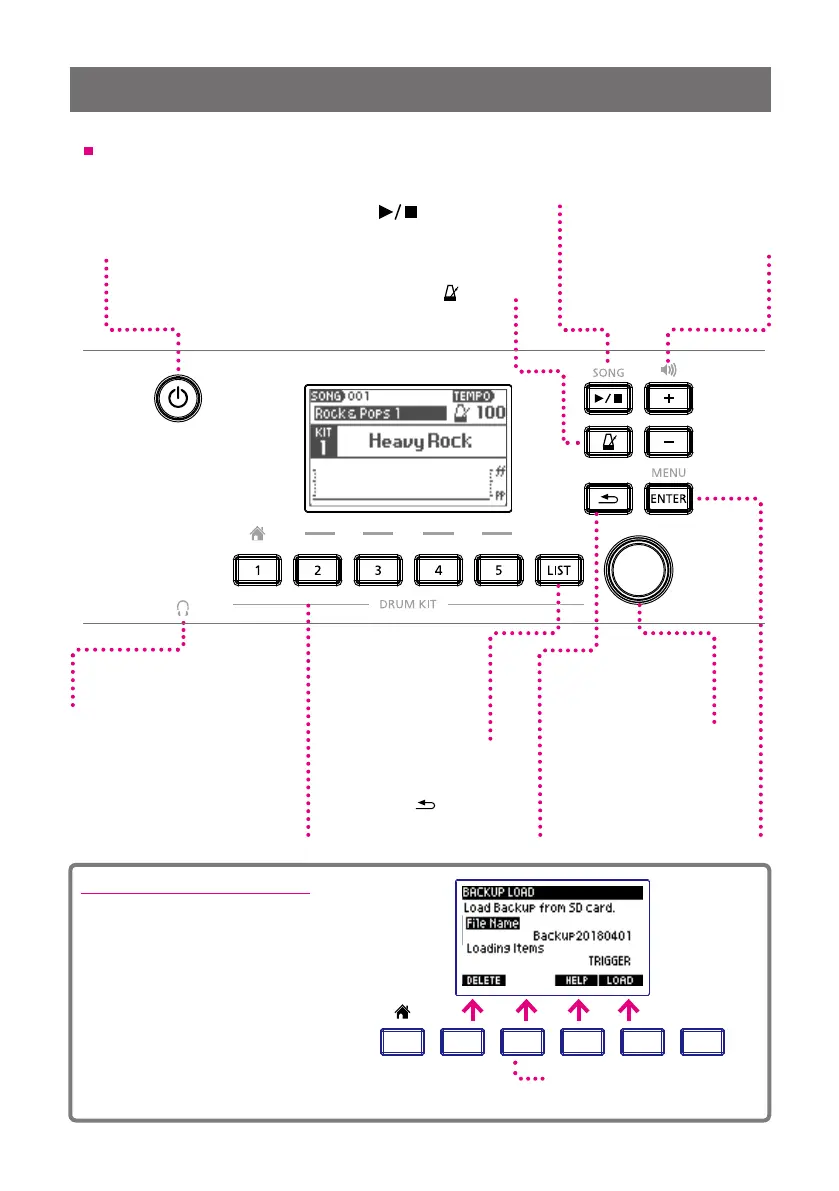
Power Button
Long-press this button to
turn the power on/o.
1 xD3 Drum Sound Instrument
Top Panel
Value Knob
Use to change and select
dierent settings and menu
items.
PHONES
Audio jack for headphones.
[ENTER/MENU] Button
Use to determine / select
parameters and values.
On the home screen,
“Menu” is displayed.
Drum Kit Buttons[1]--[5]
[1]—[5] Use to select registered
drum kits.
Pressing button [1] will return you to
the Home screen.
[
VOLUMESONG
HOME
HOME
TRACK
CLICK
HOME
HOME
CLICK
CLICK
CLICK
HOME
HOME
MENU
VARIATION
SONG
1 2 3 4 5
ENTER
MENU
–––––––––––––––––––––––––– DRUM KIT ––––––––––––––––––––––––––
1 2 3 4 5
ENTER
LIST
HOME
MENU
](BACK)Button
Return to the previous screen.
[LIST]Button
Pressing the button
displays the drum kit
list and enables you to
select a kit.
VOLUME [+][–]Buttons
Use to adjust the
headphone and output volume.
SONG [
](PLAY/STOP)Button
Use to start and stop the song.
An SD memory card is necessary
for song playback.
Only the buttons being operated light up.
Metronome[
VOLUMESONG
HOME
HOME
TRACK
CLICK
HOME
HOME
CLICK
CLICK
CLICK
HOME
HOME
MENU
VARIATION
SONG
1 2 3 4 5
ENTER
MENU
–––––––––––––––––––––––––– DRUM KIT ––––––––––––––––––––––––––
1 2 3 4 5
ENTER
LIST
HOME
MENU
]Button
Use to turn on / o the
built-in metronome.
VOLUMESONG
HOME
HOME
TRACK
CLICK
HOME
HOME
CLICK
CLICK
CLICK
HOME
HOME
MENU
VARIATION
SONG
1 2 3 4 5
ENTER
MENU
–––––––––––––––––––––––––– DRUM KIT ––––––––––––––––––––––––––
1 2 3 4 5
LIST
Buttons for which there are no
corresponding menu items are unlit. .
About the Function Buttons
Other than the "Home" screen, the
drum kit buttons [2] [3] [4] [5] are used
to select corresponding menu items
and functions displayed on the screen.
For example, on the screen shown on
the right, the corresponding functions
are:
[2] Button = DELETE
[4] Button = HELP
[5] Button = LOAD


 To Next Page