30
3 Menu Functions and Settings
METRONOME
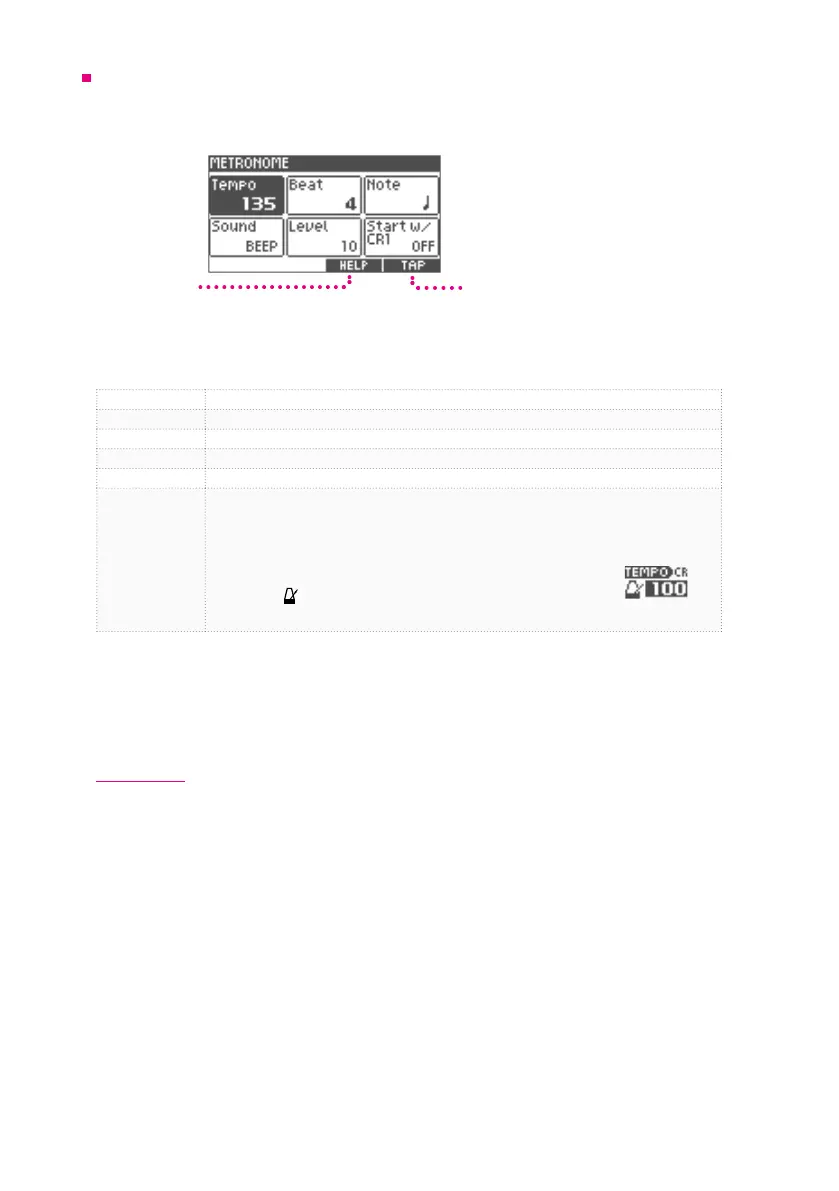
In the metronome screen, you can set metronome's tempo (bpm), beat (beats per measure), note
value, volume, and sound. You can also enable the ‘metronome start with CRASH 1’ function.
Tap Tempo
Help Screen
1
Turn the value knob to select the item you want to set.
Tempo Tempo
Beat Beat
Note Musical Note (note value of the beat)
Sound Sound
Level Volume Level
Start w/CR1
When you hit the CRASH 1 cymbal, the metronome can be set to play for either one
or two measure/s. By hitting CRASH 1 regularly, you can engage the metronome for
one or two measures and check the timing accuracy of your playing.
1.Set it to "MEAS 1" or "MEAS 2".
2.Press the[
VOLUMESONG
HOME
HOME
TRACK
CLICK
HOME
HOME
CLICK
CLICK
CLICK
HOME
HOME
MENU
VARIATION
SONG
1 2 3 4 5
ENTER
MENU
–––––––––––––––––––––––––– DRUM KIT ––––––––––––––––––––––––––
1 2 3 4 5
ENTER
LIST
HOME
MENU
]button. CR ashes on the screen.
3.Hit the CRASH 1 cymbal. The metronome will play for either 1 or 2 measures.
2
Press the [ENTER] button and change the value with the value knob.
3
Press the [ENTER] button to conrm the value.
Tap tempo
You can set the tempo of the metronome by pressing the TAP button several times. When you do
not know the tempo of the song, this function can be used to set the tempo of the metronome to
play along in time.
1
Press the [5] (TAP) button according to the beat.
The tempo is set.


 To Next Page