33
3 Menu Functions and Settings
SETUP
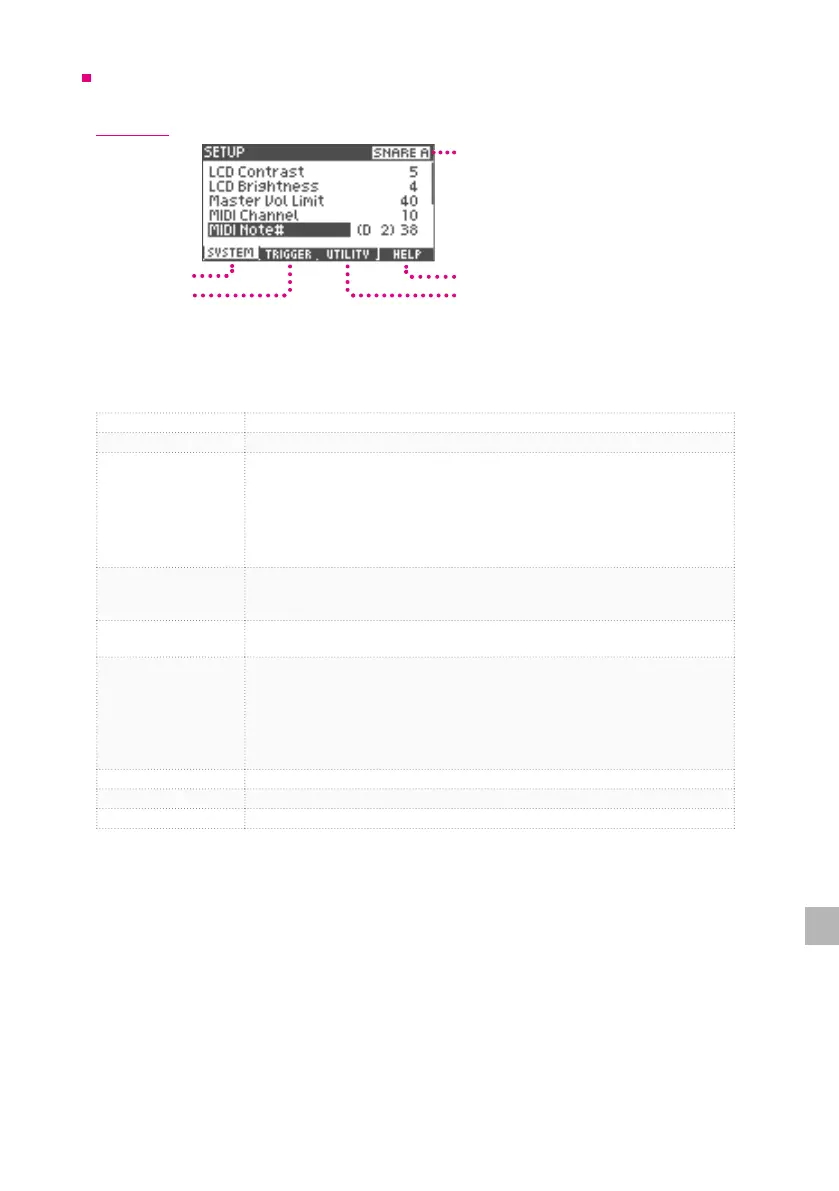
SYSTEM
Help Screen Display
Target Pad Display
Utility Tab
Trigger Tab
System Tab
1
Press the [2] (SYSTEM) button and select the System tab.
2
Use the value knob to select the desired item and press the [ENTER] button.
LCD Contrast Adjust the contrast of the display.
LCD Brightness Adjust the brightness of the display.
Auto Power O
The xD3 drum module automatically turns o after a 30-minute period of
inactivity to reduce power consumption.
Change the time setting of the auto power-o function.
30 mins : The power turns o after 30 minutes.
4 hours : The power turns o after 4 hours.
DISABLE : The xD3 will not turn o automatically.
Master Vol Limit
Set the maximum output volume of the xD3 by pressing the [+] button. This
setting limits the maximum output volume of xD3 in order to prevent hearing
damage etc. - due to excessive volume levels.
MIDI Channel
Sets the MIDI channel number for sending and receiving midi data. Normally set
to 10.
MIDI Note#
Sets the MIDI note number assigned to each pad.
*For the snare pad, assign dierent MIDI note numbers to the head part (A) and
the rim part (B) respectively.
*For the cymbal pad, assign dierent MIDI note number to the bow part (A)
edge part (B) respectively.
*Only one sound will play if a MIDI note number is duplicated.
Pad Pan Sets the stereo pan position for each pad instrument sound.
Firmware Firmware version
Product ID Product ID
3
Use the value knob to change the value and press the [ENTER] button to conrm.


 To Next Page