u.
co
.....
N
"
N
.....
0
0
:c
'<t
Selecting the driving mode
.,. To se lect t he mode , se lect the following in the
Infota inment : ICAR!funct ion button>
Comfort,
Auto, Dynamic or Individual.
You can change t he d riving mode when the vehi-
cle is stat ionary or w hile d riving. If traffic per-
m its, after cha ng ing modes, br iefly take yo ur
foot off the accelerator peda l so that t he recen t ly
se lected mode is a lso activated for the engine.
Comfort - provides a comfort-o rie nted ve hicle
setup and is su ited for long dr ives on hig hways .
Adjusting the Individual mode
A ss istance systems
Auto - provides an overa ll comfortab le yet dy-
namic driving feel and is suited for everyday use .
Dynamic - g ives the dr ive r a spo rty d riving fee l
and is suited t o a sporty driv ing style .
Individual - ~ page 113 .
A WARNING
Pay attention to t raff ic w hen ope rating the
dr ive sele ct t o redu ce the risk of an accident.
-
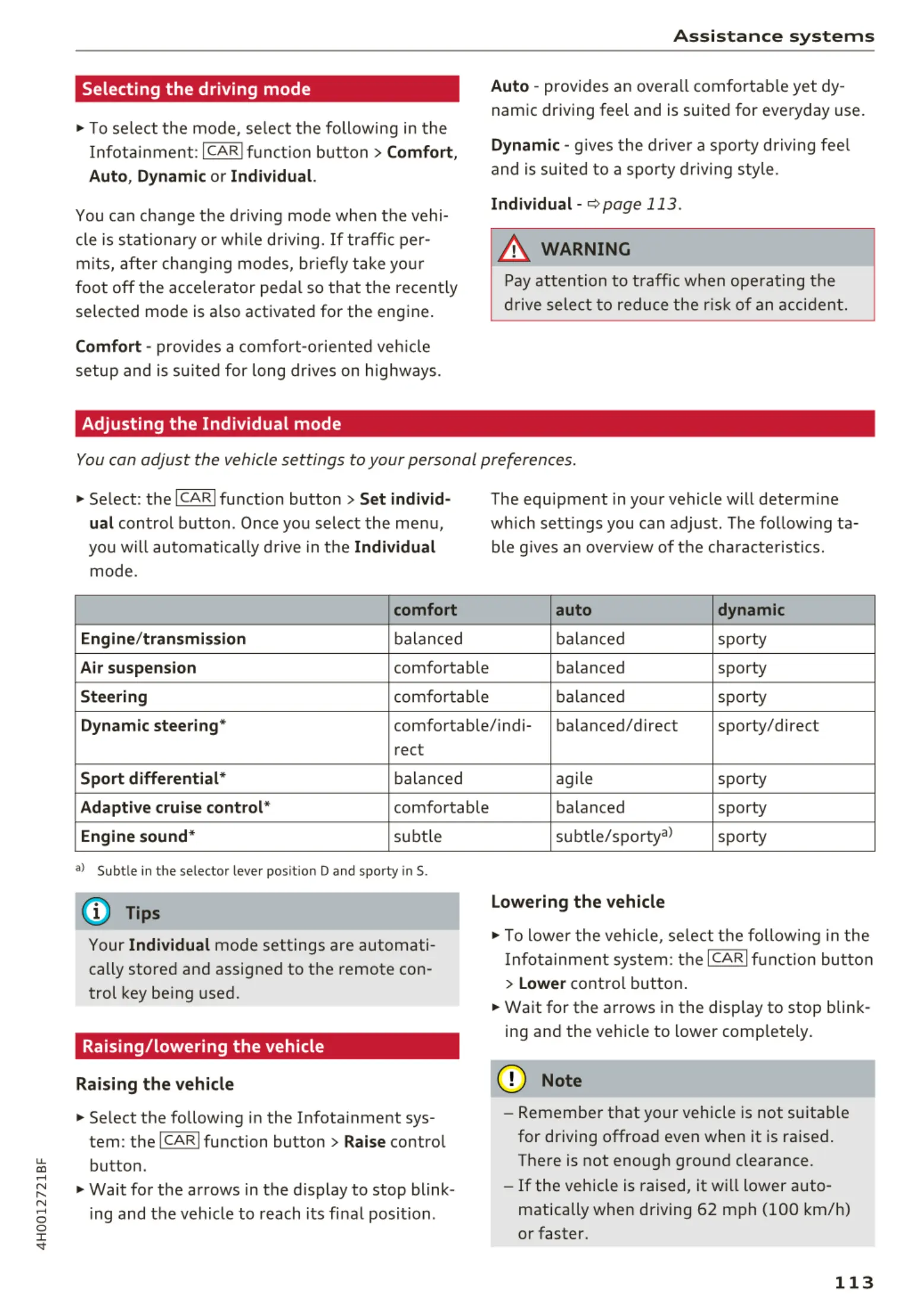
You can adjust the vehicle settings to your personal preferences .
.,. Select : the !CARI fu nction button > Set individ-
ual
control button . Once you select the me nu,
you w ill automatically d rive in t he
Individual
mode.
comfort
Engine/ transmission
balan ced
Air suspension comfortable
Steering co mfo rtable
The equ ipment in you r vehicle will determ ine
wh ich sett ings you can adjust . The follow ing ta-
ble g ives a n overv iew of t he cha racte ristics.
auto dynamic
ba lan ced sporty
balanced spo rty
ba lan ced sporty
Dynamic steering* comfo rtable/ ind i- balanced/direc t sporty/direct
rect
Sport differential * balanced
Adaptive cruise control* comfortable
Engine sound* subt le
a> Sub t le in t he se lector leve r posit ion D and sporty in S.
(D Tips
Your Individual mode settings are automati -
cally stored an d assigned to the remote con -
trol key be ing used.
Raising/lowering the vehicle
Raising the vehicle
.,. Se lect the following in the Infota inment sys-
tem : the !CAR! function button>
Raise control
button .
.,. Wait for the arrows in the display to stop blink -
ing and the vehicle to reach its fi nal posit ion .
ag ile sporty
balanced sporty
subt le/spor tyal
sporty
Lowering the vehicle
.,. To lower the vehicle, se lect t he follow ing in the
Infota inment system: the ICAR! funct ion bu t to n
>
Lower cont rol button .
.,. Wait for the a rrows in the display to stop blink -
ing and the veh icle to lower comp letely .
@ Note
- Remember t hat yo ur vehicle is not suitab le
for driving offroa d eve n when it is ra ised.
There is not enough ground clearance.
- If the vehicle is raised, it will lower auto -
matically when driving 62 mph (100 km/h)
or faster.
113



 To Next Page