EasyManua.ls Logo

Audi Q4 e-tron 2024 - Traffic Information

Audi Q4 e-tron 2024
310 pages
Print Icon
To Next Page IconTo Next Page
To Previous Page IconTo Previous Page
Loading...
Navigation
@
Tips
Because
of
the
high
volume
of
data,
Audi
rec-
ommends
performing
the
map
update
using
the
USB
connection
>
page
202.
Map
update
using
the
USB
connection
Applies
to:
vehicle
with
map
updates
using
the USB
connec-
tion
With
the
map
update,
you
can
update
the
map.
material
in
your
navigation
system.
Requirement:
you
must
have
created
a
myAudi
account
at
my.audi.com.
Your
vehicle
must
be
registered
in
your
myAudi
account.
Downloading
updates
»
Download
the
map
update
at
my.audi.com
and
store
it
on
a
USB
flash
drive.
For
additional
in-
formation,
visit
my.audi.com
Installing
updates
»
Connect
the
USB
flash drive
to
the
USB
port
with
charging
function
*
page
273.
»
Open
the
notification
in
the
notification
center
on
&
page
23
and
press
on
the
notification.
»
Press
Next.
The
status
of
the
installation
is
shown
in
the
display.
Traffic
information
Introduction
Applies
to:
vehicles
with
navigation
system
and
online
traffic
information
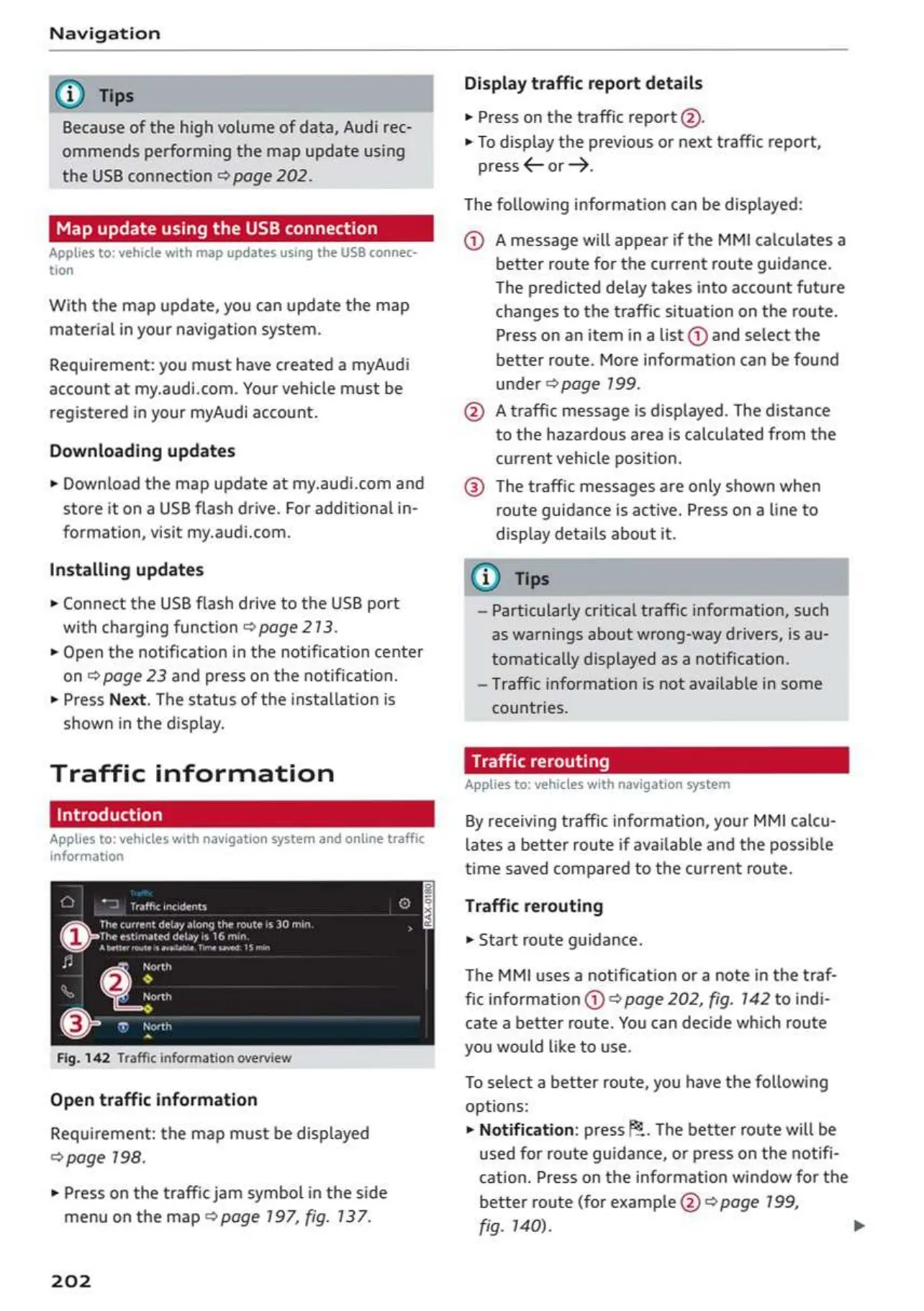
Fig.
142
Traffic
information
overview
Open
traffic
information
Requirement:
the
map
must
be
displayed
©
page
198.
»
Press
on
the
traffic
jam
symbol
in
the
side
menu
on
the
map
©
page
197,
fig.
137.
202
Display
traffic
report
details
»
Press
on
the
traffic
report
@).
»
To
display
the
previous
or
next
traffic
report,
press
or.
The
following
information
can
be
displayed:
@
Amessage
will
appear
if
the
MMI
calculates
a
better
route
for
the
current
route
guidance.
The
predicted
delay takes
into
account
future
changes
to
the
traffic
situation
on
the
route.
Press
on an
item
ina
list
@
and
select
the
better
route.
More
information
can
be
found
under
©
page
799.
@
A
traffic
message
is
displayed.
The
distance
to
the
hazardous
area
is
calculated
from
the
current
vehicle
position.
@
The
traffic
messages
are
only
shown
when
route
guidance
is
active.
Press
ona
line
to
display
details
about
it.
@
Ths
Particularly
critical
traffic
information,
such
as
warnings
about
wrong-way
drivers,
is
au-
tomatically
displayed
as
a
notification.
~
Traffic
information
is
not
available
in
some
countries.
Applies
to:
vehicles
with
navigation
system
By
receiving
traffic
information,
your
MMI
calcu-
lates
a
better
route
if
available
and
the
possible
time
saved
compared
to
the
current
route.
Traffic
rerouting
»
Start
route
guidance.
The
MMI
uses
a
notification
or
a
note
in
the
traf-
fic
information
@)
*
page
202,
fig.
142
to
indi-
cate
a
better
route.
You
can
decide
which
route
you
would
like
to
use.
To
select
a
better
route,
you
have
the
following
options:
>
Notification:
press
P2.
The
better
route
will
be
used
for
route
guidance,
or
press
on
the
notifi-
cation.
Press
on
the
information
window
for
the
better
route
(for
example
@
page
199,
fig.
140).
OwnersManuals2.com

Table of Contents

Related product manuals