34
AC MAINS CONNECTION
Check that the voltage supplied by your electrical outlet corresponds to the value reported on
the rear panel of the amplifier (see part 16 at page 47).
After connecting the unit to the AC mains with the screened supplied cable, commute the
power switch, on the rear panel, to position “1” (see also part 20, page 47).
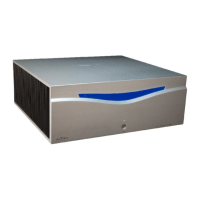
The blue LOGO on the front panel (see part 8 at page 47) will come on with a blinking light,
indicating the stand-by position.
To completely turning off the amplifier, commute the power switch, on the rear panel, to
position “0” (see also part 20, page 47).
NOTICE: for the proper working of the unit and for the safety of persons and things, it is
mandatory that your home’s electrical system supply a real earth ground. Moreover all other
units in the audio system must be grounded. The absence of an earthed outlet could be cause of
malfunction (refer also to the section “SAFETY INSTRUCTIONS” at page 25).
Flight ONE has a “SOFT START and SOFT OFF” main circuit.
CAUTION
CAUTION



 To Next Page