EasyManua.ls Logo

Audio Technica ATW-T3201a - User Manual

Audio Technica ATW-T3201a
32 pages
Print Icon
To Next Page IconTo Next Page
Loading...
User Manual
UHF Wireless Systems
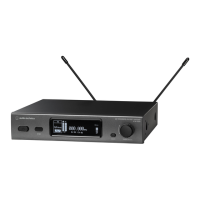
ATW-R3210
Receiver
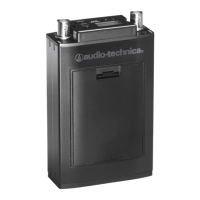
ATW-T3201 / ATW-T3201a
Body-Pack Transmitter
ATW-T3202 / ATW-T3202a
Handheld Transmitter
3000 Series

Table of Contents

Questions and Answers

  • S
    Susan BruceAug 7, 2025
    Why is the sound distorted on my Audio Technica Microphone system?
    • L
      Lisa HarrisAug 7, 2025
      If you're experiencing distorted sound with your Audio Technica Microphone system, ensure that the audio output level isn't set too high. Also, check that the volume of any connected components isn't excessively high.
  • R
    Rachael PerezAug 18, 2025
    What to do if there is no voice output from Audio Technica Microphone system?
    • A
      anna90Aug 18, 2025
      If you're not getting any voice output or the voice output level is low on your Audio Technica Microphone system, verify the following: * Confirm that the transmitter/receiver channels are correctly set. * Ensure that the receiver's power button is turned ON. * Check that the antennas are properly connected. * Make sure all connected components, like a mixer, are correctly connected to the receiver. * Verify that the audio output isn't set to the minimum level. * Confirm that the audio output level of connected components (such as a mixer) is not minimized.
  • H
    Howard GardnerAug 26, 2025
    How to reduce unwanted noise on Audio Technica Microphone system?
    • J
      Jennifer ReedAug 27, 2025
      If you are experiencing unwanted noise with your Audio Technica Microphone system, check the following: * Ensure there isn't a noise source nearby, such as a fluorescent lamp or electrical component. * Verify that each transmitter uses a different frequency. * Confirm the receiver's output terminal is correctly connected. * Ensure the receiver isn't sharing an electrical outlet with another noisy component. * Check for other wireless systems nearby using the same frequency band and adjust the squelch level.

Summary

Introduction and Safety

Safety Precautions

Covers critical warnings, cautions, and battery handling advice for safe product use.

Regulatory Compliance

Details FCC and Industry Canada compliance information for users in the USA and Canada.

Part Names and Functions

ATW-R3210 Receiver Front Panel

Detailed description of the front panel controls and indicators of the ATW-R3210 receiver.

ATW-R3210 Receiver Rear Panel

Detailed description of the rear panel connectors and features of the ATW-R3210 receiver.

ATW-T3201; ATW-T3201 a Transmitter

Detailed description of the controls, connectors, and indicators of the ATW-T3201/ATW-T3201a transmitter.

ATW-T3202; ATW-T3202 a Transmitter

Detailed description of the controls, capsule, and indicators of the ATW-T3202/ATW-T3202a transmitter.

How to Insert Batteries

ATW-T3201; ATW-T3201 a Battery Insertion

Procedure for inserting batteries into the ATW-T3201/ATW-T3201a body-pack transmitter.

ATW-T3202; ATW-T3202 a Battery Insertion

Procedure for inserting batteries into the ATW-T3202/ATW-T3202a handheld transmitter.

Microphone Capsule Handling

Attaching Microphone Capsule

Steps for securely attaching the microphone capsule to the transmitter body.

Detaching Microphone Capsule

Steps for safely detaching the microphone capsule from the transmitter body.

Understanding the Display

ATW-R3210 Main Screen Display

Detailed breakdown of the indicators and information presented on the ATW-R3210 receiver's main display.

ATW-R3210 Transmitter Info Display

Explanation of the specific display elements showing transmitter status and information.

Advanced Display Functions

ATW-R3210 Level Meter Screen

Detailed description of the level meter screen, its indicators, and functions.

Minimum Hold and Screen Switching

Explanation of the minimum hold function and how to navigate between display screens.

Transmitter Display Overview

Transmitter Main Screen Display

Detailed breakdown of the indicators and information presented on the transmitter displays.

System Operation Guide

Basic System Operation

Step-by-step guide for the fundamental operation of the wireless system.

IR SYNC Transmitter Setup

Procedure for synchronizing the transmitter and receiver using the IR SYNC function.

QUICK SYNC Function

A shortcut method for accessing transmitter settings from the receiver.

Receiver Settings (ATW-R3210)

Navigating Receiver Settings

Instructions for navigating and changing settings on the ATW-R3210 receiver.

Transmitter Settings (ATW-T3201;T3202)

Navigating Transmitter Settings

Instructions for navigating and changing settings on the ATW-T3201/ATW-T3201a and ATW-T3202/ATW-T3202a transmitters.

ATW-R3210 Configuration

List of ATW-R3210 Settings

A comprehensive list of all configurable settings for the ATW-R3210 receiver.

Setting ATW-R3210 Group;Channel

How to set the receiver's operating frequency based on group and channel.

Setting ATW-R3210 Operating Frequency

Step-by-step instructions for manually setting the operating frequency.

Setting ATW-R3210 Receiver Name

Procedure for naming the receiver for easier identification.

ATW-R3210 Advanced Settings

Setting ATW-R3210 Audio Output Level

How to adjust the audio output volume level of the receiver.

Scanning for Open Channels

How to automatically find and select available, interference-free channels.

Syncing Transmitter Settings via IR

How to configure transmitter settings remotely using the receiver's IR SYNC feature.

ATW-R3210 Squelch & System Functions

Setting ATW-R3210 Squelch Level

How to adjust the squelch threshold for optimal signal reception.

Locking ATW-R3210 Settings

How to lock the receiver settings to prevent accidental changes.

Setting ATW-R3210 Antenna Power

How to enable or disable power supply to the antenna input terminals.

ATW-R3210 Customization

Setting User-Defined Scan Groups

How to create and manage custom scan groups for frequencies.

Setting Backup Frequency Mode

How to configure a backup frequency for quick switching.

Setting ATW-R3210 Main Screen Layout

How to customize the primary information displayed on the receiver's main screen.

ATW-R3210 Final Settings & Info

ATW-R3210 Display & Access Settings

Configure AF meter display, screen brightness, and user access levels.

Resetting ATW-R3210 Settings

Procedure to restore the receiver settings to their factory defaults.

Checking ATW-R3210 Information

How to view system information and firmware version of the receiver.

Transmitter Settings (ATW-T3201;T3202) - Part 1

List of Transmitter Settings

A comprehensive list of all configurable settings for the transmitters.

Setting Transmitter Group;Channel

How to set the transmitter's operating frequency using group and channel selection.

Setting Transmitter Frequency

Step-by-step instructions for manually setting the transmission frequency.

Setting Transmitter Name

Procedure for naming the transmitter for easier identification.

Transmitter Settings (ATW-T3201;T3202) - Part 2

Adjusting Transmitter Gain

How to adjust the input gain level for microphones or instruments.

Setting Transmitter RF Power

How to adjust the transmitter's radio frequency output power.

Setting Transmitter HPF Filter

How to enable or disable the high-pass filter to reduce low-frequency noise.

Locking Transmitter Buttons

How to lock the transmitter buttons to prevent accidental changes.

Configuring Transmitter Function Button

How to assign specific functions to the transmitter's function button.

Transmitter Settings (ATW-T3201;T3202) - Part 3

Setting Transmitter Mute Mode

How to configure the mute switch function on specific transmitters.

Setting Transmitter Indicator LED

How to set the transmitter's indicator LED to be always on or off.

Setting Transmitter Battery Type

How to select the type of batteries used for accurate power indication.

Setting Transmitter User Access Level

How to set the user access level for transmitter operations.

Transmitter Maintenance

Resetting Transmitter Settings

Procedure to restore transmitter settings to their factory defaults.

Checking Transmitter Information

How to view the firmware version of the transmitter.

Attaching the Body-Pack Transmitter

Basic System Connections

Achieving Stable Reception

Rack-Mounting the Receiver

Troubleshooting Guide

ATW-R3210 Receiver Troubleshooting

Common issues and their solutions specific to the ATW-R3210 receiver.

Transmitter Troubleshooting

Common issues and their solutions for the ATW-T3201/ATW-T3201a and ATW-T3202/ATW-T3202a transmitters.

Dimensions

ATW-R3210 Receiver Dimensions

Detailed dimensional drawings and measurements for the ATW-R3210 receiver.

Transmitter Dimensions

ATW-T3201; ATW-T3201 a Dimensions

Detailed dimensional drawings and measurements for the ATW-T3201/ATW-T3201a transmitters.

ATW-T3202; ATW-T3202 a Dimensions

Detailed dimensional drawings and measurements for the ATW-T3202/ATW-T3202a transmitters.

System Specifications

Overall System Specifications

Comprehensive technical data covering frequency bands, modulation, and performance.

ATW-R3210 Receiver Specifications

Detailed technical specifications for the ATW-R3210 receiver unit.

Transmitter Specifications

ATW-T3201; ATW-T3201 a Specifications

Detailed technical specifications for the ATW-T3201/ATW-T3201a body-pack transmitters.

ATW-T3202; ATW-T3202 a Specifications

Detailed technical specifications for the ATW-T3202/ATW-T3202a handheld transmitters.

Audio Technica ATW-T3201a Specifications

General IconGeneral
BrandAudio Technica
ModelATW-T3201a
CategoryMicrophone system
LanguageEnglish

Related product manuals