EasyManua.ls Logo

Audio bit Ten - Bit Ten De-Equalization Process; Bit Ten De-Equalization Analysis

Audio bit Ten
49 pages
Print Icon
To Next Page IconTo Next Page
To Previous Page IconTo Previous Page
Loading...
ADVANCED MANUAL / bit Ten /
15
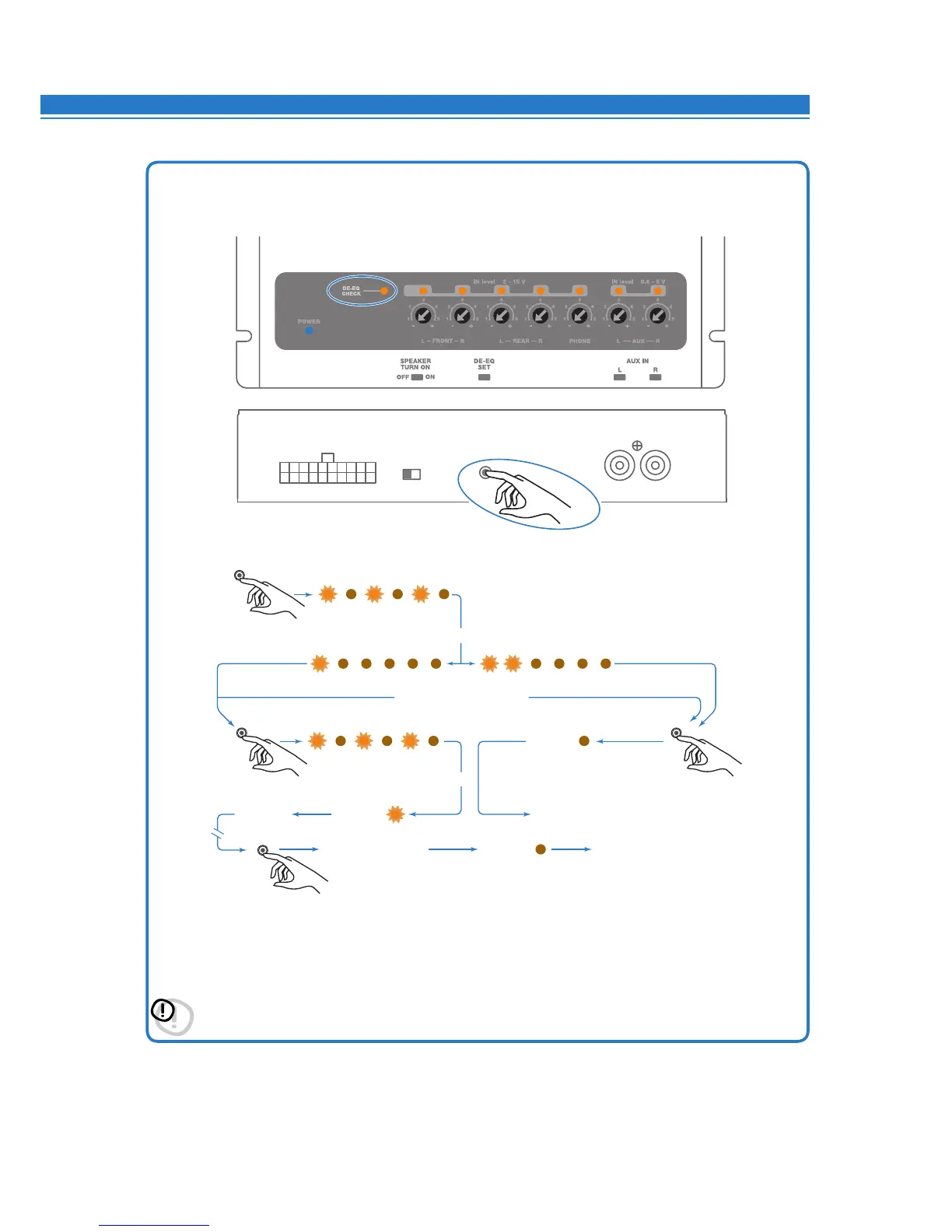
2. De-equalization analysis: setting the bit Ten.
•PushtheDE-EQSETbuttonandchecktheDE-EQCHECKLEDfollowingtheinstructionsinthefollowingimage.
•TheDE-EQLEDturnsontoshowthatyourecordedade-equalizationcurve,otherwiseitwillbeoff.
•IftheDE-EQCHECKLEDonthebit Ten is on, you can run the de-equalization procedure again.
The new data will erase the ones previously stored.
*Important: Confirmorabortthede-equalizationprocesswithin5minutes,otherwisethebitTenwillautomatically
reset and turn off.
DE-EQ CHECK LED
OUT OF DE-EQ PROCESS
DE-EQ IN PROGRESS
ABORT DE-EQ PROCESS
NO NEED DE-EQ
: ANALYZING
MEMORY CANCEL
LED OFF
LED ONDE-EQ OK
NO DE-EQ
NEED DE-EQ
END
DE-EQ SET
0,5 sec
5 sec
5 sec
1 sec
LED OFF
END
DE-EQ CHECK LED
OUT OF DE-EQ PROCESS
DE-EQ IN PROGRESS
ABORT DE-EQ PROCESS
NO NEED DE-EQ
: ANALYZING
MEMORY CANCEL
LED OFF
LED ONDE-EQ OK
NO DE-EQ
NEED DE-EQ
END
DE-EQ SET
0,5 sec
5 sec
5 sec
1 sec
LED OFF
END
* *
6

Table of Contents