9
5 CONNECTIONS
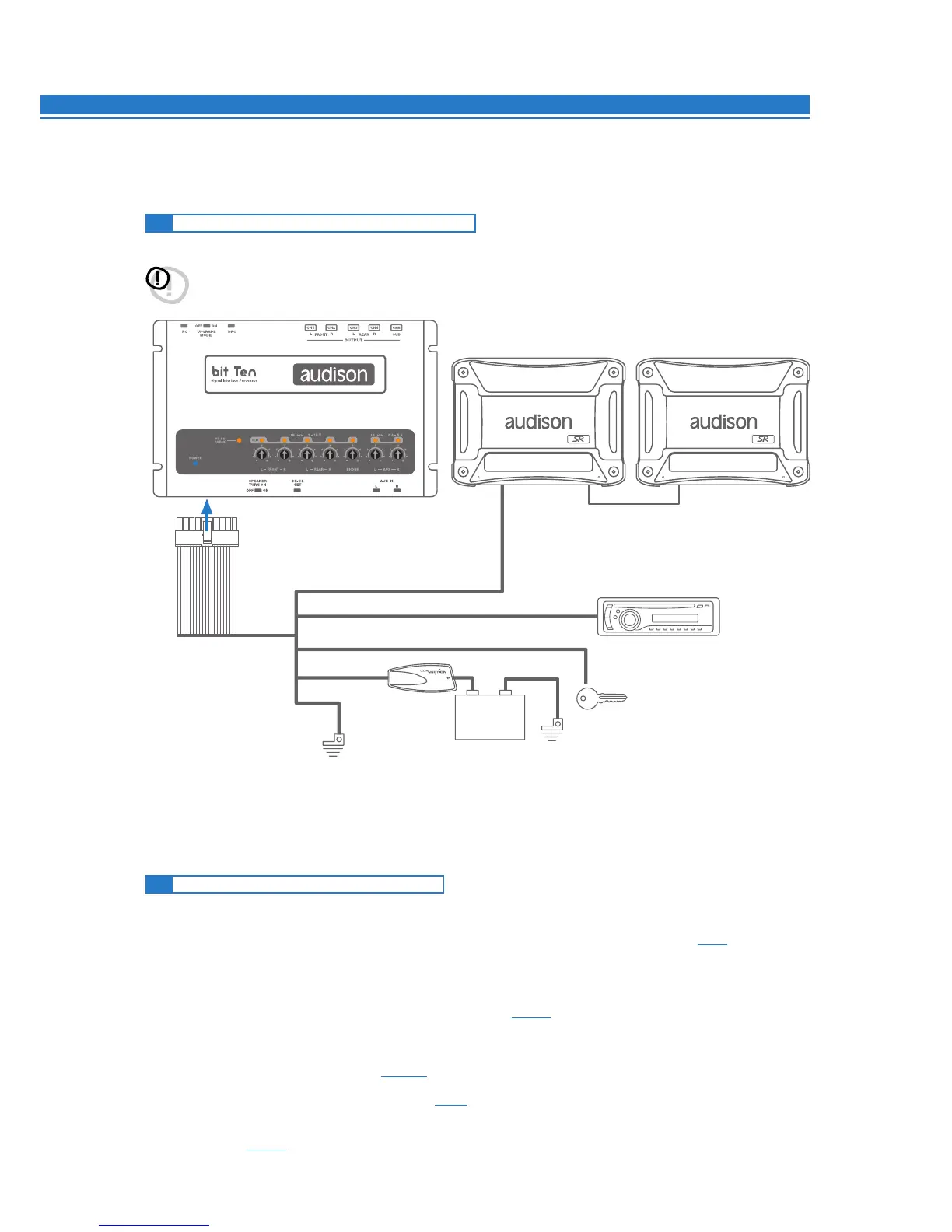
5.1 POWER SUPPLY AND REMOTE TURN ON
Remark: the bit Ten is internally protected by a fuse-resistor
soldered on its printed circuit board. To replace it contact
a service centre. Using an external fuse is recommended,
though it is not required.
5.2 HOW TO TURN THE bit Ten ON / OFF
The bit Ten is on when the POWER ON LED lights up in blue. It can be turned on / off in the following ways:
1. Push the DRC main control switch (to turn on). Keep the DRC main control knob pressed (to shut down).
In this case, no other connections Remote In / KEY MEM are required, but they can coexist (see 11).
2.
Connecting one of the Remote In plugs using a signal coming from one source.
The KEY MEM connection is not required, but it can coexist.
3. Through the KEY MEM. This method is memory-dependent (see 4.4.3).
4. Through the MASTER (INPUT FL) input. The AUTO TURN ON (ART) function is enabled by connecting an
amplified head unit output to the INPUT FL input channel. This function can be disabled by moving the
SPEAKER TURN ON switch to OFF (see 4 - 4.5).
5. Automatically through the hands-free phone kit (see 5.6) during its use.
6. Connecting either of the two MUTE IN / PHONE MUTE terminals, properly set to automatically enable the
AUX IN input (see 8.6.5).
WARNING: to power the device, use 1 mm
2
(16 AWG) cables.
5
REM IN REM INREM OUT
Battery Ground
REMOTE OUT
Black -BATT
Cyan (light blue) KEY MEM
Red REM IN
Blue REM OUT
Yellow +BATT 12V
1 mm
2
- 16 AWG
12V
+ -


 To Next Page