21
8. bit Ten INSTALLATION GUIDE USING A PC.
To configure the bit Ten inputs, outputs, equalizations and time delays, the processor must be connected to a PC
after calibrating the input levels. At that point, you need to have in mind the system you want to realize, since from this
moment if you want to change any of the settings, you will have to go through the guided procedure all over again.
More specifically the guided procedure will ask for:
- What kinds of specialization the main inputs channels use. The guided procedure changes according to your selection.
- Which auxiliary inputs will be used (e.g. AUX and / or PHONE).
- Which kind of signals will be allocated to the different outputs (e.g. Front Left, Center or Subwoofer etc.).
- Which speakers you are using for your system (e.g. 2-way Front, Front / Rear, Sub etc.).
- If the system features passive crossovers to manage speaker groups (e.g. 2-way system with active mid-low).
During this procedure, you should disconnect the bit Ten output RCA plugs to the amplifiers.
3.
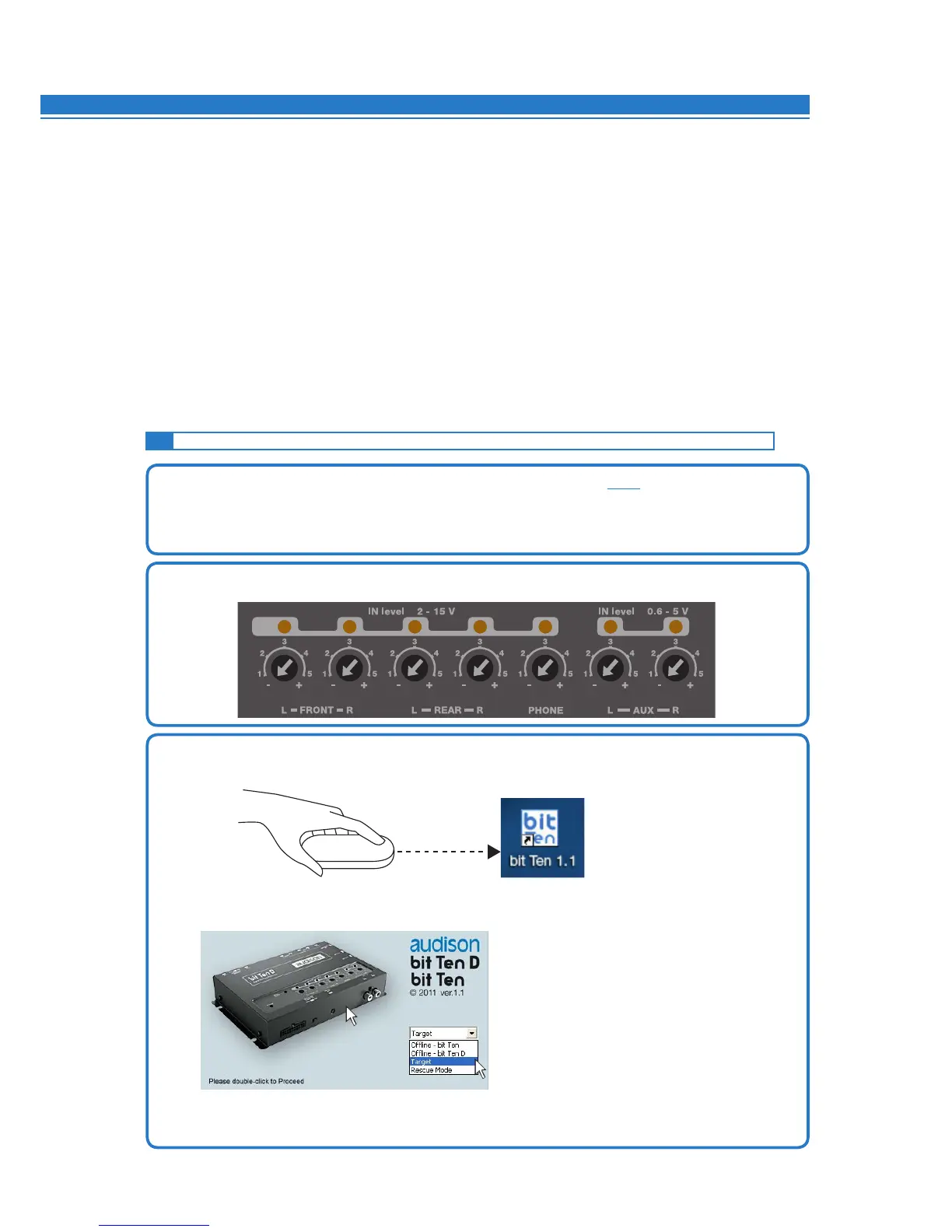
Turn on the bit Ten and connect the USB cable to a PC. After installing the bit Ten software, start it by clicking the
icon previously created on the PC desktop.
The first screen shown is the start page where you need to choose among three operational modes:
Select the Target (1) start mode on the drop-down menu, then double click (2) on the bit Ten image
or press ENTER.
8.1 SELECTING THE MASTER (FRONT / REAR) INPUTS AND OUTPUTS - TARGET MODE
1. Connect the head unit speaker outputs to the bit Ten high-level input (see 4.2).
Before turning on the system, make sure the amplifier’s RCA plugs are disconnected from the bit Ten
to avoid speaker damage during the calibration procedure.
The input calibration procedure must be performed with the ignition turned on. In this case, the car voltage is
about 14.0 volts. The head unit will provide an undistorted output signal at higher volume.
2. Make sure that the IN Level knobs for the inputs used (L / R Front, L / R Rear, Phone, Aux IN L-R) are set to
minimum sensitivity as in the figure (position -).
8
- TARGET: bit Ten D setup
- OFFLINE bit Ten: demo mode bit Ten (sel)
- OFFLINE bit Ten D: demo mode bit Ten D (sel)
- RESCUE MODE: Firmware upgrade
recovery (sel)
1
2


 To Next Page