AudioArts Lightning / June 2018
CONTROLS AND FUNCTIONS
page 2 – 4
USB Port
The Lightning console contains USB 2.0 interface, available via two USB Type B
connectors located underneath the hinged meterbridge, to enable audio to pass between
the console and a USB port on a computer. The audio from the console to the computer
is selectable via two dipswitches (described in the “Console Internal Programming” sec-
tion). Audio coming back from the computer via USB shows up as a stereo analog signal
on any input fader by using a RJ-45 straight patch cable between USB OUT and desired
input channel.
Using the USB Port . . .
Any computer having a USB port and installed drivers capable of passing and utilizing
digital audio data should work with the Lightning USB ports. Use a cable having a USB
Type B connector on the Lightning end and a connector on the other end that will mate
with the computer’s USB port; this will typically be a USB Type A connector.
. . . With a MAC
In general, this will be a plug-and-play process. The main concern is to choose the USB
Audio Codec under System Preferences>Sound as desired for audio input and/or output.
Then simply start the application.
. . . With a Windows
®
PC
When you rst connect the Lightning USB port to a PC running Windows you will
see the famous “found new hardware” sequence of messages. At some point this sequence
should end with a message that the new hardware is installed and ready to use.
Setting up any given application to use the Lightning USB ports will depend on the
application itself. Generally, you will need to select the appropriate device from a list of
devices in a Preferences dialog.
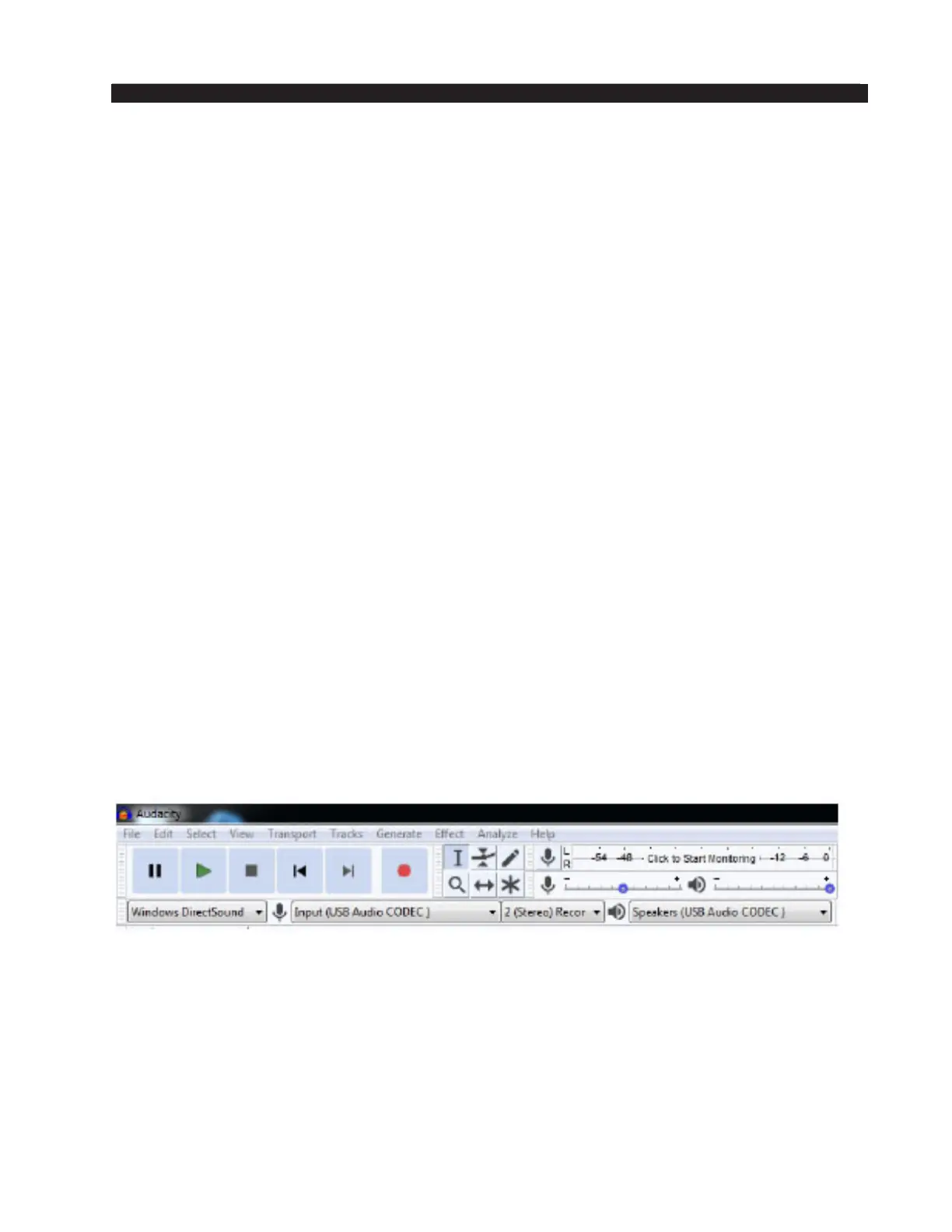
As an example, let’s look at Audacity. Audacity is a free, easy-to-use, multi-track audio
editor and recorder for Windows, Mac OS X, GNU/Linux and other operating systems. It
allows you to easily select audio inputs and outputs.
Select the USB Audio CODEC for input and output. You will be able to record audio
from the Lightning console and when you play it back, the audio will appear at the USB
OUT connector on the console.
Other Computers
If your computer does not use one of the above operating systems, or otherwise behaves
differently than described above, consult the documentation for that computer, operating
system, and/or application.



 To Next Page