AudioArts Lightning / June 2018
INSTALLATION AND POWER
page 1 – 6
Audio and Control Wiring
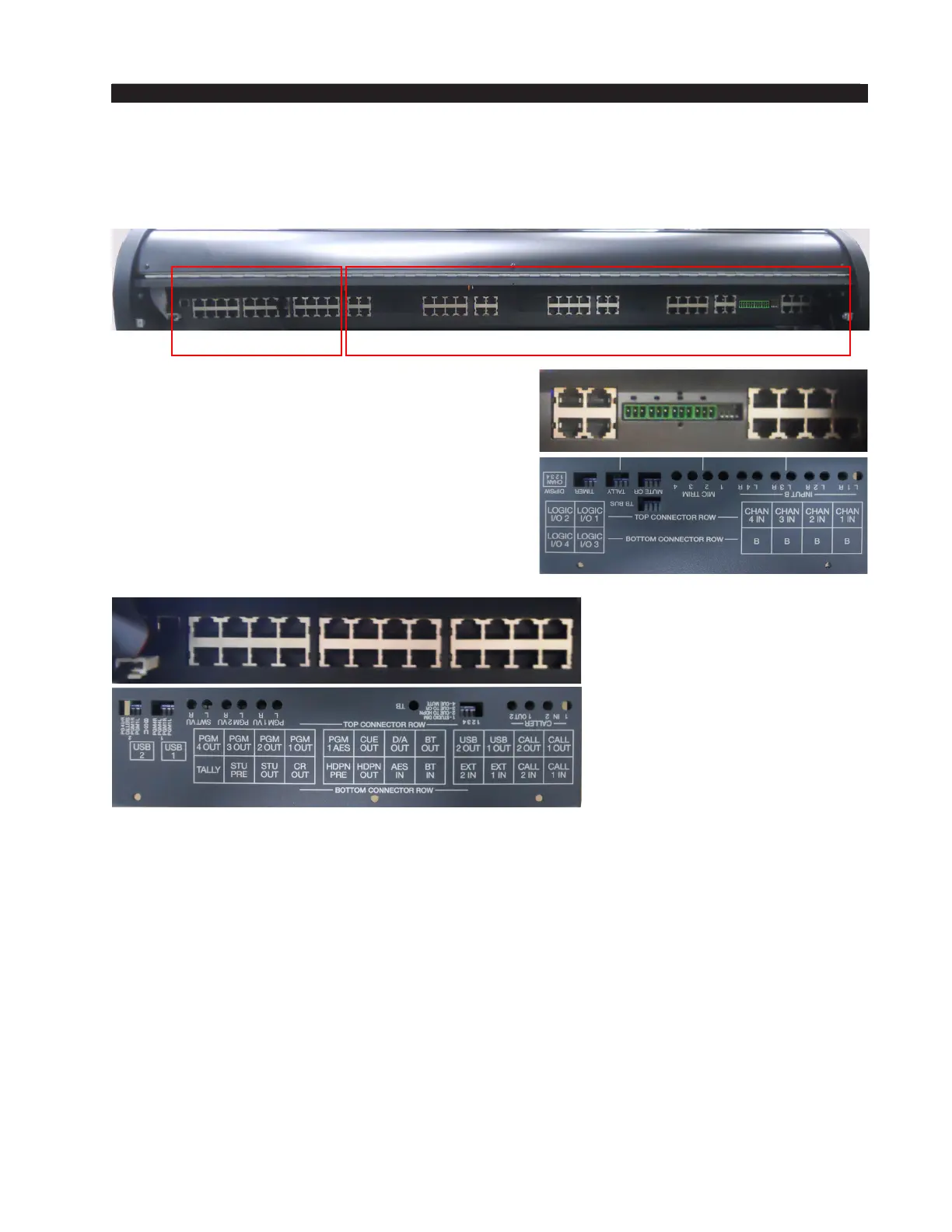
All audio I/O connections are made via RJ-45 and USB connectors on the rear panel
of the console and 3-position plug terminals on the Mic Preamp card.
Input panel’s eight RJ-45 are line level stereo
inputs for A and B channels.
A four mic preamp card is for mono mic level
signals via four 3-position plug terminals to feed
internal adjustable preamps that feed Input panel’s
A channel.
Four Logic I/O RJ-45 provide logic inputs and
outputs for Remote ON/OFF and External Start.
MASTER PANEL INPUT PANELS
These connectors are for Master panel:
Two RJ-45 CALL 1, 2 IN are mono line level inputs that are controlled by CALLER
faders.
Two RJ-45 CALL 1, 2 OUT are mono line level post fader summed trimmed outputs.
Two RJ-45 USB 1, 2 OUT are unbalanced line level stereo outputs.
Two RJ-45 EXT 1, 2 IN are balanced stereo line level inputs that feeds the monitor
circuits when EXT is selected.
BT IN/BT OUT RJ-45 is an unbalanced line level stereo input/output for Bluetooth
connectivity. Bluetooth output may be connected to any of the console’s line level inputs
using a RJ-45 straight cable.
Digital source plugs into the AES IN RJ-45, passes through built-in A/D converter,
and feeds an Input panel’s fader by patching the D/A OUT RJ-45 connector to any of the
inputs channel’s RJ-45 using a RJ-45 straight cable.
RJ-45 CUE OUT is a balanced mono line level CUE output.
RJ-45 PGM1 AES is digital Program1 output.



 To Next Page