AudioArts Lightning / June 2018
CONTROLS AND FUNCTIONS
page 2 – 8
Callers
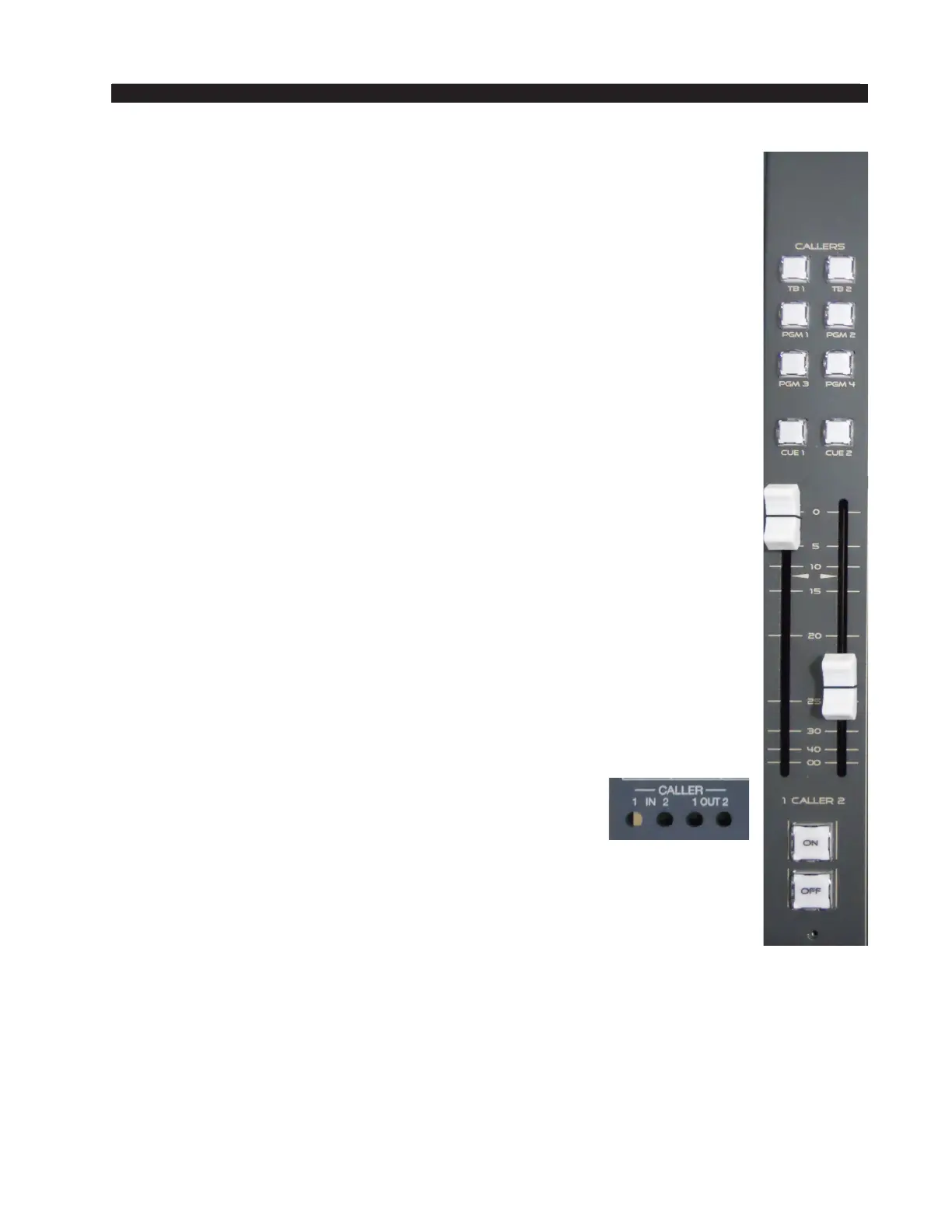
This section of the monitor panel contains the controls for two phone
hybrids or an IP phone system with analog connections. Phone systems have
two audio signals: a “From Network” signal which connects from the phone
system to the Caller1 and /or Caller 2 Inputs, and a “To Network” signal
which connects a mix-minus signal from the Caller 1 and/or Caller2 outputs
back to the phone system.
Each phone input (labeled CALLER 1 and CALLER 2) has independent
fader level control along with its own Cue (CUE1 and CUE2) and Talkback
(TB1 and TB2) buttons. The two Callers have common ON/OFF buttons
and PGM bus assignment buttons.
Only one PGM bus can be selected for the callers since the selection
both assigns the callers to the selected PGM bus and sends that PGM bus’
mix-minus audio back to both callers (the PGM bus mix-minus audio signal
is derived prior to the callers’ audio being summed into that PGM bus). Also,
the caller 1 audio is summed into caller 2’s output, and vice versa, so the
two callers can hear one another as well as the PGM bus mix-minus audio.
Because the two callers have a common ON/OFF control, both Caller 1
and Caller 2 will feed the assigned bus when the On button is lit. If you
have one caller live while answering a second call, the caller faders must be
used to control which caller is feeding the assigned PGM bus. For example,
if Caller 1 is live then the Caller 2 fader must be fully down (set to ∞). The
Cue 2 button would be lit so the board operator can hear the second caller.
To talk to the caller, the board operator would press/hold the TB 2 button. To
talk to the caller that’s on-air the board operator would press the TB1 button.
NOTE: On each fader channel, setup switch1 assigns one channel to feed
the talkback bus. Typically, only the board operator mic channel is set for
talkback. The talkback audio is derived pre-fader and pre-switch.
Four recessed trim pots (located below the hinged meter
bridge) adjust the incoming audio levels for Caller1 and
Caller2 and adjust the outgoing levels of the mix-minus
audio going to the Caller1 and Caller 2 outputs.
Taking a Caller Live to Air
If Caller 1 will go live to Air, the Callers channel is assigned to the bus
feeding air (typically PGM 1). Turn on Cue 1 so that the caller feeds cue. The
Caller 1 fader is potted up and the Caller 2 fader is potted full off. To talk to
the caller, the board operator press/holds the TB 1 button while talking. When
the TB1 button is not pressed the caller hears PGM 1.
To add the caller to the PGM 1 mix, turn On the Callers channel and adjust
the Caller 1 fader as necessary. If the board operator needs to talk to the caller
they would again use the TB 1 button to talk.
NOTE: Pressing TB1 cuts off the PGM mix-minus audio to the caller and
only talkback is heard.



 To Next Page