AudioArts Lightning / June 2018
CONTROLS AND FUNCTIONS
page 2 – 16
source of feedback. For this reason the console provides muting to the control room output
and, optionally, the built-in cue speaker, whenever a mic programmed for control room
mute is turned ON.
Turning on the CUE MUTE dipswitch will mute cue whenever the CR output is muted
by an input channelset to activate the CR mute.
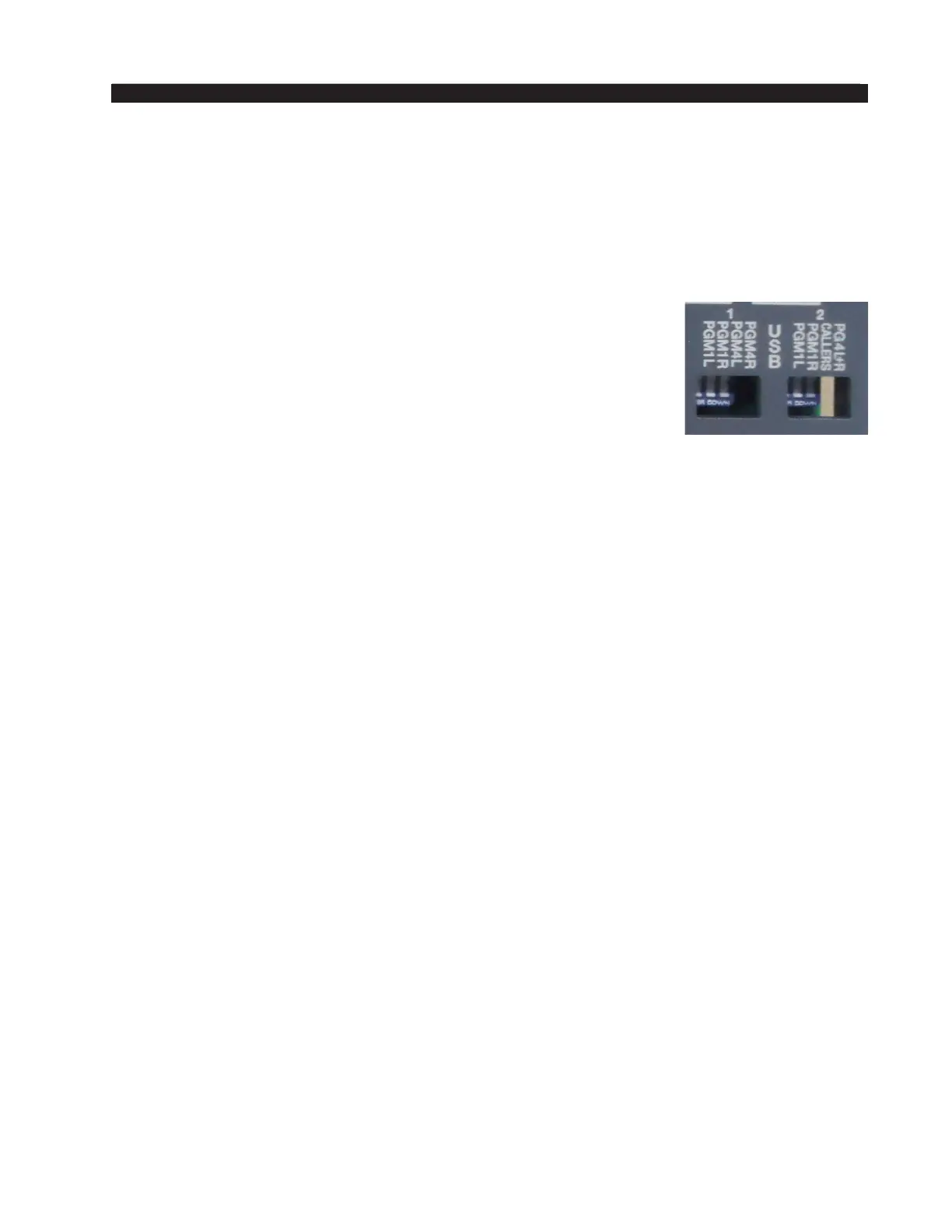
USB Source Selection
Two dipswitches are used to determine sources to feed the USB
links. Positions 1 and 2 should be on to feed USB1 and USB 2 with
PGM 1, while positions 3 and 4 should be on to feed USB1 with
PGM 4 and to feed USB2 with sum of callers and sum of L+R PGM4,
respectively.
If PGM 1 is to be used, the PGM4 positions should be off, and if
PGM 4 is to be used, the PGM1 positions should be off. DO NOT
activate both PGM1 and PGM 4 simultaneously!
Dipswitch USB 1:
pos.1 selects PGM1 LT
pos.2 selects PGM1 RT
pos.3 selects PGM4LT
pos.4 selects PGM4RT.
Dipswitch USB 2:
pos.1 selects PGM1 LT
pos.2 selects PGM1 RT
pos.3 selects SUM OF CALLERS
pos.4 selects SUM OF PGM4 LT & PGM4 RT.



 To Next Page