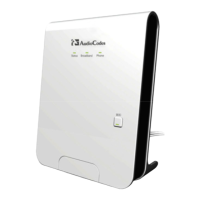
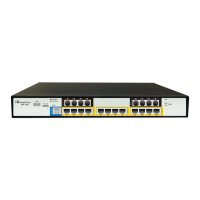
The AudioCodes MediaPack™ 5xx Analog Voice Gateway Series is a line of devices designed for basic configuration of MP-5xx Analog VoIP Gateways, as detailed in the "Basic Configuration of MP-5xx Analog VoIP Gateways Version 7.2" guide. These devices serve as analog voice gateways, facilitating the connection of analog telephony equipment to a Voice over IP (VoIP) network.
Function Description:
The primary function of the MediaPack 5xx series is to act as a bridge between traditional analog telephone lines (FXS ports) and a SIP-based VoIP network. This allows analog phones, fax machines, or PBXs to communicate over an IP network, leveraging the cost-effectiveness and flexibility of VoIP. The gateway supports routing calls using a SIP proxy server, enabling seamless integration into existing VoIP infrastructures. It can be configured to handle both incoming and outgoing calls, translating analog signals into digital packets for IP transmission and vice versa. The device is designed for typical deployment scenarios, offering a recommended configuration that can be adapted to specific network topologies.
Important Technical Specifications:
While the document doesn't provide an exhaustive list of hardware specifications, it highlights key interfaces and networking parameters:
- Interfaces:
- S0/WAN (Gigabit Ethernet 0/0): This is the main interface for connecting the device to the voice network (WAN). It supports both static IP addressing and DHCP client mode.
- S1/GE LAN: A Gigabit Ethernet LAN port, primarily used for initial device access and local network connectivity.
- S2/FXS and S3/FXS: These are the analog FXS ports, which connect to analog telephones or fax machines. The specific number of FXS ports (e.g., 4 or 8) is indicated by the model number (e.g., MP-504, MP-508).
- CONSOLE: A console port for command-line interface (CLI) access.
- POWER: A 12V 3A power input.
- Default LAN IP Address: 192.168.0.1
- Prefix Length (Subnet Mask): 24 (255.255.255.0)
- Default Gateway: 0.0.0.0
- VLAN ID: 1
- DHCP Server: The device includes an embedded DHCP server enabled by default for the LAN interface, allocating IP addresses to connected computers.
- SIP Proxy Support: The device is configured to operate using a SIP proxy server for call routing.
- Authentication: Supports authentication for FXS endpoints using usernames and passwords.
- Registration: Enables registration with a SIP registrar, with configurable registration time, retry time, and backoff time.
- Keep-Alive: Features proxy keep-alive mechanisms to maintain connectivity with the SIP proxy server, including configurable keep-alive time, failure responses, success detection retries, and interval.
- Redundancy: Supports redundancy modes for proxy sets, including proxy hot swap and load balancing methods.
- DNS: Configurable DNS settings (static or auto) for resolving hostnames.
Usage Features:
The MediaPack 5xx series offers a user-friendly web-based management interface for configuration and monitoring.
- Initial Connectivity:
- Access to the device's management interface is typically achieved by connecting a computer directly to the S1/GE LAN port using a straight-through Ethernet cable.
- The device's default LAN IP address (192.168.0.1) is used to access the web interface.
- Default login credentials are "Admin" for both username and password.
- WAN Interface Configuration:
- The WAN interface (GigabitEthernet 0/0) can be configured for either static IP addressing or DHCP client mode.
- DNS settings for the WAN interface can be set to static or auto.
- Remote Management:
- Web-based management (HTTP/S) can be enabled from the WAN interface, allowing remote access for configuration and troubleshooting.
- Voice Configuration with Proxy Server:
- Proxy Server Address Configuration: SIP proxy server addresses (IP address or hostname) are configured through "Proxy Sets," supporting multiple proxy addresses and redundancy.
- FXS Port Configuration (Trunk Groups): Individual FXS ports are enabled and grouped into "Trunk Groups" to manage analog endpoints.
- Trunk Group Settings: Various settings for FXS endpoints within a trunk group can be configured, including channel select mode and registration mode.
- FXS Authentication: Authentication (username and password) can be configured for FXS endpoints, enhancing security.
- Proxy and Registration Settings: Parameters related to SIP registration and proxy usage are configurable, such as enabling default proxy, registration, and various keep-alive settings.
- IP-to-Tel Routing: Call routing rules from the IP network to analog telephony (FXS ports) can be configured, allowing for flexible call handling.
- Documentation: Comprehensive documentation, including a Hardware Installation Manual, User's Manual, and CLI Reference Guide, is provided to assist with setup and operation.
Maintenance Features:
The device incorporates several features to ensure reliable operation and ease of maintenance.
- Web-based Management: The intuitive web interface simplifies configuration changes, monitoring, and troubleshooting.
- Command Line Interface (CLI): A console port provides CLI access for advanced configuration and diagnostics, which can be particularly useful for network administrators.
- Firmware Updates: While not explicitly detailed in the provided snippets, AudioCodes devices typically support firmware updates to introduce new features, improve performance, and address security vulnerabilities.
- Logging and Monitoring: The device likely offers logging capabilities to record events and system status, aiding in problem diagnosis. The "State Time" parameter for interfaces suggests monitoring of interface status.
- Redundancy Mechanisms: Support for proxy redundancy modes (e.g., hot swap, load balancing) helps ensure continuous voice service even if a primary proxy server fails.
- Keep-Alive Mechanisms: Proxy keep-alive and success/failure detection retries contribute to maintaining stable connections with SIP proxy servers, automatically attempting to re-establish communication if issues arise.
- Documentation and Support: AudioCodes provides customer technical support and services, along with regularly updated documentation, to assist users with any issues or questions. A documentation feedback mechanism is also available for users to report errors or suggest improvements.
- WEEE EU Directive Compliance: The device adheres to the WEEE EU Directive, indicating a commitment to environmental responsibility and providing guidelines for proper disposal.

 Need help?
 General







 To Next Page