2. Getting Started with Initial Connectivity
MP-5xx Analog VoIP Gateway
- 6 -
3.
In the 'Username' and 'Password' fields, enter the case-sensitive, default login username
(
Admin
) and password (
Admin
).
4.
Click
Log In
.
2.2 Configuring WAN Interface for Voice Gateway
This section describes how to configure the device's WAN interface using Gigabit Ethernet
(
GigabitEthernet
0/0), which is the main interface for connecting the device to the voice
network.
Before configuring the WAN interface, make sure that you have all the required
information from your Internet Telephony Service Provider (ITSP).
To configure a WAN IP address:
1.
Connect the WAN port to the WAN network. For information on cabling the WAN port,
refer to the Hardware Installation Manual.
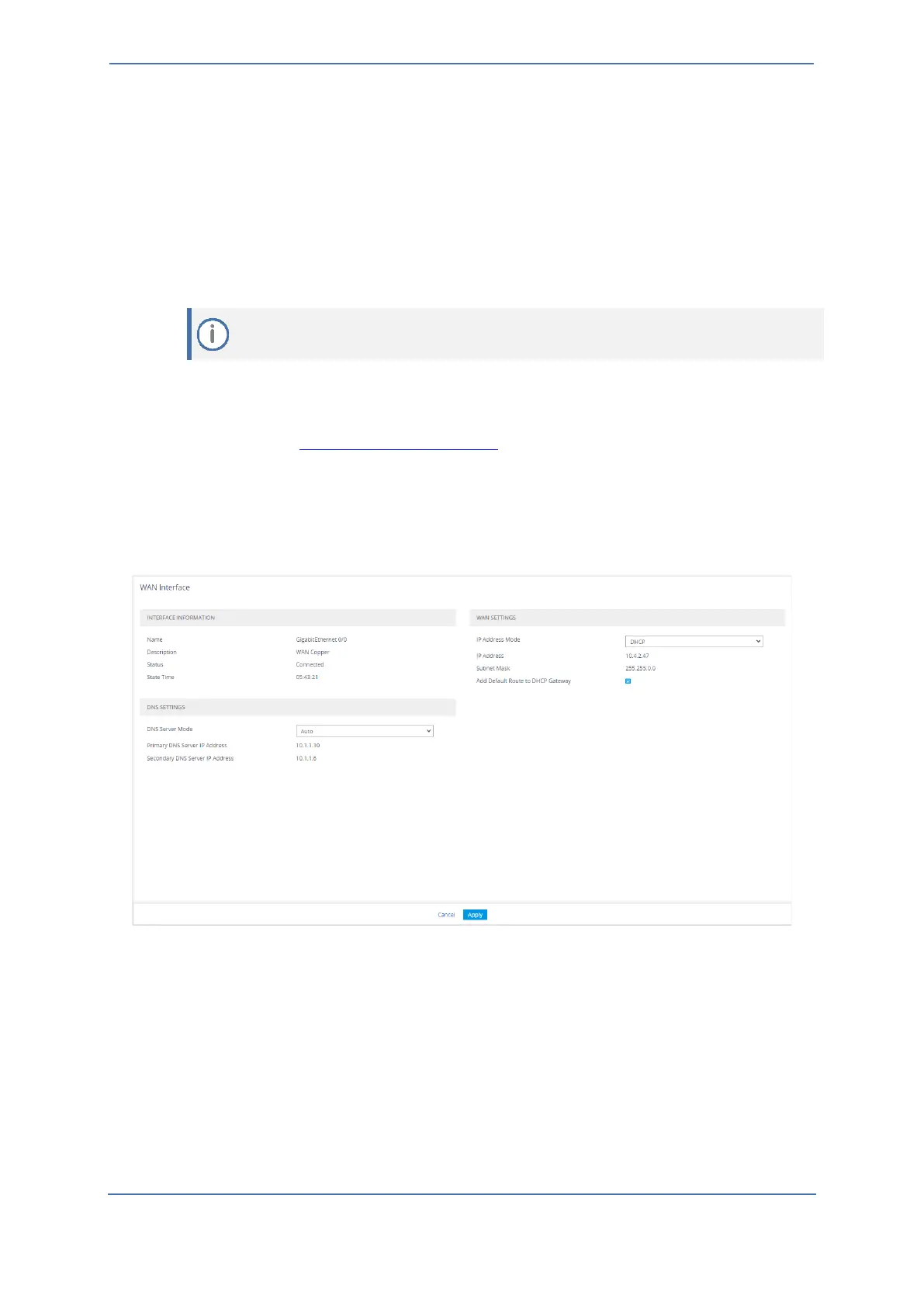
2. Open the WAN Interface page (Setup menu > Ip Network tab > Core Entities folder > WAN
Interface).
3.
On this page, you can configure:
•
WAN (static or DHCP client -
Default WAN interface is DHCP Client
)
•
DNS (static or Auto -
Default DNS settings is Auto
)









 To Next Page