EasyManua.ls Logo

AudioCodes MP-524 - Connecting to the LAN Network

AudioCodes MP-524
33 pages
Print Icon
To Next Page IconTo Next Page
To Previous Page IconTo Previous Page
Loading...
MP-524 & MP-532
- 17 -
5.2 Connecting LAN Interface
The device provides a single Gigabit Ethernet (100/1000Base-T) port for connecting to the IP network
(e.g., LAN).
Cabling specifications:
Cable: Straight-through, Category (Cat) 5/5e/6 cable
Connector: Standard RJ-45
Connector Pinouts:
Table 9: RJ-45 Connector Pinouts for Ethernet Port
Pin
Signal Name
1
Ethernet signal pair
2
3
Ethernet signal pair
6
4
Ethernet signal pair
5
7
Ethernet signal pair
8
Shield
Chassis ground
To connect to LAN interface:
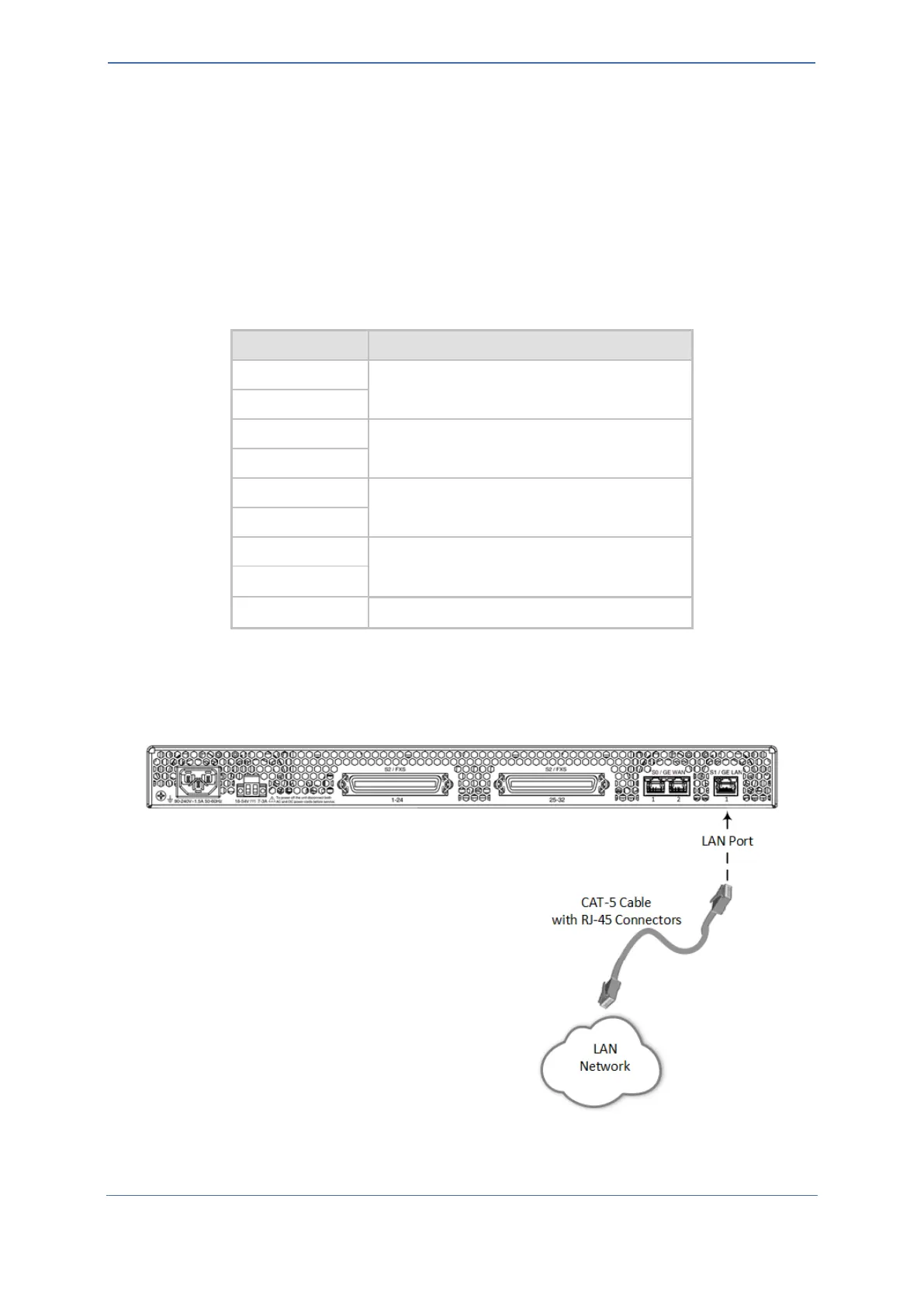
1. Connect the RJ-45 connector at one end of the straight-through Ethernet cable to the
Ethernet port labeled S1 / GE LAN, located on the rear panel:
Figure 11: Connecting to LAN Interface
2. Connect the other end of the Ethernet cable to your LAN network.

Related product manuals