46
EN
Battery replacement for the remote control
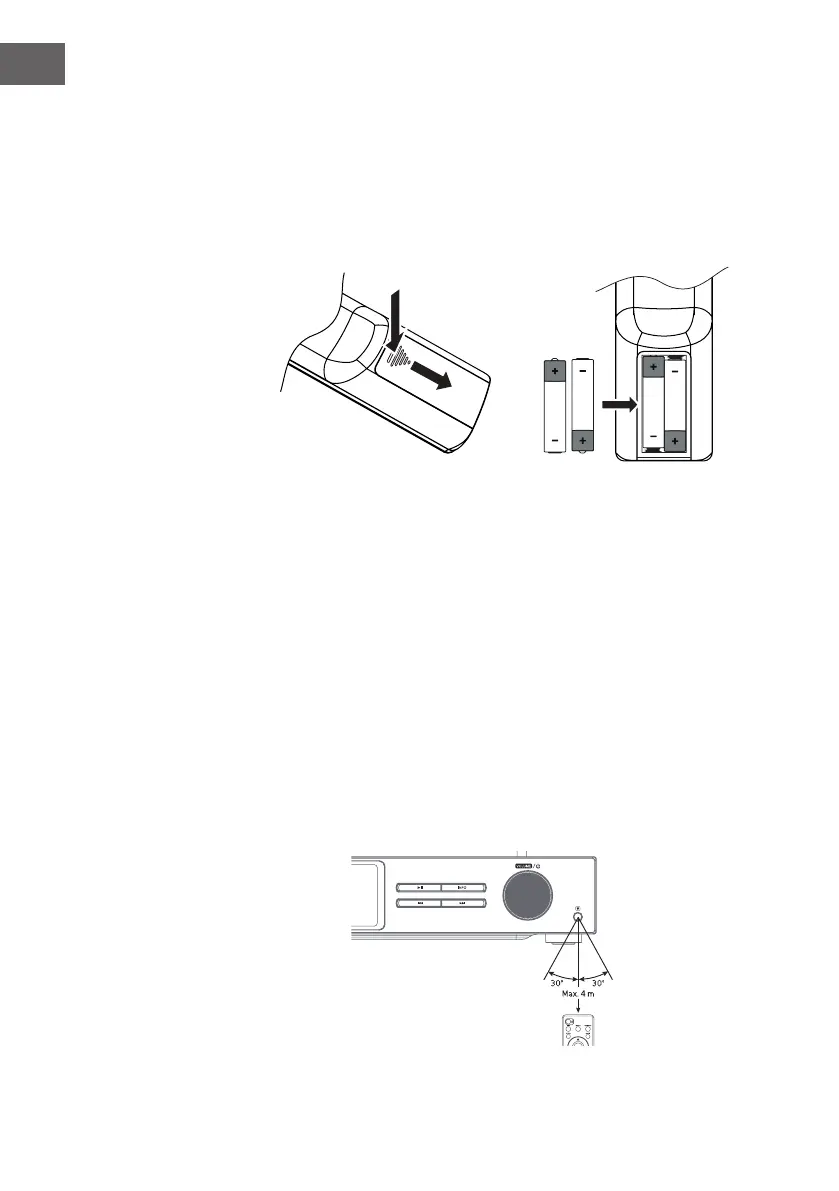
1. Press down the battery cover at the arrow and push the battery cover
outwards in the direction of the arrow.
2. Insert 2 x AAA 1.5V batteries (not included). Make sure to match the (+)
and ( - ) ends of the battery with the (+) and ( - ) ends indicated in the
battery compartment.
3. Close the cover.
Handling the Battery
• Improper or incorrect use of batteries may cause corrosion or battery
leakage, which could cause re, personal injury or damage to property.
• Only use the battery type indicated in this manual.
• Do not dispose of the used battery as domestic waste. Dispose of it in
accordance with local regulations.
• Remove the battery from the remote control when not in use for a long
period of time, as corrosion or battery leakage may occur and result in
physical injury, and/or property damage, and/or re.
Remote control operation range
The remote control sensor on the front unit is sensitive to the remote
control’s commands up to a maximum of 4 metres away and within a
maximum of 60° arc.
Note that the operating distance may vary depending on the brightness of
the room.



 To Next Page