DVDConnections
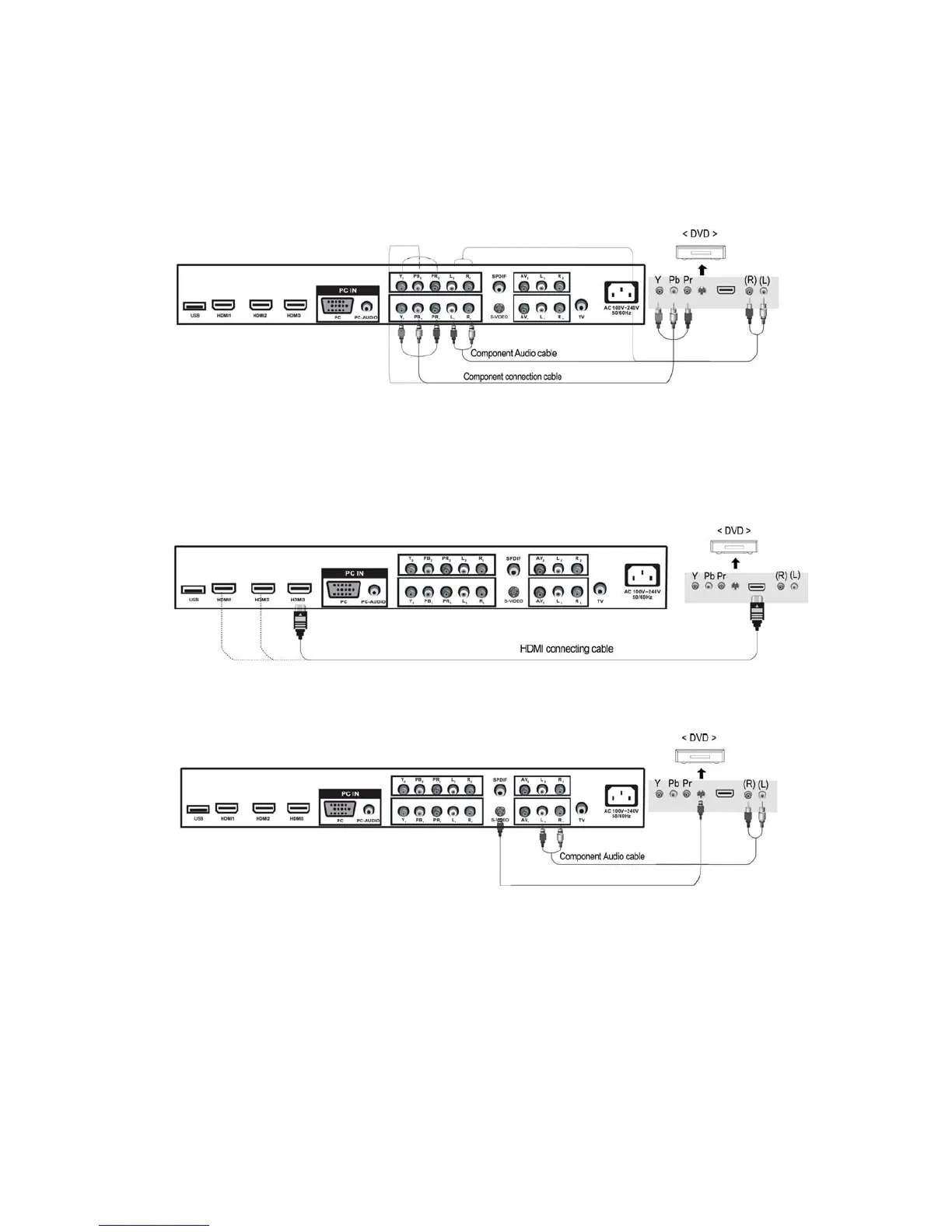
yConnectingtotheComponentterminal
Connectionterminalsofotherequipmentsdifferbymanufacturerandmodel.
1. ConnectLCDTV’sY, Pb,PrterminaltoDVD’ sVideoOutterminalusingtheexternalcable.
2. ConnectLCDTV’sAudioterminals(left&right)inAV1toDVD’ sAudioOutterminalusingthe
Audiocable.
3. ItmustmatchthecomponentconnectioncableY, Pb,PrbetweentheLCDTVandDVDPlayer.
yConnectingtotheHDMIterminal
ConnectingfromHDMIterminaltoHDMIterminal.
yConnectingtotheS‐VIDEOterminal
ConnectingfromHDMIterminaltoS‐VIDEOterminal.
PlayingtheDVD
1. TurnontheLCDTVandpressSOURCEbuttonontheremotecontrol.
2. Use▲/▼ buttonstomoveto“YPbPr”.
)IfHDMIhasbeenconnected,select“HDMI”.
3. TurnontheDVD,inserttheDVDdiscandpressPlaybutton.
10


 To Next Page