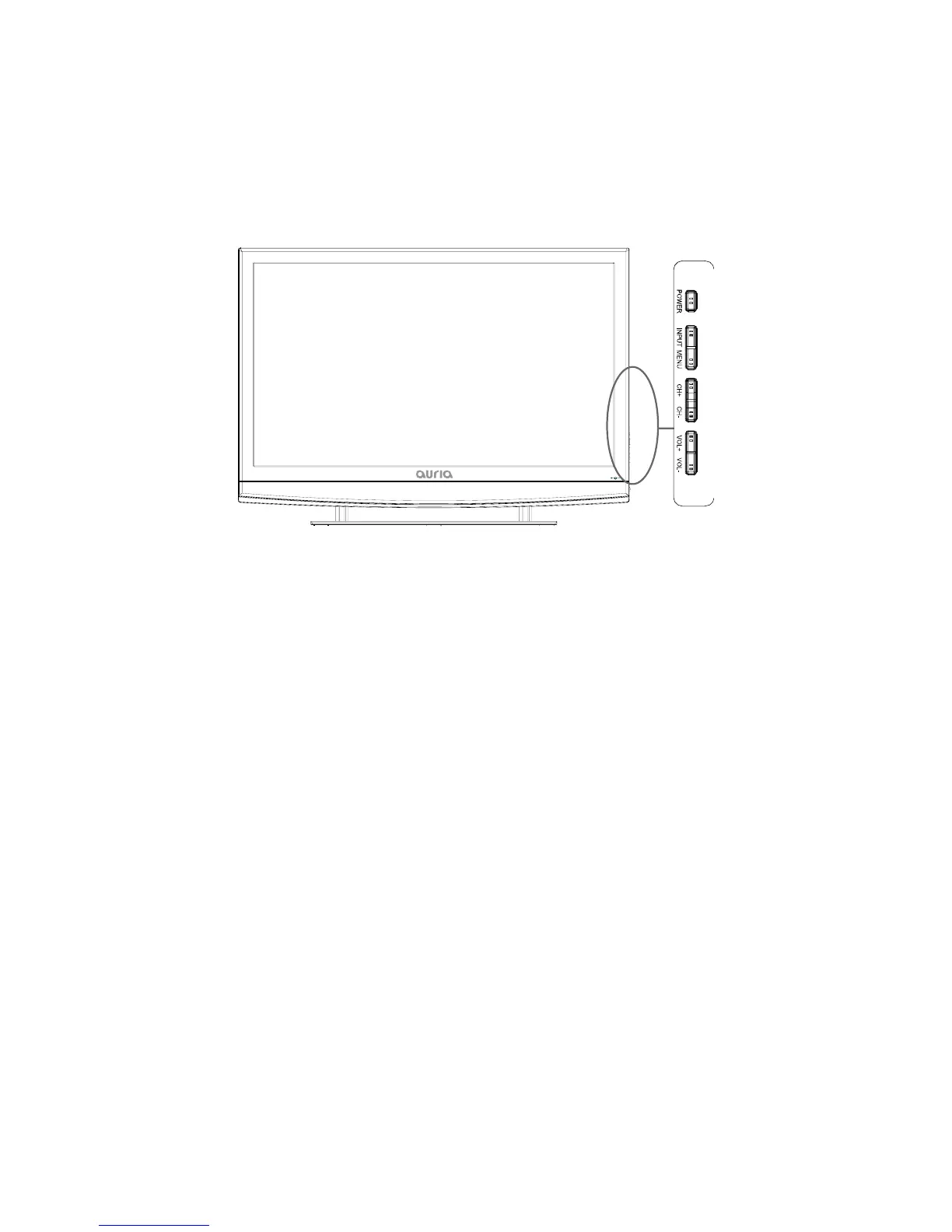
ViewingtheControlPanel
Theproductcolorandshapemayvarydependingonthemodel.
Youcanuseabuttonbypressingthesidepanelbuttons.
1. POWER:PresstoturntheTVonandoff.
2. INPUT: Toggl es between all the available input sources. In the on‐screen menu, use this
buttonasyouusetheENTERbuttonontheremotecontrol.
3. MENU:Presstoseeanon‐screenmenuofyourTV’sfeatures.
4. CH+/‐:Presstochangechannels.Intheon‐screenmenu,usetheCH+/‐buttonsasyouwould
usethe▲/▼buttonsontheremotecontrol.
5. VOL+/‐: Press to increase or decrease the volume. In the on‐screen menu, use the VOL+/‐
buttonsasyouwouldusethe◄/►buttonsontheremotecontrol.
5


 To Next Page