PCMode
SettingupyourPCsoftware(basedonWindowsXP)
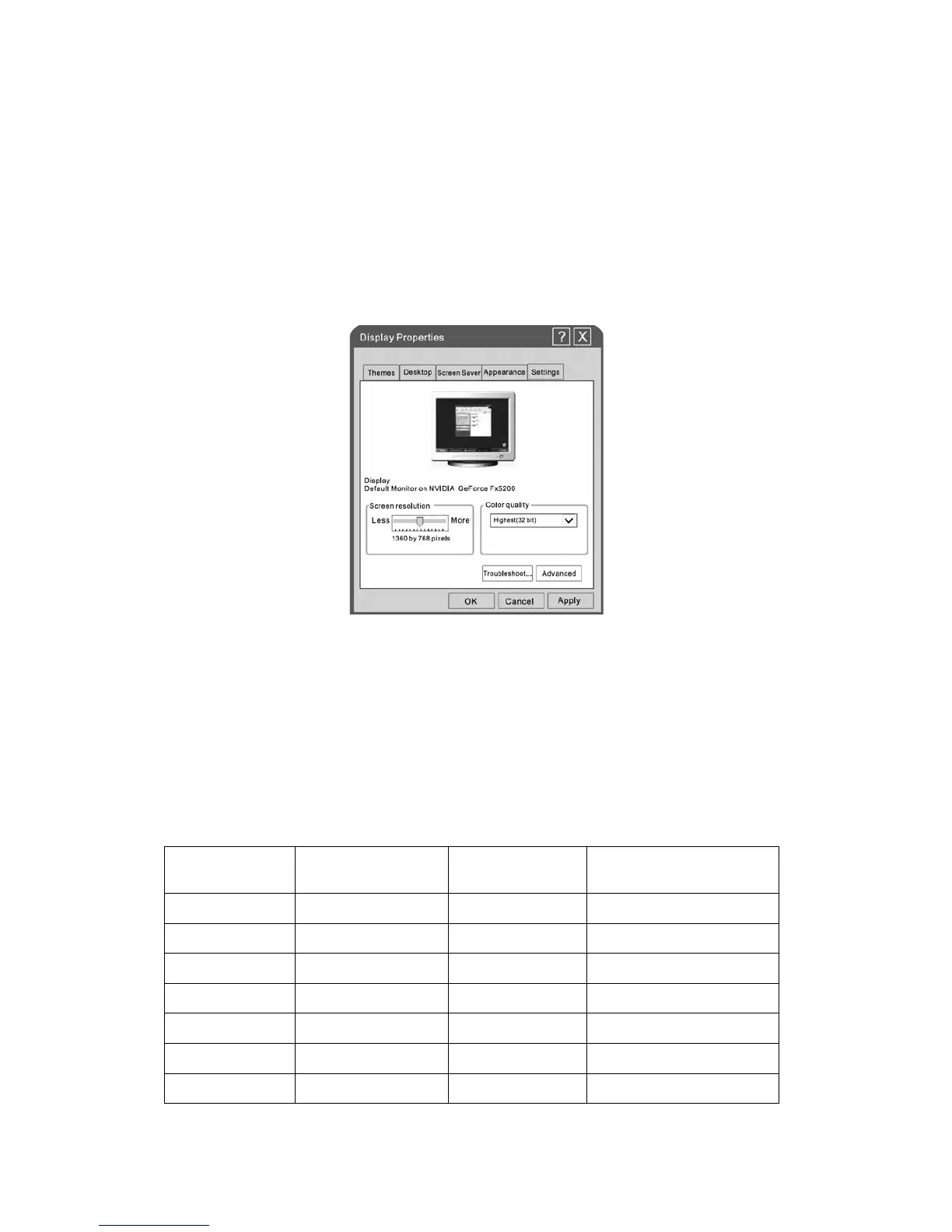
TheWindowsdisplay‐settingsforatypicalcomputerareshownbelow.Butthe actualscreenon
yourPCwillprobablybedifferent,dependinguponyourparticularversionofWindowsandyour
particular video card. But even if your actual screen looks different, the same, basic set‐up
informationwillapplyinalmostallcases.
1. First,clickon“ControlPanel”ontheWindowsstartmenu.
2. When the control panel window appears, click on “Appearance and Themes” and a display
dialog‐boxwillappear.
3. When the control panel window appears, click on “Display” and a display dialog‐box will
appear.
4. Navigatetothe “Setting” tabon the display dialog‐box. The correct sizesetting (resolution)
Optimum:1360×768.
Ifavertical‐frequencyoptionexistsonyourdisplaysettingsdialogbox,thecorrectvalueis“60Hz”.
Otherwise,justclick“Enter”andexitthedialogbox.
Resolution
Horizontal
Frequency(KHz)
Vertical
Frequency(Hz)
StandardMode
720x400 31.47 70 DOS
640x480 37.9 72 VGA
800x600 37.9 60 SVGA
1024x768 48.4 60 XVGA
1280x1024 64 60 SXVGA
1360x768 47.7 60 WXVGA+
1920x1080 67.5 60 WSXGA+
27


 To Next Page