CustomizingtheCHANNELSettings
SelectTVsourceforexample.(PressSOUCEbuttontoselectTVmode)
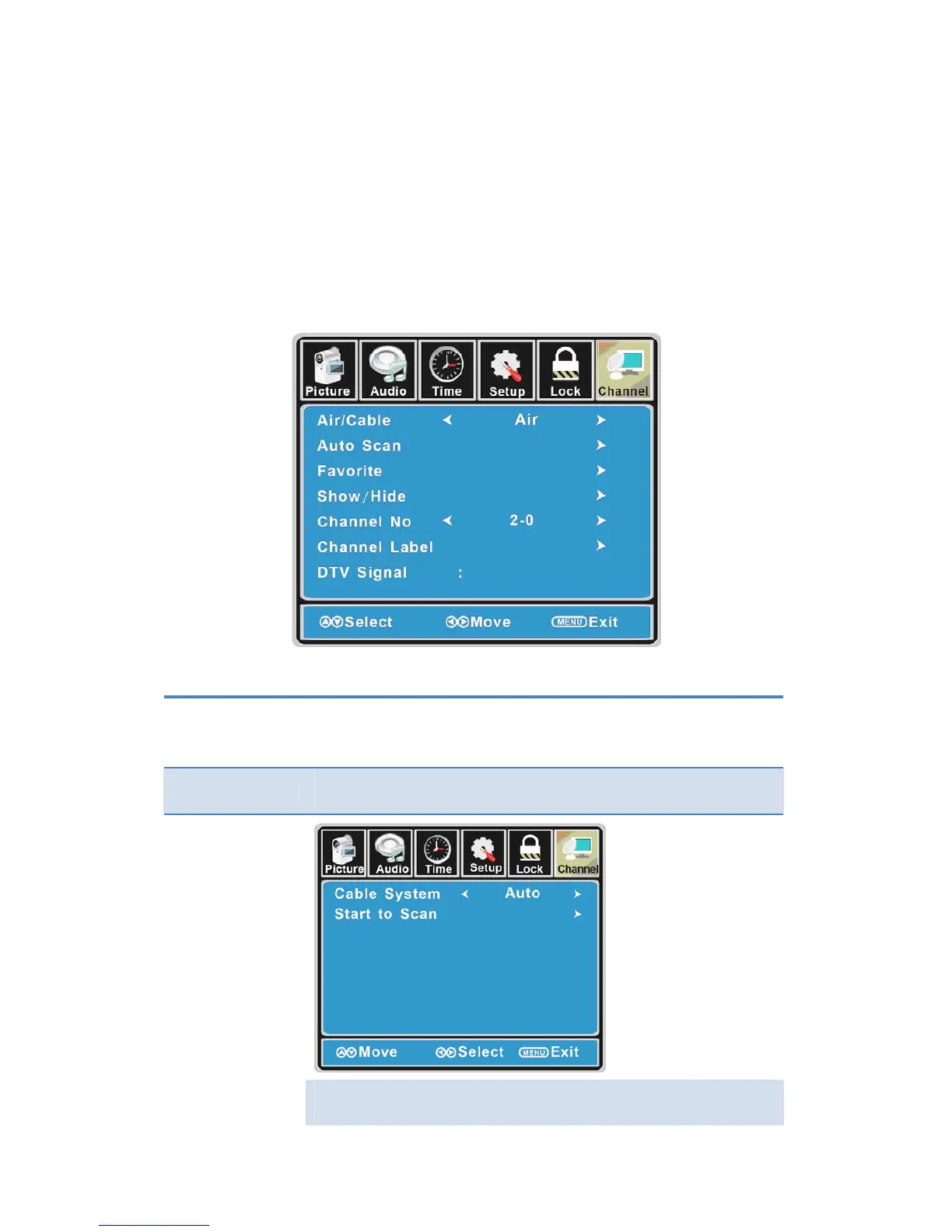
1. PressthePO WERbuttontoturntheLCDTVon.
2. PresstheMENUbuttonontheremotecontroltodisplaytheMainmenu,andusethe◄/►
buttonstoselecttheCHANNEL.
3. Use the ▲/▼ buttonsto highlight an individual CHANNEL option, usethe ◄/► buttons to
changethesetting,andpresstheMENUbuttontoexit.
TheCHANNELmenuincludesthefollowingoptions:
Air/Cable
AllowsyoutoselectantennabetweenAirandCable.
If you select “Cable”, the following items (Favorite, Show/Hide, Channel
NO.,ChannelLabelandDTVSignal)areunabletouse.
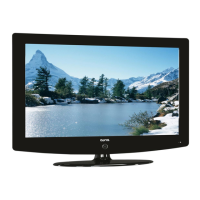
AutoScan
Usethe▼ buttontohighlightthe“AutoScan”item,thenpress►button
toenterintothefollowingmenu.
If you select “Air ” as input signal in Antenna item, you can press the ►
buttontosearchthechannelsautomatically.
24


 To Next Page