RemoteControl
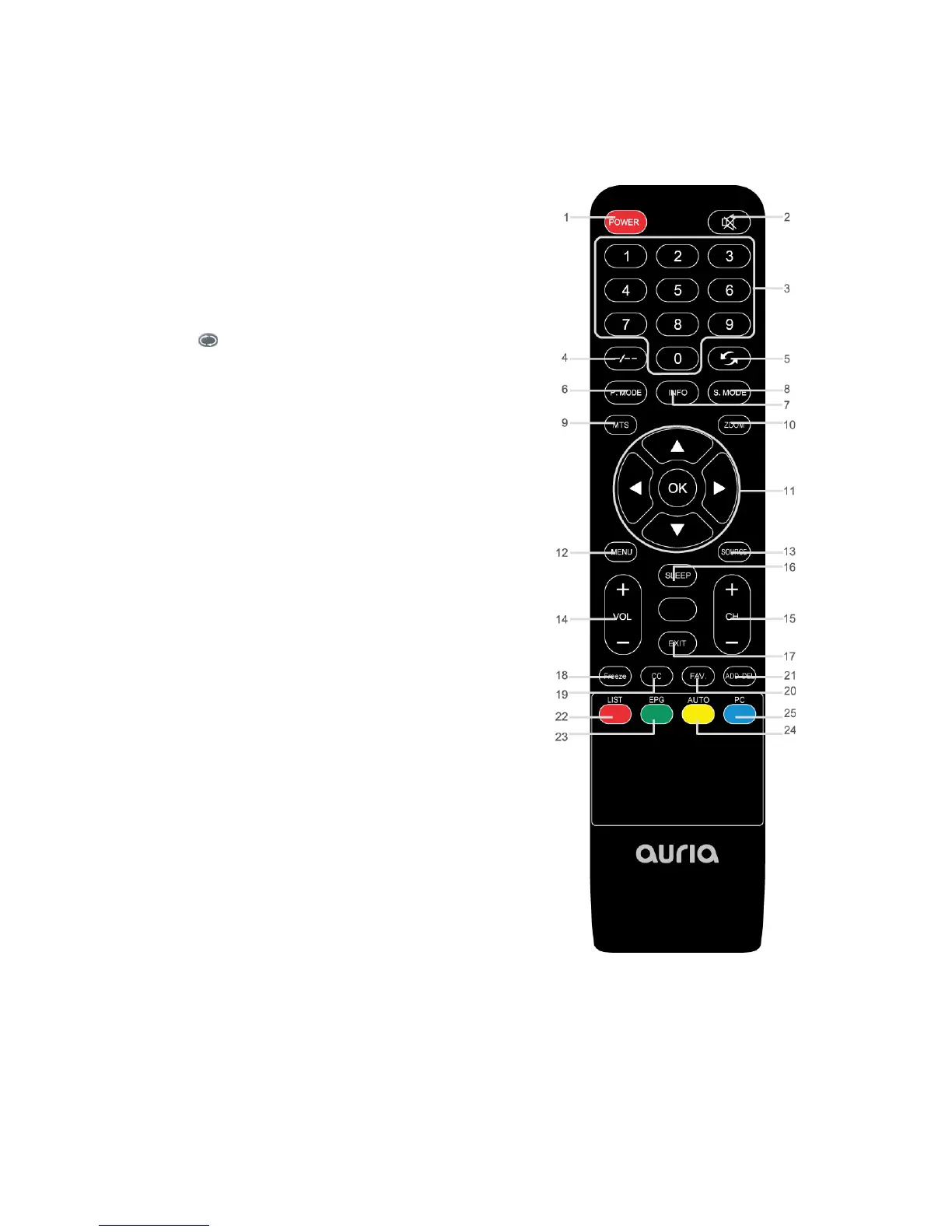
1. POWER:TurnstheTVonandoff.
2. MUTE:Presstotempor arilycutoffthesound.
3. NEMERIC BUTTONS: Press to change the channel, or
inputpasswordnumber.
4. ‐/‐‐: Press to select additional channels (digital) being
broadcast by the same station. For example, to select
channel‘5‐3’,press‘5’,thenpress‐/‐‐and‘3.’
5.
: Press to switch between the current and the
previouschannel.
6. P. M O D E : Presstoselectthepicturemode.
7. INFO:PresstodisplayinformationtotheTVscreen.
8. S.MODE:Presstoselectthesoundmode.
9. MTS:Pressto choose stereo, mono or Separate Audio
Program(SAPbroadcast).
10. ZOOM: Press to cycle through the different zoom of
themainpicture.
11. ▲/▼/◄/►/ENTER: Use to select on‐screen menu
itemsandchangemenuvalues.
12. MENU:Presstodisplaythemainon‐screenmenu.
13. SOURCE:Presstodisplayandselecttheavailablevideo
sources.
14. VOL+/‐:Presstoincreaseordecreasethevolume.
15. CH+/‐:Presstochangechannels.
16. SLEEP:PresstosetuptheTVautoturnofftime.
17. EXIT:Presstoexitthemenu.
18. FREEZE: Press to freeze picture. It’s not available on
DTVmode.
19. CC:Presstocontrolthecaptiondecoder.
20. FAV: Press to display Favorite Channel Lists on the
screen.
21. ADD/DEL: Press to add/remove the highlighted
channelasfavorite.
22. LIST:PresstodisplayChannelListsonthescreen.
23. EPG: Press to show the Electronic Program Guide
menu.
24. AUTO:AutoadjustthepictureinPCmode.
25. PC:PresstoselectthePCmodedirectly.
Universal Remote Codes: 11423, 10017,11265, 10178, 10856,11178..Please also refer to LG
codes.
6


 To Next Page