CustomizingtheLOCKSettings
SelectTVsourceforexample.(PressSOURCEbuttontoselectTVmode)
1. PressthePO WERbuttontoturntheLCDTVon.
2. PresstheMENUbuttonontheremotecontroltodisplaytheMainmenu,andusethe◄/►
buttonstoselecttheLOCK.
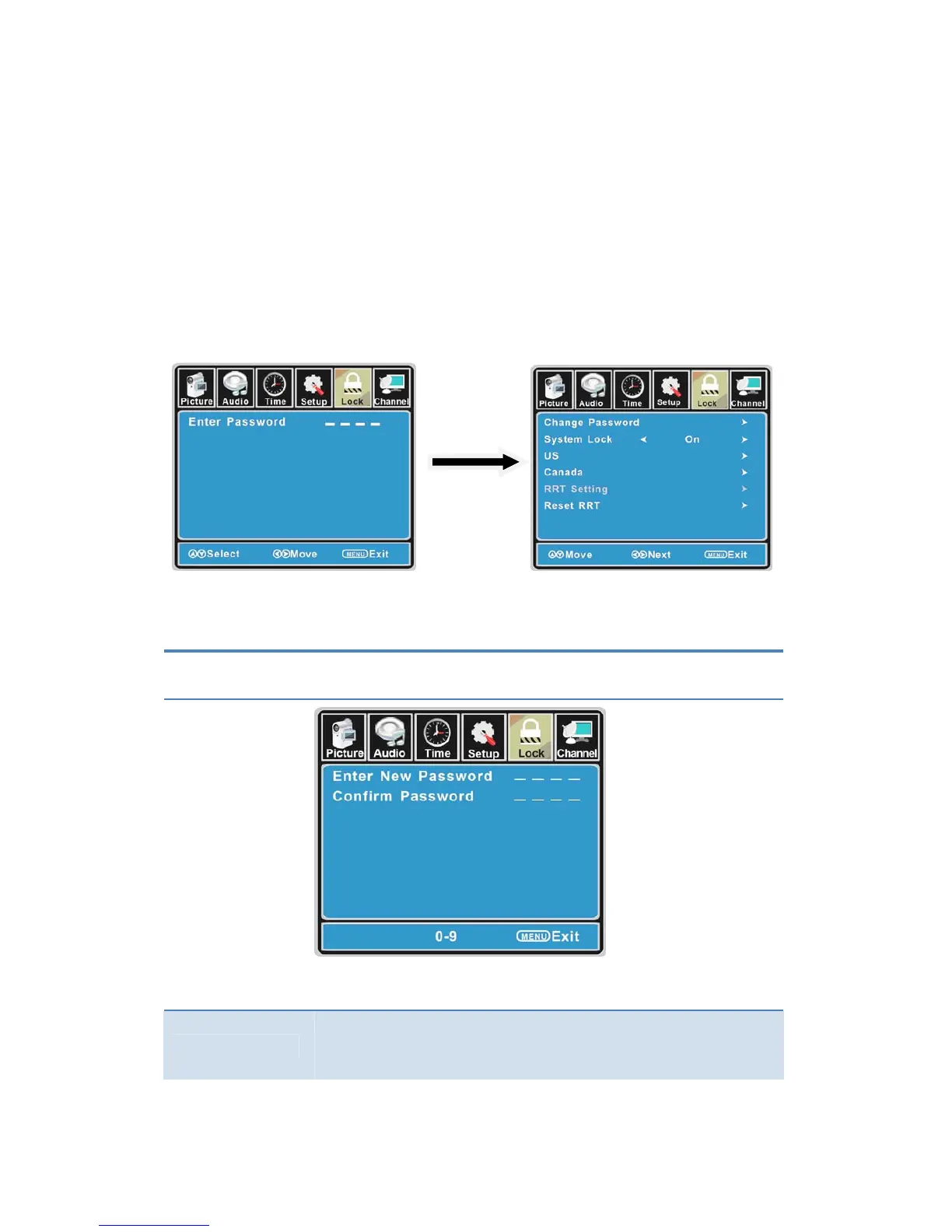
3. Usethe▼ buttontohighlight“EnterPassword”item,usethenumerickeystoinput4‐digital
password.Afteryouthat,thescreenwilldisplaythejuniormenu.Aftersettings,pressmenu
buttontoexit.
NOTE:Thefactorypasswordis0000.Thesupervisionpasswordis9999.
4‐di
assword
Input
TheLOCKmenuincludesthefollowingoptions:
ChangePassword
Use the ▼ button to select the “ChangePassword”item,thenpressthe
►buttontoenterintothefollowingmenu.
Inputthenew4‐digitalpasswordandinputitagaintoconfirm.
SystemLock
Allowyoutoturnonoroffthesystemlock.
Ifyouturnoffthesystemlock,thenthefollowingitems(US,Canada,RRT
SettingandResetRRT)willunabletouse.
21



 To Next Page