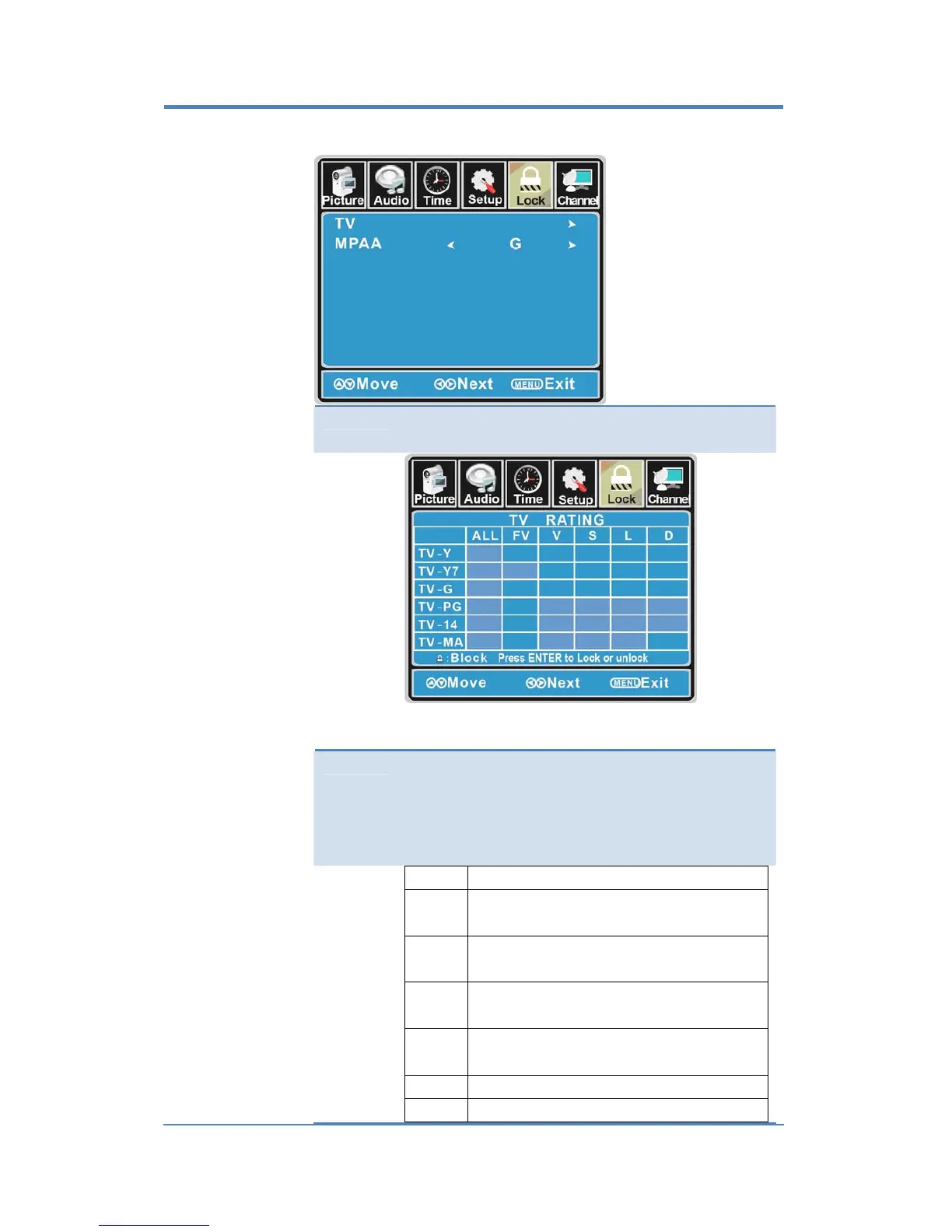
US
Usethe▼ buttontohighlightthe“US”item,thenpressthe►buttonto
enterintothefollowingmenu.
TV Use the ▼ button tohighlight the “TV” item, then press
►buttontoenterintothefollowingmenu.
Use the ▲/▼ buttons to select the desired rating and
pressthe►buttontoblockorunblockrating.
MPAA TheMovierating(MPAA)isusedfororiginalmoviesrated
bytheMotionPictureAssociation(MPAA)asbroadcasted
oncableTVandnoteditedfortelevision.
Use the ▲/▼ buttons to select N/A, G, PG, PG‐13, R,
NC‐17orX.
RATING DESCRIPTION
G
GeneralAudiences.Movieisappropriatefor
allages.
PG
ParentalGuidanceSuggested.Maycontain
materialnotsuitedforyoungerviewers
PG‐13
Containscontentthatmaynotbe
appropriateforviewersundertheageof13.
R
Restricted.Containsadultcontent,noone
under17admittedwithoutparent.
NC‐17 Noone17andunderadmitted.
X Adultsonly.
22


 To Next Page