CustomizingthePICTURESettings
SelectTVsourceforexample.(PressSOURCEbuttontoselectTVmode)
1. PressthePO WERbuttontoturntheLCDTVon.
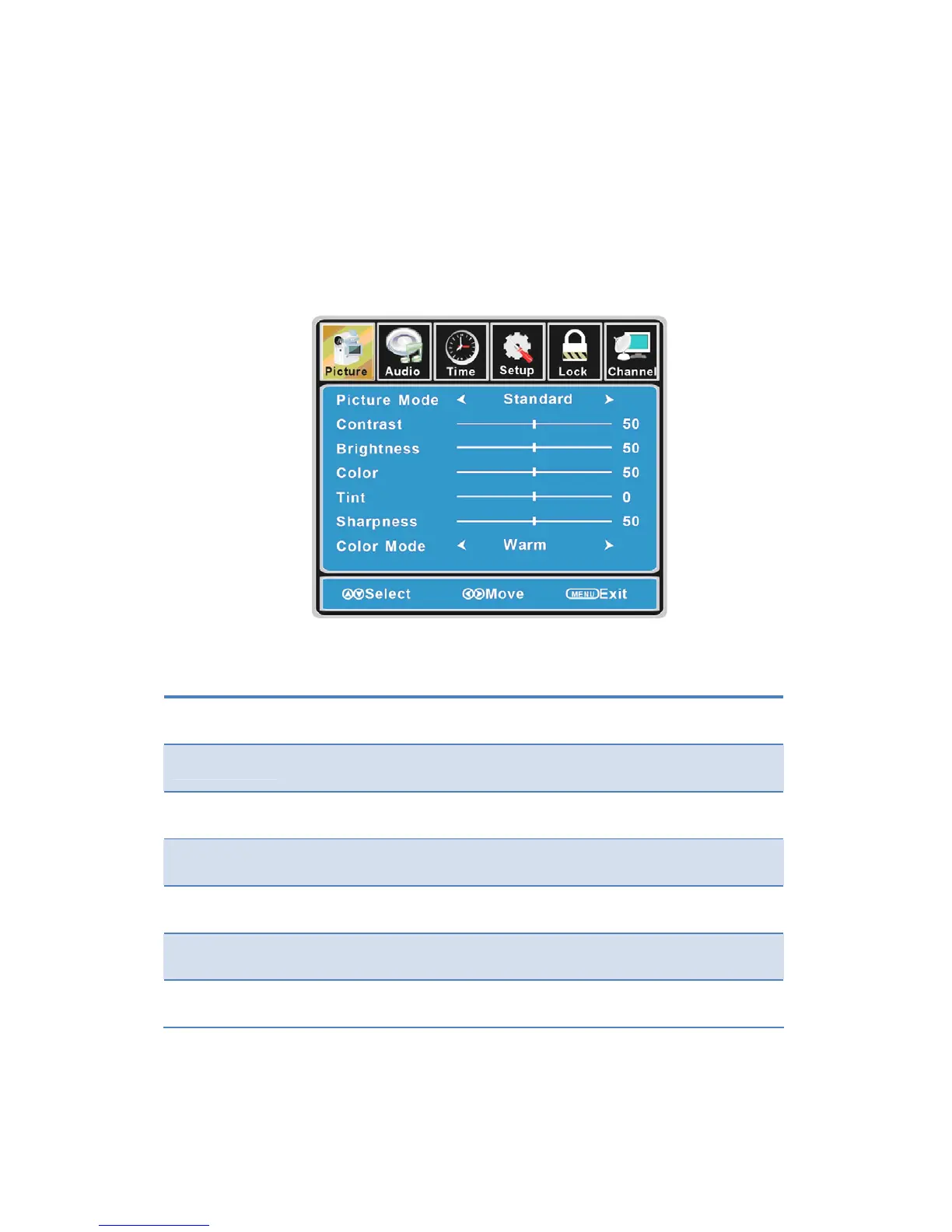
2. PresstheMENUbuttonontheremotecontroltodisplaytheMainmenu,andusethe◄/►
buttonstoselectthePICTURE.
3. Use the ▲/▼ buttons to highlight an individual PICTURE option, use the ◄/► buttons to
changethesetting,andpresstheMENUbuttontoexitthemenu.
ThePICTUREmenuincludesthefollowingoptions:
PictureMode Cycleamongpicturedisplaymodes:Standard,Dynamic,Soft,Personal.
Contrast
Control the difference between the brightness and darkest regions of the
picture.
Brightness Controltheoverallbrightnessofthepicture.
Color Controlthecolor.
Tint Controlsthetint.
Sharpness
Increase this setting to see crisp edges in the picture; decrease it for so ft
edges.
ColorMode Cyclesamongcolormodes:Normal,Cool,Warm.
15


 To Next Page