English
55
Note
◊ Make sure the WiFi is set to 2.4GHz before the robot connects to the app. The robot cannot
connect to a 5G network.
◊ There is a reset switch on the side of the robot. Press it with a needle in case of a
malfunction.
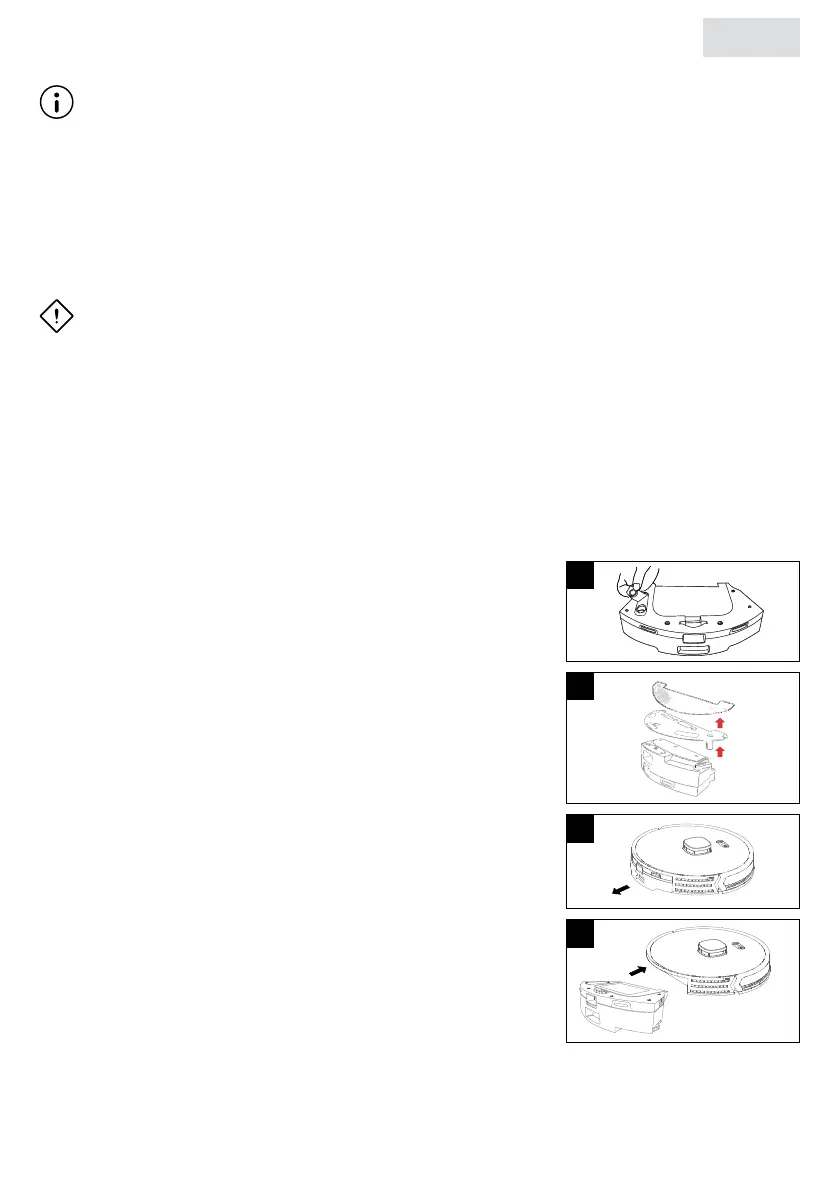
3.5 Using/dismantling the water tank and mop
ATTENTION!
◊ Excess water from the mop may affect the operation of the robot, squeeze the mop and dry
it before use.
◊ The mop may change color due to the nature of the fabric. Keep the mop clean and dry
after use.
◊ If the rubber stopper is not tted properly, water may leak.
◊ If water stays in the water tank for a long time, it may become contaminated and give off a
strange odor.
◊ Always empty the water tank after use and leave the rubber stopper open to dry.
1. Open the rubber stopper of the water tank, ll the water tank
with water and then install the rubber stopper in its proper
place.
2. Attach the mop to the mop holder with the Velcro closure.
Attach the mop holder to the bottom of the water tank/dust
collector.
3. Insert the water tank/dust collector horizontally into the
robot’s housing until it clicks into place.
4. To remove the water tank/dust collector, press the button
in the center of the water tank/dust collector and pull it
horizontally out of the robot.
5. Remove the mop from the mop holder. Clean the mop
and the water tank/dust collector.
1
2
3
4


 To Next Page