56
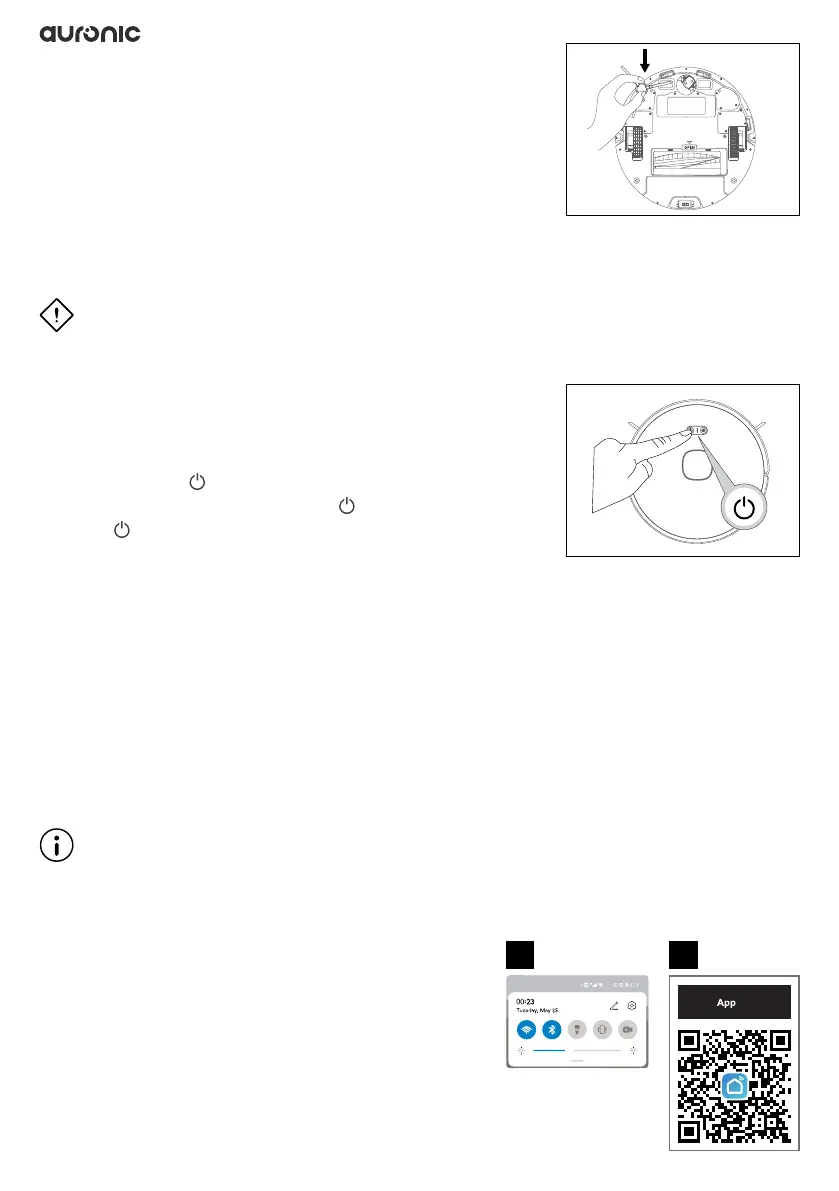
3.6 Installing the side brushes
Push the two side brushes one at a time into the designated
spot on the bottom of the robot. When you hear a “click”, the
side brush is correctly installed.
3.7 Turn on/Clean/Pause
The instructions below apply if you want to operate the robot using the control buttons on the
robot. You can also operate the robot using the app. See the instructions at 3.9.
ATTENTION!
◊ Before using the robot, remove liquids (water, oil, etc.) and pet feces from the oor to
prevent secondary contamination.
◊ Always make sure lters are installed on the robot before
operating it.
1. Press and hold for 6 seconds to turn the robot on.
2. When the robot is on, press briey to start cleaning.
3. Press briey to begin pausing.
3.8 Shutdown/Stop cleaning
The instructions below apply if you want to operate the robot using the control buttons on the
robot. You can also control the robot via the app. To do so, see the instructions at 3.9.
• Stop cleaning: Press this button to pause cleaning during the cleaning process.
• Turn off: Press and hold this button for at least 3 seconds to turn off the robot.
Note: The robot cannot be turned off while charging. Disconnect the robot from the charging
station rst if you want to turn it off.
3.9 Operation via the app “Smart Life”
Note
◊ The screenshots below are from an Android phone. If you are using an iPhone or other type
of mobile operating system, your Display may look different.
1. Make sure your phone is connected to a 2.4GHz
Wi-Fi network and that the Bluetooth feature on
your phone is enabled.
2. Turn on your phone’s camera and scan the QR code
to the right to download the “Smart Life” app.
• You can also search and download the “Smart Life” app from the Play
Store or App Store.
Mobile Download
1 2


 To Next Page